Tennis
Singles and doubles on a hard court, in a sport center of ten courts. You play the CPU, or up to four people play on one screen, split in two or four, or online with people on other PCs (and their friends on the same screen as them). The ball is a FEMFX soft body, and so are the racket's strings: the ball flattens on them and on the court and wobbles back, and the strings give a pocket and ring. Every swing is made on the spot, with no animation clips: you hold a shot button to take the racket back (the longer, the harder, if your legs have it) and let go to swing; when you let go decides whether you meet the ball dead on, early or late. Fourteen strokes, from topspin drives and slices to volleys, smashes and three serves, each with its own path, speed and timing window, picked from where the ball is. Running flat out and hitting hard tire you: tired players run slower, hit softer and time worse. The score is real tennis: deuce and advantage, tiebreaks, lets, double faults, changing ends.
The demo teaches how to put a FEMFX object into a game that needs exact numbers (the ball's flight is the game's own maths; FEMFX gives it its body), a CPU player whose footwork is pure logic you can unit-test, rules as a small state machine the whole game listens to, procedural swings (two-bone IK and a turning, crouching body) with no animation clips, a FEMFX object pinned in a frame, the start menu with local players and CPU players, and online play where every machine flies the ball from the same hit. Start here for a sports game, any game with a ball, or any game where a soft body has to go exactly where the rules say.
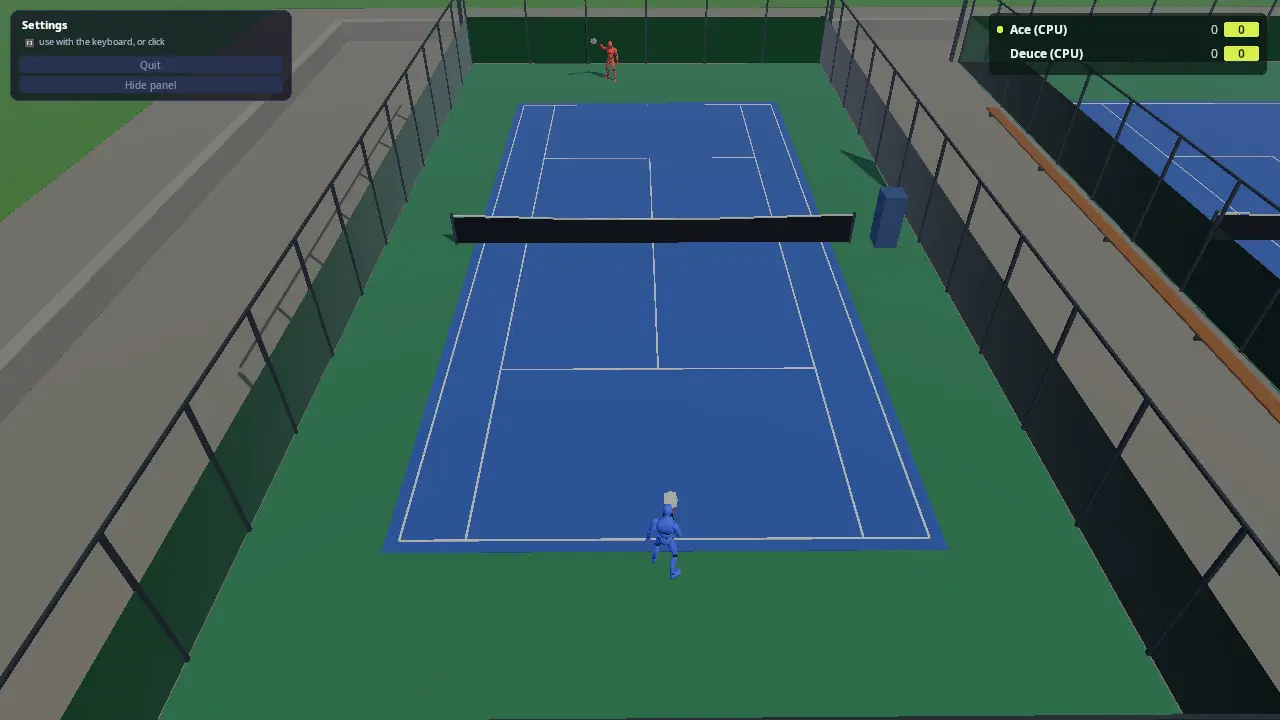
Or pick Sport center in the menu: walk about all ten courts, step up to a free court's gate to play (someone else at the gate is your opponent, or play the CPU), watch the CPU players' matches with a crowd of up to 100 people who sit, stand and cheer, and see who has won most on the board. Online, the host's sport center is everyone's: people from every screen walk about together, meet at a gate and play each other.
Run it
The executable is tennis (kke_add_game(tennis ...) in
CMakeLists.txt). The root CMakeLists.txt adds it when
KKE_ENABLE_JOLT, KKE_ENABLE_FEMFX and KKE_ENABLE_NET are all on: the
everything presets. FEMFX has no ARM port yet, so there is no Android
build.
cmake --build build --target tennis
cd build/bin
./tennis
KKE_SKIP_INTRO=1 ./tennis                            # skip the logo intro
KKE_TENNIS_BOTS=1 KKE_TENNIS_QUIT=120 ./tennis       # watch two CPU players, with a log
KKE_TENNIS_BALLTEST=1 ./tennis                       # the ball's test shots, logged
KKE_TENNIS_CENTER=1 KKE_TENNIS_BOTS=1 KKE_TENNIS_CROWD=100 ./tennis  # the whole sport center, CPU players only
KKE_TENNIS_BENCH=singles ./tennis                    # the busiest case: 100 people, 10 matches, a flying camera
KKE_TENNIS_BENCH=doubles KKE_BENCHMARK=40 ./tennis   # the same with doubles, measured, with a report
KKE_NET=host KKE_NET_NAME=Pip ./tennis                # host an online match...
KKE_NET=join:127.0.0.1 KKE_NET_NAME=Rook ./tennis     # ...and join it from a second terminal
| Variable | Effect |
|---|---|
KKE_TENNIS_BOTS=1 |
CPU players only, no menu (a demo that plays itself) |
KKE_TENNIS_DOUBLES=1 |
four players, two a side |
KKE_TENNIS_LEVEL=0..3 |
the CPU players' level when there is no menu: Easy, Normal (default), Hard, Expert |
KKE_TENNIS_GAMES=<n> |
games to win the set, over the menu's choice |
KKE_TENNIS_LOBBY=0 |
skip the menu: you against one CPU player |
KKE_TENNIS_QUIT=<s> |
quit after that many seconds of play, logging the score every 10 s and every call |
KKE_TENNIS_SEED=<n> |
the CPU players' dice (default 1) |
KKE_TENNIS_REPLAYS=0 |
no slow-motion replays of winners and aces (the menu's Replays row) |
KKE_TENNIS_BENCH=singles / doubles |
the busiest case, a showcase and a benchmark: 100 people in the sport center, a CPU match on every court (20 players in singles, 40 in doubles), 6 or 5 people watching each match from the benches, the rest walking, and a camera flying from court to court. kke_benchmark runs both |
KKE_NET=host / KKE_NET=join:ADDRESS |
host, or join a host, at startup (docs/NETWORKING.md); KKE_NET_NAME=<name> is player 1's name |
KKE_TENNIS_CENTER=1 |
the sport center instead of one match (the menu's Play row) |
KKE_TENNIS_CROWD=<n> |
how many CPU people walk about the sport center and watch (the menu's Crowd row: 0, 20, 40 or 100) |
KKE_TENNIS_EMPTY=1 |
the sport center's free courts stay empty (no CPU matches) |
KKE_TENNIS_WAIT=<n> |
hosting: start the match by itself once n people have joined (tests) |
KKE_TENNIS_AUTOPLAY=1 |
the players at this screen are played by the CPU (tests: two copies that play each other online; in the sport center, walk to a free gate and play the CPU) |
KKE_TENNIS_BALLTEST=1 |
no match: seven scripted shots (a drop, a groundstroke, into the net, a serve, both fences, the roof), every contact logged with how far the FEMFX body is from the flight |
KKE_TENNIS_SWINGLOG=1 |
a log line for every hit: the stroke, the timing error and word, the spacing, the quality, the power, the stamina |
KKE_TENNIS_STRINGTEST=1 |
one string bed on its own hit by a 30 m/s ball every 2 s, and every racket's pocket, logged in mm |
KKE_TENNIS_CLOSEUP=<n> |
the camera side-on to player n (0 = the first), close: for looking at swings |
KKE_TENNIS_CLOSEUP_DISTANCE=<m> |
how far that camera is (default 3.8): about 1.5 to look at the hands on the racket; negative puts it on the player's other side |
KKE_TENNIS_POSE=<stroke>,<f\|b>,<t> |
player 1 held in one moment of a stroke, e.g. drive,b,-1 (a backhand drive's full takeback) or flat serve,f,0 (contact); names as strokeName in Swing.cpp |
KKE_ANIMATIONS_DIR |
where to look for UAL1_Standard.fbx and UAL2.fbx |
KKE_ASSETS_DIR |
also searched for Universal Animation Library 2/Unity/UAL2.fbx |
Rebindings are saved to tennis_input.json and the menu's choices to
tennis_lobby.json (the names passed in main.cpp).
Controls
All bindings are made in TennisModule::defineControls
(TennisModule.cpp), the same for players 1 to 4, and
are rebindable actions in the "Shots" and "Game" groups.
| Action | Keyboard / mouse | Controller |
|---|---|---|
Run (move, relative to the camera) |
WASD | left stick |
Look around (look.rate; the camera settles back behind you, facing the net, when you let go) |
none | right stick |
Topspin, the all-round shot; also the toss and the serve (tennis.topspin) |
Space / left mouse | A (south) |
Flat: hard and fast (tennis.flat) |
J | X (west) |
Slice: low and slow (tennis.slice) |
K / right mouse | B (east) |
Lob: over their head (tennis.lob) |
L | Y (north) |
| Pause menu: settings, controls, quit | Esc | Start or Select |
Back to the menu (tennis.menu; online, a client leaves the game; in the sport center, leave the court, the other side winning) |
M, or the pause menu | the pause menu |
Talk to the people near you (voice.talk, online) |
V | LB |
Developer panels (panels) |
F1 | none |
- A shot. Press and hold a shot button as the ball comes: the racket goes back and the shot builds power (the power bar, bottom left; you move slower while you hold). Let go to swing. The forward swing takes 0.1 to 0.25 s depending on the stroke, so let go that long before the ball reaches your hitting spot, a little in front of you. The word bottom left says how it went: Perfect, Early, Late, Very early, Very late. Too early or too late by more than about 0.12 to 0.18 s and you miss it.
- Which stroke is picked for you from where the ball is and the button: a high ball before the bounce is a smash, near the net a volley, just after the bounce and low a half volley, far to the side a stretch; otherwise Topspin is a drive, Flat a flat drive, Slice a slice, Lob a lob (the CPU players also play drop shots). Forehand or backhand is the side the ball is on.
- Aim with the stick (or WASD) as you hit: left and right is across the court, forward is deeper, back is shorter.
- Reading the ball. The camera sits close behind you, a little over your right shoulder, looking over the net. The ball has a soft shadow straight under it on the court (smaller and darker as it comes down), and a shot coming at you shows a yellow ring where it will land; the ring stays a moment after the bounce, shrinking (Marks.cpp).
- The serve. Stand still and hold a shot button: the ball goes up and the racket goes back. Let go to swing; the best serve meets the ball near the top of the toss. Topspin and Lob serve a kick serve (high and safe, always the second serve's pick), Flat the fastest, Slice one that swings wide. Let the ball drop and you catch it and toss again.
- Stamina (the green bar, bottom left) goes down when you run faster than a jog and with every swing (more the harder), and comes back slowly in a rally and quickly between points. Tired, you run slower, can't build full power, your timing window shrinks and your aim wanders.
- Swing timing in the menu: Relaxed (a wider window), Normal, Pro (a narrower one), or Automatic (the swing lets go by itself at the right moment; you pick the shot, the power and the aim).
- The HUD's hints show the right glyph for the device each player last
touched (
InputModule::promptText). - The engine's character actions this game doesn't use (jump, sprint,
fire, look and so on) have their bindings cleared;
voice.talkmoves to V and LB (B is the slice). - Proximity voice chat online (
kke::VoiceModule+kke::VoiceHudModule, docs/NETWORKING.md "Voice"): people within 30 m are heard from where they stand (the next court faintly), a ring over a talker's head or an arrow at the screen's edge shows where a voice comes from, and the menu's "Voices nearby" has a mute for each slot of the nearby talkers list.
How it plays
- The menu. Controllers press A to join, up to four players, each with a name, a colour for their top, a skin tone, and trousers and shoes colours (docs/OUTFITS.md), and with the POLYGON City Characters pack a Body (one of eleven City people); online, everyone sees the clothes each player picked. Player 1 picks one match or the sport center (with its crowd and whether CPU players take the free courts), the CPU players (0 to 3, Easy to Expert), the match length (a short set to 4 games, a set to 6, best of three short sets, or quick: to 2), the teams (across the net, or all the people at this screen on one side against the CPU) and the helping hand, and the swing timing. Two players make singles; three or four make doubles (filled up with CPU players).
- The sport center (the menu's Play row). Everyone at this screen walks the promenade between the courts (split screen for two or more, the camera behind each). A court's gate is at its end by the promenade: stand there and press Topspin to play on it. A second person at the gate is your opponent (a few seconds' countdown lets a third and fourth join for doubles); Lob plays the CPU now, Slice leaves. CPU players take any court nobody wants and hand it over at the end of a point when someone waits (the two middle courts stay free while anyone here plays). The crowd (the Crowd row) strolls, picks a court with a match on, sits on a bench or stands beside it, and cheers or groans at every point. After a match its players walk off at the gate, and every match won goes on the board top right, "Matches won here".
- Scoring. Real tennis (Rules.cpp): 15, 30, 40, game; deuce and advantage (or no-ad); a tiebreak to 7, two clear, at 6 games all (or 4 all, or 2 all); the serve changes every game and every two points of a tiebreak; ends change after every odd game and every 6 tiebreak points; in doubles the partners take turns serving.
- The umpire. A serve must land in the box diagonally across; out is a fault, two are a double fault; one that clips the net and lands in is a let. The return waits for the serve's bounce. In a rally the ball may be taken out of the air or after one bounce, never after two, and nobody hits it twice. Out, the fence or the roof before it bounces: the hitter loses the point. A ball that stops dead counts as bounced twice where it lies.
- The helping hand (on by default): when you let go of the stick while the ball is coming to you, you walk to meet it, your reach is 0.45 m longer and a hit is never worse than fairly good. Off, it's all you.
- Replays (the menu's Replays row, on by default). A winner or an ace is shown again at a quarter speed from a camera flying beside the ball: the hit, the flight and the landing, the ball and the strings squashing again. Any shot button skips it. Only in one match played at this screen: slowing the game down would slow every court with it.
- The CPU players read your shot after a reaction time, run to where
the ball can be met, pick a shot (lobs when you're at the net, drop
shots when brave, slices, flats, topspin) and aim away from you. Their
levels differ in speed (3.6 to 6.2 m/s), reaction time (0.45 to 0.1 s),
how straight they aim, how hard they hit and how close to the lines
they go (Bot.cpp
BotSkill::forLevel).
How it works
Startup and the frame
main.cpp sets the mood clear_day and adds the modules in
this order: Settings, Input, RigidBody (Jolt), Physics (FEMFX, metre
scale, no demo objects, its own ground drawing off), Model, Ui, Audio,
Lobby, Net, DemoPanel, Tennis, Stats. The order matters once: fixed
updates run in add order, so FEMFX has stepped the ball before
TennisModule::fixedUpdate reads it.
Each fixed step (TennisModule::fixedUpdate, stepMatch in
Play.cpp): the ball moves and reports what it touched, the
umpire hears it, every player thinks (CPU) or reads the controls (people),
runs and maybe hits. Each frame (update): the menu, the controls, the
bodies' animation and IK, the cameras, the HUD.
The ball: our flight, FEMFX's body
Ball.cpp. The first version let FEMFX fly the ball, and the ball test measured why that can't work for tennis: FEMFX's implicit solver is made for soft, heavy things, and on a 57 g ball it lost most of gravity (a 2 m drop reached the court at 1.2 m/s instead of 6.2) and nearly all of the bounce, and a 30 m/s shot passed through a thin wall between two steps. So the ball is two parts:
- The flight is worked out in
Ball::stepeach fixed step, in small steps (2 cm at most, so a 60 m/s serve can't jump the net tape): gravity plus the spin's pull, air drag, the court's bounce, the net (the tape lets it roll over slowly; the mesh stops it and drops it), the fence and the invisible roof (they take most of its speed). Every rule, the CPU and, later, the network read this one. - The body is a FEMFX tet-mesh sphere (
buildSphere(4, 0.045), rubber of 400 kg/m³ and a stiffness of 1e4) thatsteerBodypushes along the flight each step: every vertex gets the same push, so only the whole ball moves and the squash and the wobble stay FEMFX's. A hit (Ball::strike) gives every vertex the new velocity plus a turn about the centre (spin) and a squeeze along the hit that grows with the distance from the centre, so the strings flatten it and FEMFX springs it back. The body stays within about 5 cm of the flight (10 cm at a hard hit), and FEMFX's own ground plane and the court's boxes squash it where it lands.
The engine calls it uses are new and general
(PhysicsModule.h
"Steering a whole object"): objectMotion, changeVertexVelocities,
translateObject, resetObject.
Every court also gives FEMFX boxes for its fence walls (2 m thick),
its roof at 14 m and its net (Ball::courtBoxes, one
setExternalBoxes call for all ten courts): the flight never leaves the
court, and the body can't either.
The maths everyone agrees on
Shot.cpp is pure maths, tested in tests/test_tennis.cpp:
Flight: position and velocity at any time, in closed form, with gravity, a spin's extra pull and linear air drag (0.4 per second: a 25 m/s drive loses about a third by the far baseline). When it comes down to a height, when it crosses the net.bounce: 75% of the vertical speed back (the ITF's 2.54 m drop comes back to 1.35-1.47 m), 62% of the speed along the court (a medium-paced hard court); 40% of the spin's pull is left after.planShot: the launch velocity that lands a ball exactly on a target at about a speed, raising the arc until it clears the net by a margin.meetPoint,meetOnArc: where a player takes a ball after its bounce, waist high on the way down, or earlier when it would carry them too deep.
Swings and hitting
Swing.h is pure maths (tested): the fourteen strokes, each a
StrokeShape (the racket head's path through ready, takeback, slot,
contact and finish in the body's frame, the face's angle, how far the
shoulders turn and the knees bend, how long the takeback, forward swing
and follow-through take, the timing window, how fast and how steady),
pickStroke (which stroke fits the ball), racketAt (where the racket
and body are at a moment of the swing: a curve through the slot, mirrored
for a backhand) and Stamina.
A swing runs on one clock, t: -2 to -1 the takeback (held as long as
the button is), -1 to 0 the forward swing (from the release, taking
forward seconds), 0 contact, 0 to 1 the follow-through. stepPlayer
and stepSwing in Play.cpp: on release the contact time is
known (contactAt); when the ball crosses the hitting plane (a distance
in front of the body, or a height for an overhead) within reach, that is
crossAt. The timing error is contactAt - crossAt; within maxError
it's a hit (hitBall), otherwise a miss. Quality is spacing (the ball an
arm and a racket to the side, between knee and shoulder) times timing
(timingQuality: 1 dead on, ~0.8 at the window's edge). The target is the
aim plus a wobble that grows as quality drops and with tiredness; early
pulls it across the body, late pushes it wide. The stroke scales the
speed and the wobble; planShot gives the velocity; the harder the hit,
the more the strings squash the ball. CPU players (and Automatic timing)
let go themselves, when the ball is forward seconds from the plane,
plus a timing error drawn from their level (BotSkill::timing: 55 ms
Easy to 18 ms Expert).
The strings
Strings.h, Strings.cpp. Each racket's string
bed is a FEMFX slab (6 x 7 cells, 4 cm thick; thinner ones jitter)
whose rim is pinned in the frame (TetSpawnOptions::pinnedVerts) and
stretched 3% into it (moveVertices), so it has tension like strings.
The slab stays still 150 m above the sport center, never drawn; the
16 x 19 strings are ribbons drawn on the racket from points embedded in
it (kke::embedPoints, deformEmbedded), moved along the face's normal
as the slab bends. A hit pushes the slab's vertices around the contact
point in proportion to the ball's speed; FEMFX bends it into a pocket
(about 17 mm for 30 m/s, measured with KKE_TENNIS_STRINGTEST) and lets
it ring out over ~0.4 s, and then it is put to sleep (sleepObject;
FEMFX never sleeps a lone object by itself). A real pocket lasts about
5 ms, less than a frame: these strings are softer, so it can be seen.
The CPU player
Bot.cpp has no engine in it: it is told where the ball is
going (a Flight), where it stands, where the opponent stands and what
the rules allow, and answers where to run, how urgently, and whether to
arm a shot, which, aimed where. The test drives a Hard bot at its own
speed toward what it says against 60 random shots and checks it reaches
at least 90%.
Bodies and swings
Body.cpp. The players are the UAL mannequin with its idle,
walk, jog and sprint clips blended by speed, UAL2's side steps when that
pack is there, and sitting, cheering and groaning. There are no swing
clips: racketAt gives the racket head's place, and the body follows it.
The pelvis and spine turn (30% / 70%) with the shoulders, the hips drop
and two-bone IK keeps the feet planted. The racket is an equipped item
(docs/EQUIPMENT.md): kke::Equipment puts it
in the right hand's palm socket by its "main" grip (the handle along the
palm, the head past the thumb and index finger, the strings facing as the
palm), and the fingers close round the handle until they touch it. The
right arm reaches for where that puts the hand with the body-aware
kke::solveHumanArm, which keeps to what a person's shoulder, elbow,
forearm and wrist can do and never lets the arm or the racket go through
the body (a follow-through wraps round the shoulder instead of through
the head); the racket is then drawn where the hand got to. The left hand
takes the "support" grip for a two-handed backhand and the "throat" at
the ready, throws the toss or points up at a smash. The racket face opens for slice and lob and closes for
topspin. The racket is POLYGON Shops' tennis racket when that pack is
there (its flat string sheet taken out: the FEMFX strings go there), or a
mesh built in code.
The sport center
Court.cpp, Scene.cpp. Ten courts to ITF size in
two rows of five, one scene, with a green surround, lines, net and posts,
fences with windscreens (see-through: drawTranslucent), an umpire's
chair, floodlights, benches along the promenade between the rows, and
spectators' seats beside every court and a standing row behind the
promenade end. The fences and floodlight poles are Jolt walls, so people
can't walk onto another court or through a pole.
Center.cpp runs it. Everyone out of a match is a Walker
(a Jolt character and a Body): a person at this screen, moved by the
stick relative to their camera, or one of the crowd. Each court has a
Gate (who waits, the countdown); startCourt turns the people waiting
into a match (hiding their walkers and removing their capsules),
endCenterMatch counts the win and puts them back at the gate. Matches
come and go, so player slots are reused (Player::alive).
The crowd is three states: stroll to a spot on the promenade, go to a
free seat by a court with a match on (seats beside a court are in the
gap between two fences, so they walk to the gap's mouth first and back
out the same way), and watch for 25 to 75 s, facing the court. A point
on the court they watch sets them cheering (three in four) or groaning.
Each seat is held by one walker (m_seatTaken), so nobody stands in
anybody. The walkers' camera pulls in in front of a pole or a fence
(a Jolt raycast from the head), so it never sits inside one.
Cost, 100 in the crowd and ten matches: each person is a skinned
mannequin (skinned on the CPU by ModelModule) and a Jolt character;
the ten balls are ten FEMFX bodies. On the software renderer the CI uses
it runs at 3 to 4 frames a second, all of it waiting on the renderer;
a real GPU is the test that counts.
Online
Player 1 sets Online in the menu to Host or Join (the games
found on the network and on this PC are listed; pick one and press Join).
Everyone at each screen plays: a second person at a screen is a
NetModule local player, like the menu's seats. Net.cpp has
the game's side, NetTennis.h the messages (event kinds
from 0x5400).
- Who plays. The host's Start builds the match: its own seats, then everyone online, then the menu's CPU players, then more CPU players if a side is short. More than four people: the first four play. Its Setup says who plays where; each client builds the same match, its own seats played from its own controllers.
- The CPU players are the host's. It sends where they all are, every match's in one Cpus event ten times a second.
- Each machine runs its own players and sends where they are, where
they face and how far into which swing (
toState, aNetPlayerStatewith the swing's contact packed into its extra bytes). Everyone else's players are kinematic capsules put where their machine says. - The host is the umpire. Its Serve starts each point (with a number, so a hit that arrives after the call is dropped) and its Point ends it with the result and the call; every machine applies that result to the same score. A client never calls a point from its own ball.
- A hit is all the ball needs. The hitter's machine plans the shot and sends Hit (where, the velocity, spin, pull); everyone, the hitter too, flies the ball from the numbers as they come off the wire, so the flights match to the bit (a test checks the bytes). The host checks a client's hit could happen (their turn, this point, this shot) before it passes it on. A serve's Toss goes the same way.
- Drift is put right. Five times a second the host sends its ball; a client more than 25 cm or 1 m/s off takes it, unless a hit of its own is on the way to the host.
- Someone leaves: the host ends the match for everyone (End) and all go back to the menu; a client's menu button leaves the game.
- The sport center online. When the host picks Sport center, every client walks in too (Board says it's on). The host runs every court: each match has its own number, so every event names the match it belongs to, and a Hit or a Toss names the player by their place in it. Each machine sends where its people walk; the others see them walk. At a gate, a client asks the host (Gate: join, leave, play the CPU now) and the host keeps the queues; its Board, twice a second, has how many wait at each gate, the countdowns and the wins. Someone who joins later gets the Board and a Setup for every match on, with the points so far, so they see the right score. The crowd is each screen's own: it only watches. Someone leaving mid-match forfeits it (the other side wins).
Tested with two copies on one PC, both played by the CPU
(KKE_TENNIS_AUTOPLAY=1, the commands in "Run it" plus
KKE_TENNIS_WAIT=1 KKE_TENNIS_LOBBY=0 KKE_TENNIS_QUIT=70): both logs make
the same calls after the same number of shots, rallies of 6 to 15 shots.
The sport center the same way, the host with KKE_TENNIS_CENTER=1 (no
KKE_TENNIS_WAIT): each copy's person walks to a different free court's
gate and plays the CPU, and both logs show every court's matches.
Replays
Replay.cpp keeps the last five seconds of a match, one
frame per fixed step: the ball's flight state and every player's feet,
facing and swing. When the point's last hitter wins it, the replay starts
0.7 s before that hit and ends 0.6 s after the ball lands. The ball flies
again from its saved state (its flight is the game's own maths, so it
flies exactly the same way) and is struck again at the recorded step,
which squashes the FEMFX ball and pushes the FEMFX strings again; the
players are drawn from the frames. The engine's
Application::setTimeScale(0.25) makes it slow: as many fixed steps a
second, each a quarter as long, so FEMFX stays smooth. The ball camera starts
beside the hitter, a little in front, on the court's middle side, and
watches the ball come in and the swing meet it; after the hit it swoops
off after the ball, beside and behind it, and stays on the landing spot
once the ball has bounced.
The busiest case (KKE_TENNIS_BENCH)
Bench.cpp fills the sport center to 100 people: a CPU match on every court (always singles, or always doubles), 6 (or 5) spectators put straight onto each court's benches, spread along both sides, and the rest strolling the promenade. Matches are sets to 6 so the courts stay busy, and a court that finishes starts the next match at once with the same spectators. The camera flies along one row of courts and back along the other, 4.5 s over each court's promenade end, gliding across it while it watches the ball, both players and the benches. The seed is fixed, so every run plays the same points. It loads FEMFX with 10 balls and 20 or 40 string beds, Jolt with 100 characters, and 100 procedural bodies.
Cameras and the HUD
With people playing, each gets a camera behind their own baseline, high enough to see over the net, that swings round when ends change; two people split the screen, three or four split it in four. With only CPU players (and in the menu) it's the TV view: high behind one end, both baselines in sight. The HUD is RmlUi (ui/tennis_hud.rml, Hud.cpp): the scoreboard with who serves, the umpire's call, "Second serve" and "Tiebreak", and the controls for whoever is at this screen.
Design decisions
- The flight is ours, the body is FEMFX's. Measured above: FEMFX on its own can't give a tennis ball's numbers, and the rules, the CPU and a network all need one flight they agree on to the millimetre.
- Linear drag. Real drag grows with the square of the speed; linear
drag is close over a rally's speeds and keeps every sum closed-form, so
planShotlands exactly where it aims. - Press early, swing on arrival. Timing a button to the exact frame is not fun on a TV; arming the shot and grading how early you pressed keeps timing a skill without being a lottery.
- Procedural swings. Kees has no tennis animations (they are expensive) and wants the fun to be in procedural ones: every stroke is a path, a body turn and IK, so it bends to wherever the ball really is.
- Hold to take back, let go to swing. The player measures the swing (how long to hold: power, costing stamina) and times it (when to let go); the stroke itself is picked from the ball so a pad has enough buttons. Automatic timing keeps it playable for anyone who wants only the tactics.
- Hits, not a streamed ball, online. Sending the hit and letting every machine fly the same maths costs one small message per shot and looks smooth at any latency; the host's ball a few times a second only mops up. Streaming the ball's position would lag it and jitter the squash.
- Strings far away. Carrying a FEMFX slab on a racket swinging at 40 m/s would cost solver time and shake it; only the pocket matters, so the slab stays still and its shape is copied onto the racket.
- No Synty courts yet. The Shopping Mall pack Kees mentioned is not on the share; the courts are built from boxes. The racket is Synty's.
Tuning
| What | Where | Value |
|---|---|---|
| Bounce: vertical kept, along kept | BounceModel in Shot.h |
0.75, 0.62 |
| Air drag | kDrag in Shot.h |
0.4 /s |
| Spin pull (topspin, slice, lob, drop, serve) | spinPull in Shot.cpp |
6, -2.5, 1, -1.5, 2 m/s² |
| Shot speeds | speedFor in Play.cpp |
flat 25-35, topspin 20-28, slice 15-20, lob 9-10.5, serve 30-46 m/s |
| Run speed, while charging | kRunSpeed, kChargeSpeed in Play.cpp |
5.8, 3.6 m/s |
| Reach, helping hand's extra | kReachMin, kReachMax, kReachHelp |
0.2, 1.5, 0.45 m |
| Stroke paths, times, windows, speed, steadiness | shapes() in Swing.cpp |
forward swing 0.1-0.25 s, window 25-50 ms, miss past 100-180 ms |
| Stamina costs and effects | Stamina in Swing.cpp |
swing 0.015 + 0.05 x power², recovery 0.02 /s in a rally, 0.18 /s between points |
| Swing timing choice | setTiming |
Relaxed 1.5x, Normal 1x, Pro 0.7x the window |
| CPU timing error | BotSkill::timing in Bot.cpp |
55, 38, 27, 18 ms |
| The strings | stringMaterial, kStretch, kPush in Strings.cpp |
1e4 stiffness, 3% stretch, 0.1 x the ball's speed |
| CPU levels | BotSkill::forLevel in Bot.cpp |
speed, reaction, aim, power, risk |
| A CPU's aim wandering in a long rally | tired in hitBall (Play.cpp) |
+10 cm a shot after the 3rd |
| Sport center: walking, the crowd's stroll | kWalkSpeed, kCrowdSpeed in Center.cpp |
4.2, 1.5 m/s |
| Sport center: gate reach, countdown, a court's rest before CPU players take it | kGateReach, kGateCountdown, kCourtRest |
3 m, 4 s, 6 s |
| The ball's body | ballMaterial, buildSphere(4, ...) in Ball.cpp |
400 kg/m³, 1e4 stiffness |
| How hard the body is steered | steerBody in Ball.cpp |
25 /s blend, 20 /s pull onto the path |
Engine features it uses
- FEMFX soft bodies and the steering calls (
PhysicsModule, see the physics demo) - Jolt characters and walls (
RigidBodyModule) - The start menu (
LobbyModule, docs/LOBBY.md) - Input with four players, rebinding and button glyphs (docs/INPUT.md)
- Skinned models, the animator and two-bone IK (
ModelModule, docs/PROCEDURAL_ANIMATION.md) - Split screen (
kke::splitScreen) - RmlUi for the HUD, the demo panel (
DemoPanelModule, docs/DEMO_PANEL.md) - Impact sounds (
AudioModule::playImpact) - Moods (docs/MOODS.md)
- Online play with local players (
NetModule:sendEvent,relayEvent,addLocalPlayer,setLocalPlayer, LAN search; docs/NETWORKING.md)
Assets
- The mannequin and its clips:
assets/animations/UAL1_Standard.fbx(Quaternius' Universal Animation Library, CC0), in the repository. - Side steps:
UAL2.fbx(Universal Animation Library 2, CC0) fromassets/animations/orKKE_ASSETS_DIR. Without it the log says so once at info level and players turn to run sideways. - The ball's felt and seam: textures/tennis_ball.png, made by textures/make_ball_texture.py.
- The racket:
SM_Prop_Sport_Tennis_Racket_01.fbxand its atlasPolygonShops_Texture_01_A.pngfrom Synty's POLYGON Shops pack, found anywhere underassets/syntyorKKE_ASSETS_DIR(Synty packs are never in the repository). Without it the racket is built in code. - Everything else (the courts) is built in code.

Make a game like this
- Build with FEMFX (
cmake --workflow --preset everything) and copy the folder:cp -r games/tennis games/my_sport; rename the target, the namespace and the input and menu files. - Keep the rules pure. A
Rules.cppwith no engine in it that hears "hit", "bounce", "net", "out" and answers who won the point is easy to test and easy to change (badminton, squash, volleyball). - Own the flight, give FEMFX the body. For any ball that must go
where the rules say, fly it with your own maths (
Flight, or your own) and steer the FEMFX body along withchangeVertexVelocities; kick it withstrike-like velocity fields for the squash. - Write the CPU as pure logic that gets a view and returns a decision, then test its footwork without a window.
- Online, send what happened, not where things are. A hit, a toss, the umpire's call: small events every machine applies the same way (Net.cpp); only people's poses stream.
- Read next: the physics demo, Climb Race for more online play with local guests, docs/LOBBY.md.
Files
| File | What's in it |
|---|---|
| main.cpp | The modules and the mood |
| TennisModule.h, TennisModule.cpp | Players and matches, startup, controls, the frame, the ball test |
| Play.cpp | A match's step: points, the umpire, people's controls, CPU players, serving, hitting |
| Scene.cpp | The sport center's meshes and walls, bodies, cameras |
| Hud.cpp, ui/tennis_hud.rml | The scoreboard, the calls, the hints |
| Lobby.cpp | The start menu's fields and options |
| Center.cpp | The sport center: walkers, gates, the crowd, CPU matches on free courts, the win board |
| Replay.cpp | Slow-motion replays of winners and aces, and the ball camera |
| Bench.cpp | The busiest case: ten matches, 100 people, the flying camera |
| Net.cpp | Online: Host / Join rows, who plays, events in and out, other machines' players |
| NetTennis.h, NetTennis.cpp | The online messages and how they are packed (tested) |
| Rules.h, Rules.cpp | The score and the umpire (pure) |
| Shot.h, Shot.cpp | Flights, bounces, planning a shot, where to meet a ball (pure) |
| Court.h, Court.cpp | Court sizes, boxes, positions, the ten-court layout, seats |
| Ball.h, Ball.cpp | The ball: its flight and its FEMFX body |
| Bot.h, Bot.cpp | The CPU player (pure) |
| Swing.h, Swing.cpp | The strokes, their paths and timing, stamina (pure, tested) |
| Strings.h, Strings.cpp | The FEMFX string beds and the strings' ribbons |
| Body.h, Body.cpp | The mannequin, its clips, the procedural swings, the racket |
| textures/ | The ball's texture and the script that makes it |