Gameplay
Four recipes that turn a level into a game: something that reacts to where you are, something you can do to the world, and a round with a goal, a clock and a result.
Trigger zones and doors
A zone is a box in space, and "is the player in it?" is six comparisons. Remember whether they were in it last frame, and you know when they step in and when they step out. Here the green square opens a door; stepping off shuts it two seconds later.
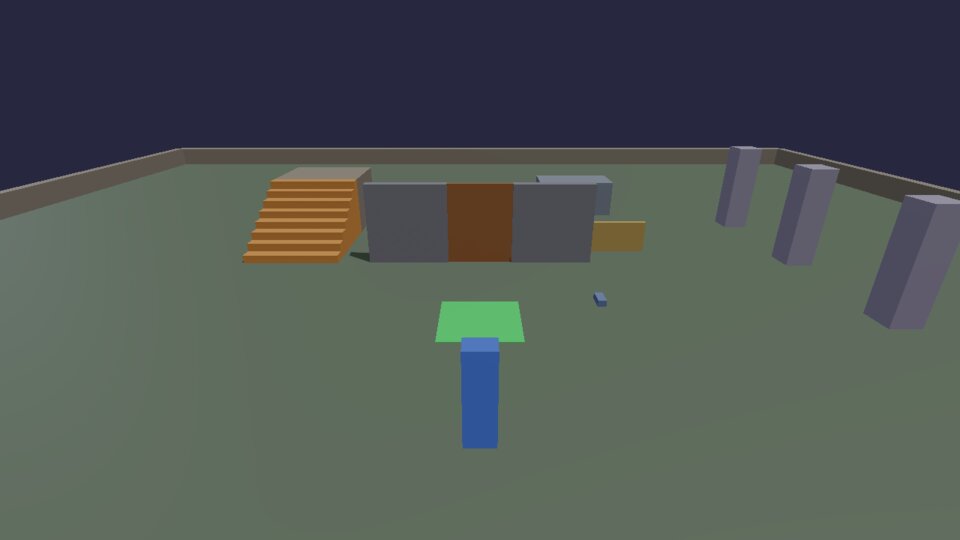
-- zone_door.lua: a trigger zone. Stand on the green square and the door
-- opens; step off and it shuts two seconds later. Zones are just "is the
-- player inside this box?", checked every frame. (docs/cookbook/gameplay.md)

local ZONE_MIN, ZONE_MAX = Vec(-1, -0.5, 1), Vec(1, 2.5, 3)   -- a box: two corners
local DOOR_AT = Vec(0, 1.25, -2)

physics.box { pos = Vec(0, 0.01, 2), size = Vec(2, 0.02, 2), color = Vec(0.3, 0.9, 0.4), static = true }
-- The wall with a gap for the door.
physics.box { pos = Vec(-2.25, 1.25, -2), size = Vec(2.5, 2.5, 0.3), color = Vec(0.5, 0.5, 0.55), static = true }
physics.box { pos = Vec(2.25, 1.25, -2), size = Vec(2.5, 2.5, 0.3), color = Vec(0.5, 0.5, 0.55), static = true }

local door = nil
local function setDoor(closed)
  if closed and not door then
    door = physics.box { pos = DOOR_AT, size = Vec(2, 2.5, 0.2), color = Vec(0.6, 0.4, 0.25), static = true }
  elseif not closed and door then
    physics.remove(door)
    door = nil
  end
end
setDoor(true)

local function inside(p, lo, hi)
  return p.x >= lo.x and p.x <= hi.x and p.y >= lo.y and p.y <= hi.y and p.z >= lo.z and p.z <= hi.z
end

local wasInside = false
hook.Add("Think", "zone.check", function()
  local now = inside(player.position(), ZONE_MIN, ZONE_MAX)
  if now and not wasInside then            -- just stepped in
    timer.Remove("zone.close")             -- cancel a pending close
    setDoor(false)
    print("Door open")
  elseif wasInside and not now then        -- just stepped out
    timer.Create("zone.close", 2, 1, function() setDoor(true) end)
  end
  wasInside = now
end)
The same shape works for checkpoints (save where they are), traps (start
a timer), shops and cutscenes (switch the camera). timer.Create with a
name is what makes "shut it later, unless they come back" work: stepping
back in removes the pending timer by its name.
Shooting with rays
A ray is a line tested against the world: where it hits, what it hits,
and the surface's direction there. physics.raycast(from, direction,
distance) from the camera along camera.forward() is "what am I looking
at?". Click (the standard fire action) to knock crates off the wall.
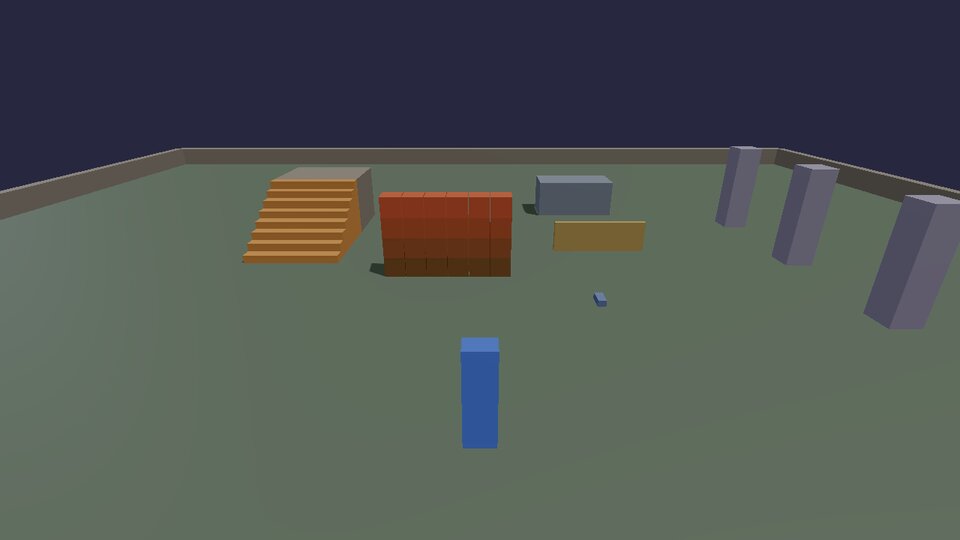
-- shooter.lua: click to shoot where the camera looks. A ray finds what
-- it hits; a hit crate gets knocked back, and a spark marks the spot.
-- "fire" is one of the engine's standard actions (left mouse, right
-- trigger). (docs/cookbook/gameplay.md)

-- A wall of crates to shoot at.
for row = 0, 3 do
  for col = 0, 5 do
    physics.box { pos = Vec(-2.5 + col * 0.62, 0.3 + row * 0.62, -1), size = Vec(0.6, 0.6, 0.6), density = 100,
                  color = Vec(0.5 + row * 0.1, 0.35, 0.2) }
  end
end

local sparks = {}

local function spark(at)
  local id = physics.sphere { pos = at, radius = 0.06, color = Vec(1, 0.9, 0.3), static = true }
  table.insert(sparks, id)
  timer.Simple(0.3, function() physics.remove(id) end)
end

hook.Add("Think", "shooter.fire", function()
  if not input.pressed("fire") then return end
  local from = camera.position()
  local dir = camera.forward()
  -- raycast(from, direction, max distance) -> what it hit, or nil.
  local hit = physics.raycast(from, dir, 60)
  if not hit then return end
  spark(hit.pos)
  -- Push what was hit, at the point it was hit (so it spins too). Only
  -- script bodies can be pushed; pcall skips the rest (walls, the floor).
  pcall(physics.impulse, hit.body, dir * 4, hit.pos)
end)
physics.impulse(id, push, point)pushes at a point, so a crate hit at the corner spins. Its size is momentum (mass × m/s), so heavy things move less.- The hit also tells you
hit.normal(which way the surface faces, for bullet holes and ricochets),hit.distanceandhit.material(for the right sound). - Rays are cheap; line-of-sight checks for enemies are the same call from their eyes to the player.
Explosions
An explosion is a loop over what's near: push each thing away from the centre, harder the closer it is. B blows up the heap; a new one comes three seconds later.
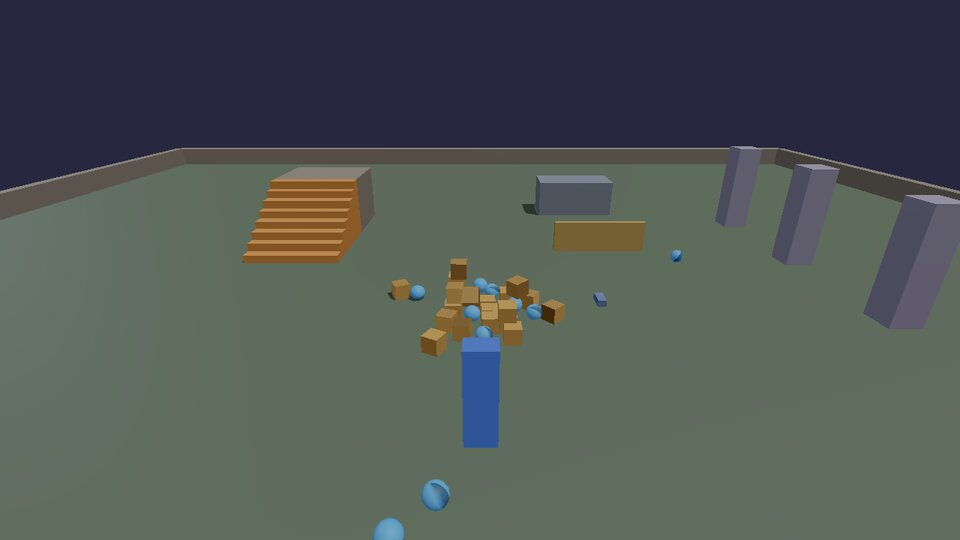
-- explosion.lua: press B to blow up the heap. Every body nearby is
-- pushed away from the centre, harder the closer it is; there's a sound,
-- and the camera shakes where the game has one that can.
-- (docs/cookbook/gameplay.md)

input.define("boom", "Explosion", "B")
local RADIUS = 5
local FORCE = 12   -- m/s at the centre

-- Things to blow up: a heap of crates and balls, rebuilt every time.
local things = {}
local function heap(at)
  for _, id in ipairs(things) do physics.remove(id) end
  things = {}
  for i = 1, 30 do
    local p = at + Vec(math.random() * 2 - 1, 0.3 + i * 0.1, math.random() * 2 - 1)
    local id
    if i % 3 == 0 then
      id = physics.sphere { pos = p, radius = 0.2, color = Vec(0.3, 0.7, 1) }
    else
      id = physics.box { pos = p, size = Vec(0.4, 0.4, 0.4), density = 150, color = Vec(0.8, 0.6, 0.3) }
    end
    table.insert(things, id)
  end
end

local function explode(centre)
  for _, id in ipairs(things) do
    local offset = physics.position(id) - centre
    local distance = offset:length()
    if distance < RADIUS then
      local falloff = 1 - distance / RADIUS                 -- 1 at the centre, 0 at the edge
      local away = (offset + Vec(0, 0.5, 0)):normalized()    -- a little upward: things lift
      physics.setVelocity(id, physics.velocity(id) + away * (FORCE * falloff))
    end
  end
  if audio then audio.impact(centre, "Stone", 1.0) end
  if view then view.shake(0.8) end   -- only in games with a view table (the cookbook game)
end

local HEAP = Vec(0, 0, 2)
heap(HEAP)
hook.Add("Think", "explosion.keys", function()
  if input.pressed("boom") then
    explode(HEAP + Vec(0, 0.2, 0))
    timer.Simple(3, function() heap(HEAP) end)   -- a new heap to blow up
  end
end)
if view then ... end is how a script uses something only some games
have: tables exist only when the game has the module that provides them
(there's no audio without an AudioModule, no view outside the
cookbook game), and a missing table is nil.
A whole round
Everything together: a goal (knock the pillars over), a clock, a HUD, a win and a lose, a best time that's still there tomorrow, and a button to play again.
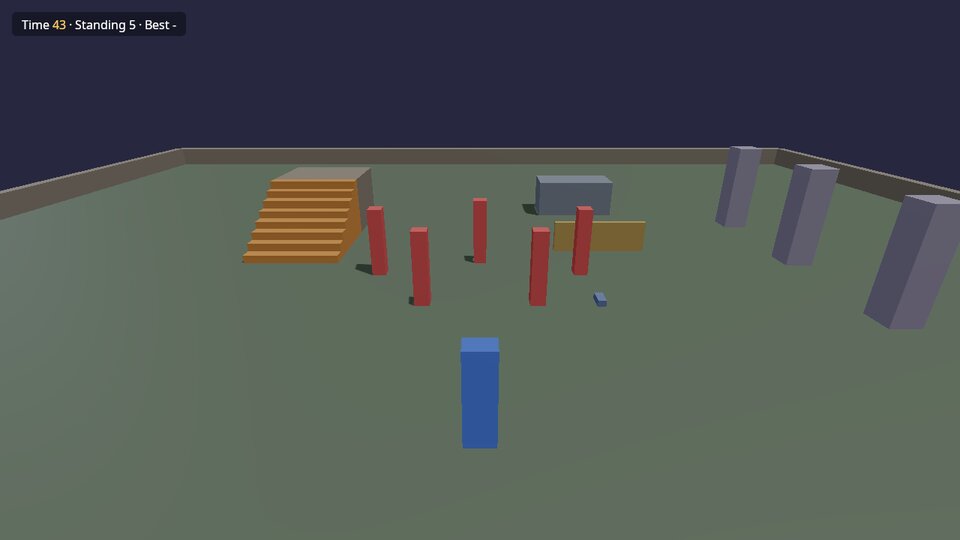
-- round.lua: a whole game round. Knock all the pillars over before the
-- clock runs out; a HUD shows the time and what's left, you win or lose,
-- the best time is saved, and a button starts again.
-- (docs/cookbook/gameplay.md)

local TIME = 45
local SPOTS = { Vec(-3, 0, -1), Vec(0, 0, -2), Vec(3, 0, -1), Vec(-1.5, 0, 1), Vec(1.5, 0, 1) }

local hud = ui and ui.open([[
<rml><head><style>
  body { width: 100%; height: 100%; font-family: Noto Sans; color: #ffffff; pointer-events: none; }
  #panel { position: absolute; left: 20dp; top: 20dp; padding: 8dp 16dp; background-color: #10131ecc;
           border-radius: 8dp; font-size: 20dp; }
  #time { color: #ffd166; }
  #result { position: absolute; top: 40%; width: 100%; text-align: center; font-size: 40dp; }
  #again { position: absolute; top: 55%; left: 50%; margin-left: -80dp; width: 160dp; padding: 8dp;
           text-align: center; background-color: #ef8354; border-radius: 8dp; pointer-events: auto; }
  #again:hover { background-color: #f4a261; }
  .hidden { display: none; }
</style></head>
<body>
  <div id="panel">Time <span id="time"></span> · Standing <span id="left"></span> · Best <span id="best"></span></div>
  <div id="result"></div>
  <div id="again" class="hidden">Play again</div>
</body></rml>
]])

local pillars, timeLeft, playing = {}, 0, false

local function show(id, text) if hud then ui.text(hud, id, text) end end

local function standing()
  local n = 0
  for _, p in ipairs(pillars) do
    -- Still standing = its middle is still up high and near where it was.
    local at = physics.position(p.id)
    if at.y > 0.9 and (Vec(at.x, 0, at.z) - p.home):length() < 0.5 then n = n + 1 end
  end
  return n
end

local function start()
  for _, p in ipairs(pillars) do physics.remove(p.id) end
  pillars = {}
  for _, home in ipairs(SPOTS) do
    local id = physics.box { pos = home + Vec(0, 1, 0), size = Vec(0.4, 2, 0.4), density = 60, color = Vec(0.9, 0.35, 0.35) }
    table.insert(pillars, { id = id, home = home })
  end
  timeLeft, playing = TIME, true
  show("result", "")
  if hud then ui.class(hud, "again", "hidden", true) end
  local best = store.load("round.best")          -- nil until someone wins
  show("best", best and string.format("%.1f s", best) or "-")
end

local function finish(won)
  playing = false
  if won then
    local took = TIME - timeLeft
    show("result", string.format("You did it in %.1f seconds!", took))
    local best = store.load("round.best")
    if not best or took < best then
      store.save("round.best", took)
      show("best", string.format("%.1f s", took))
    end
  else
    show("result", "Out of time!")
  end
  if hud then ui.class(hud, "again", "hidden", false) end
end

hook.Add("Think", "round.tick", function(dt)
  if not playing then return end
  timeLeft = math.max(0, timeLeft - dt)
  local left = standing()
  show("time", string.format("%.0f", math.ceil(timeLeft)))
  show("left", tostring(left))
  if left == 0 then finish(true)
  elseif timeLeft == 0 then finish(false) end
end)

if hud then ui.onClick(hud, "again", start) end
start()
- The HUD is an RmlUi document: HTML-like markup with CSS-like styles.
ui.text(doc, id, text)changes what an element says,ui.classadds or removes a class (herehidden, to show the button), andui.onClick(doc, id, fn)runsfnwhen it's clicked.pointer-events: noneon the body lets clicks go through to the game, except on the button. Press Esc to free the mouse and click it. - Saving:
store.save(name, value)andstore.load(name)keep numbers, text and tables between sessions, in a small database next to the game (Saving). - Win or lose is checked once per frame, and
playingstops the round from ending twice.
Tutorial 3 builds a coin pickup with a
score HUD step by step, and games/first_lua_game/ is a complete small
game in one Lua file (its walkthrough).
Next: algorithms.