Your first game in Lua: break the targets
A complete little game, written only in Lua, that runs inside kke_demo: eight breakable targets on iron pedestals, 45 seconds, a score, a HUD and a results screen with a "Play again" button. No C++ and no rebuild.
It is the starting point for small arcade games made only of scripts: shooting galleries, time attacks, score chasers, any "start a round, beat the clock, see your score" game. It shows the whole loop of a game in one 148-line file: settings, an action to start, a HUD, spawning, a clock, scoring from an engine event, a results screen and a saved best score.
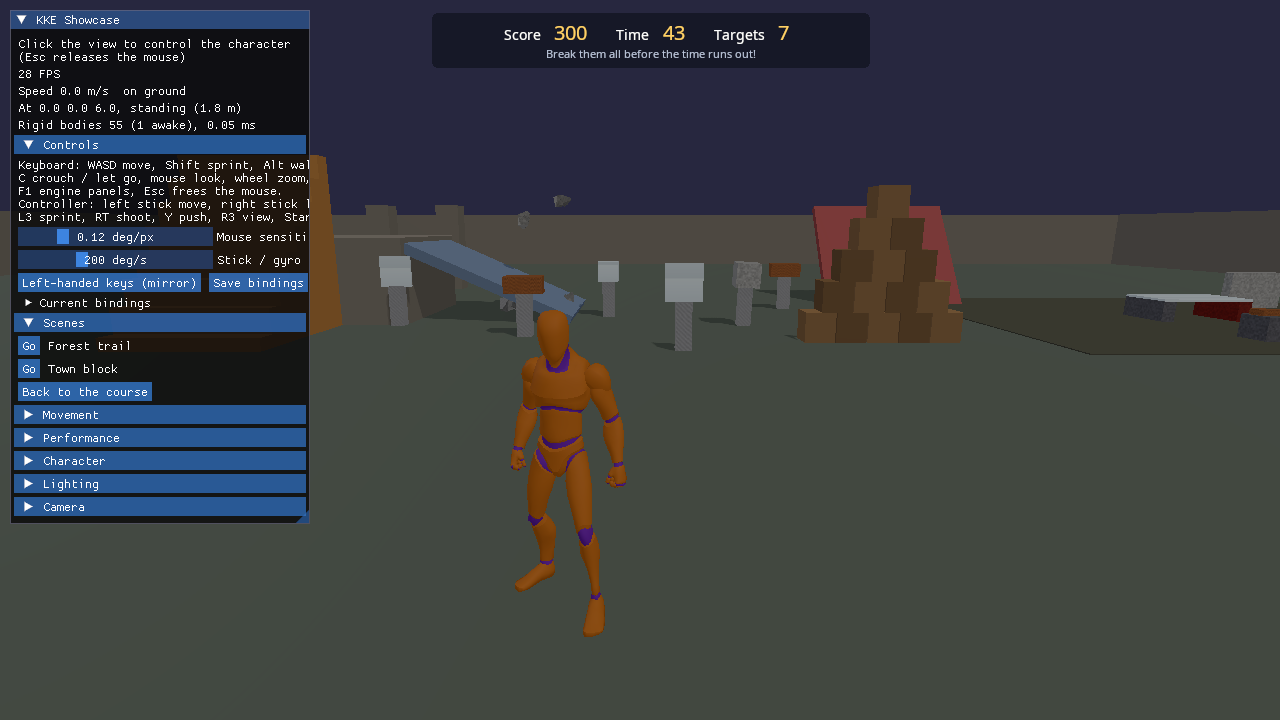
Run it
The two files in scripts/ are not a game of their own: they are copied
into kke_demo's bin/scripts/ folder by
games/showcase/CMakeLists.txt (when
ENGINE_ENABLE_LUA is on), and kke_demo's ScriptModule runs every
script there.
The targets are FEMFX breakables and the demo's shot is a FEMFX ball, so
this game needs the FEMFX build: the everything preset
(KKE_ENABLE_FEMFX=ON, see docs/BUILDING.md).
In the default build kke_demo has no breakable table; pressing T then
says so on the HUD (start() checks if not breakable) instead of
starting a round.
cmake --workflow --preset everything
cd build/bin && ./kke_demo
KKE_SKIP_INTRO=1 ./kke_demo       # skip the engine's logo intro
To change the game while it runs, point the demo at this folder (kke_demo's
own toys.lua is then not loaded):
Edit targets.lua, save, and it reloads by itself.
Controls
Click the view to take control of the mouse.
| Action | Keyboard and mouse | Controller |
|---|---|---|
| Start a round (or start again) | T | d-pad right |
| Shoot | left mouse button (hold: 4 shots a second) | RT |
| Play again (results screen) | click the button, or T | d-pad right |
Moving and looking are kke_demo's own controls (WASD and the mouse, or the sticks); see games/showcase/README.md.
How it plays
- Press T. Eight targets appear in an arc in front of where you look, 7 to 13 m away, each on an iron pedestal (iron never breaks).
- Shoot them. Each broken target scores its points plus 5 for every whole second left, and adds 2 seconds to the clock.
- The round ends when the clock reaches 0 ("Time!") or every target is down ("All targets down!"). The results show the score, how many targets for how many shots (accuracy), and your best score.
| Target | Material | Size (m) | Points |
|---|---|---|---|
| Glass pane | glass | 0.7 x 0.7 x 0.06 | 150 |
| Stone block | stone | 0.55 cube | 100 |
| Wooden beam | wood | 0.8 x 0.35 x 0.35 | 120 |
| Ice block | ice | 0.5 cube | 80 |
The four kinds repeat in that order across the eight targets.
How it works
Read scripts/targets.lua from top to bottom; it is 148 lines. Here is what each part does and which engine table it uses (the full API is in docs/SCRIPTING.md).
The frame
The script has no loop of its own. ScriptModule runs the file once when
it loads it (which defines everything and registers hooks), then calls
the hooks: Think every frame, Break when a breakable the script made
comes apart, and the timer's function every 0.1 s during a round. A
small state machine in the local state (idle, playing, done)
decides what those hooks do.
Settings first
ROUND_SECONDS, TARGETS, BONUS_SECONDS and the KINDS table
(material, sound, size, points) are at the top. Change a number, save,
press T again.
A key
This makes an action with a keyboard key and a controller button. It
shows up in the rebinding screen like any other action. The Think hook
reads it with input.pressed("targets.start"), and counts a shot on
every press of kke_demo's own fire action.
The HUD
The HUD is scripts/targets_hud.rml, an RmlUi
document (HTML-like markup with CSS-like styles). ui.load opens it and
returns a handle; ui.text(hud, id, text) fills in the numbers,
ui.class(hud, id, class, on) turns the red "low time" style (under 10
seconds) and the results panel on and off, ui.rml puts a button
picture in the hint line, and ui.onClick(hud, "again", start) runs
start when "Play again" is clicked. The <prompt action="..."/> tags
in the document show the key or pad button of whatever device the
player is holding, and redraw by themselves when it changes. The body has
pointer-events: none so clicks go through to the game; only the results
panel takes them.
Every ui.* call is guarded (if hud then ... end), so the game still
runs, without a HUD, in a build with no UI.
Targets
start() places them in an arc: it takes camera.forward() flattened
onto the ground, a side vector at right angles to it, and
camera.target() as the origin, then puts target i at
(i - 4.5) * 1.6 m to the side and 7 + ((i * 7) % 5) * 1.5 m out. Each
is two FEMFX breakables:
local pedestal = breakable.box { pos = at + Vec(0, 0.45, 0), size = Vec(0.3, 0.9, 0.3), material = "iron", cells = Vec(1, 3, 1) }
local id, why = breakable.box { pos = top, size = kind.size, material = kind.material }
breakable.box returns an id, or nil and a reason (the script prints it
and carries on). The ids go in the targets table (id to kind and
position) and the pedestals list, so clear() can remove everything
the last round made with breakable.remove.
Scoring
The engine checks every frame whether a script's breakable came apart and
then runs the Break hook with its id. The hook looks the id up in
targets; if it is a live target during a round it adds the points and
the time bonus, plays audio.impact(pos, sound, 1.0) where it broke, and
marks it false (counted, but kept in the table so clear() still
removes its pieces). The last target ends the round.
The clock
A named timer that fires every 0.1 s and repeats forever (0 repetitions
means no limit) until finish() calls timer.Remove("targets.clock").
Each tick takes 0.1 from timeLeft and refreshes the HUD.
Saving
The best score survives quitting: store.load("targets.best", 0) when
the script starts (0 the first time), store.save("targets.best", best)
when a round beats it. It lands in save/scripts.db next to the game (a
SQLite file, docs/STORAGE.md).
Sharing with other scripts
Each script's globals are private. The best score and the target
positions go into shared, the one table every script can read.
hook.Add("TargetsStart", ...) lets another script (or the console)
start a round with hook.Run("TargetsStart").
Design decisions
- Lua only. The game is scripts on top of kke_demo, so it needs no build step and shows that a whole game loop fits in Lua (AGENTS.md: "Lua first").
- Score from the engine's
Breakevent, not from hits. The script never ray casts: it scores when the physics says a target broke, so what counts is what you see. - Ids stay in the table after a break (
targets[id] = false), so the next round'sclear()removes the broken pieces too (the comment inBreaksays so). - Guards for optional modules.
hud,storeandaudioare checked before use, so the script survives a build without them. (breakableis not guarded: see "Run it".) - Sharing on purpose. Globals are per script;
sharedandhook.Runare the two doors between scripts (commit "Lua v2: per-script globals").
Tuning
| What | Where | Effect |
|---|---|---|
ROUND_SECONDS (45) |
targets.lua | round length |
TARGETS (8) |
targets.lua | how many targets |
BONUS_SECONDS (2) |
targets.lua | time added per target |
KINDS |
targets.lua | material, sound, size and points of each kind |
math.floor(timeLeft) * 5 |
Break hook |
the speed bonus per target |
7 + ((i * 7) % 5) * 1.5, 1.6 |
start() |
how far out and how far apart targets stand |
timeLeft < 10 |
refresh() |
when the clock turns red |
Engine features it uses
| Feature | Lua table | Doc |
|---|---|---|
| Actions with keys and pad buttons | input.define, input.pressed |
SCRIPTING.md, INPUT.md |
| RmlUi documents and button prompts | ui.load, ui.text, ui.class, ui.rml, ui.onClick |
SCRIPTING.md |
FEMFX breakables and the Break hook |
breakable.box, breakable.remove |
SCRIPTING.md, PHYSICS_BRIDGE.md |
| Timers and hooks | timer.Create, timer.Remove, hook.Add, hook.Run |
SCRIPTING.md |
| Impact sounds | audio.impact |
AUDIO.md |
| The camera | camera.forward, camera.target |
SCRIPTING.md |
| Saving | store.load, store.save |
SCRIPTING.md "Saving", STORAGE.md |
| Sharing between scripts | shared |
SCRIPTING.md |
Assets
None of its own: the targets and pedestals are FEMFX boxes made from material presets, the sounds are synthesised impacts, and the HUD uses kke_demo's fonts. No Synty packs.
Make a game like this
- For a new game, start from the starter template instead of kke_demo:
tools/new_game my_game(see games/template). Copytargets.luaandtargets_hud.rmlintogames/my_game/scripts/. - The starter game defines the
fireaction (left mouse, RT) but nothing shoots when you press it: add a shot from a recipe in docs/cookbook/recipes such asshooter.lua(which usesfire) orthrow.lua. - Without the FEMFX build, swap
breakable.boxforphysics.boxbodies and score from your own rule (a body knocked off its pedestal, a zone entered). - Keep the shape: settings at the top,
start(),finish(), arefresh()that writes the HUD, a state variable, and hooks that only act in the right state. - Check it headless with
tools/check_game my_game(it prints OK or FAILED).
Pitfalls:
- Keep every id you create, so the next round can remove it; a script can only change what it made itself.
- Name timers and hooks with a prefix (
targets.clock,targets.hit) so they do not clash with another script's. input.pressed("fire")counts presses, but kke_demo keeps firing (4 shots a second) while the button is held. The Think hook counts shots the same way: one on the press, then one every 0.25 s whileinput.held("fire"), so the accuracy matches what flew.
Files
| File | What is in it |
|---|---|
| scripts/targets.lua | The whole game: settings, input, HUD updates, spawning, clock, scoring, saving |
| scripts/targets_hud.rml | The HUD and results panel (RmlUi) |
| screenshot.png | The picture above |