RmlUi showcase (game UI toolkit)
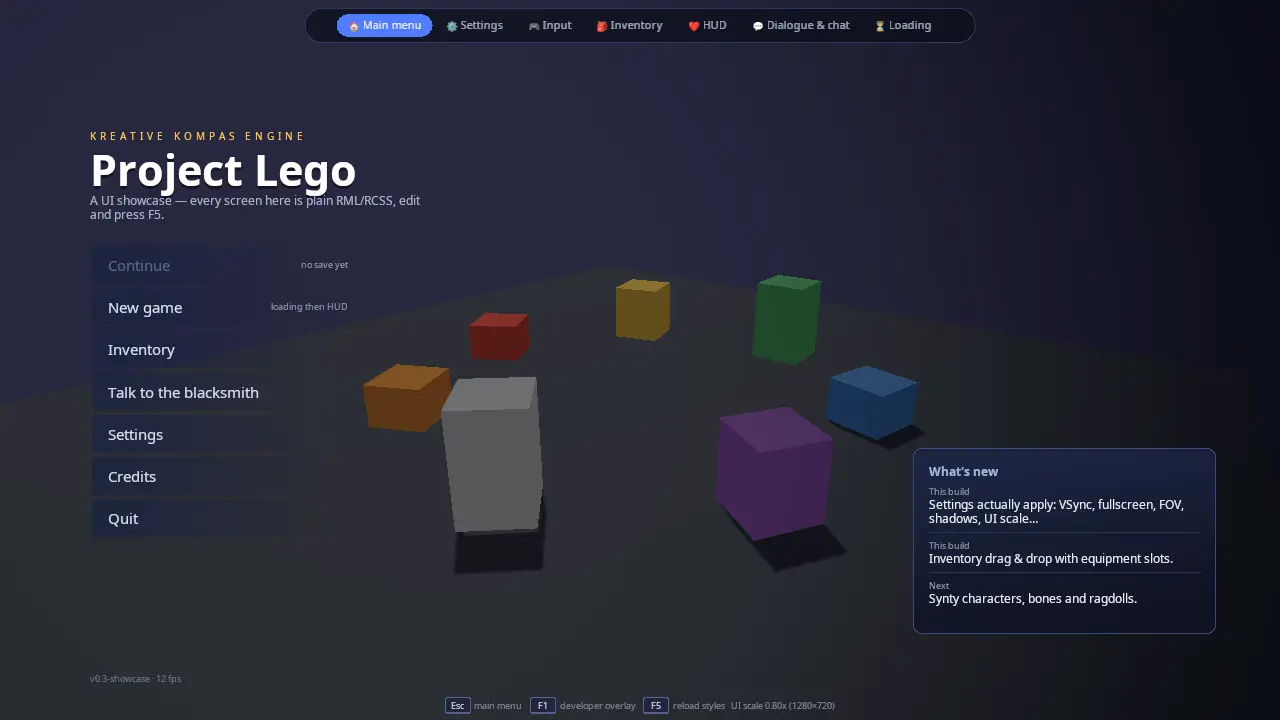
A set of real game screens drawn over a small, slowly turning 3D scene:
a main menu, a settings screen that really changes the engine, a live
input tester and bindings editor, an inventory with drag and drop, an
in-game HUD, an NPC dialogue with a chat box, and a loading screen. A nav
bar at the top switches between them. Every screen is a plain .rml
(markup) and .rcss (style) file in ui/; C++ only owns the data
and reacts to events.
This is the starting point for any player-facing UI in a KKE game: title
menus, pause and options menus, inventories, HUDs, dialogue systems,
lobbies and loading screens. The pattern it teaches (documents for layout
and style, a C++ data model for state, one document per screen) is the
one the engine's other games follow; climb_race, duel,
goblin_horde and command_kit copy this demo's theme.rcss as their
own base theme.
Run it
The executable is rmlui_demo (CMakeLists.txt). It is
always built: no KKE_ENABLE_* option guards it in the root
CMakeLists.txt, and the default preset includes it
(docs/BUILDING.md).
Run it from build/bin: the documents are loaded from ui/ next to the
executable, and the fonts from assets/fonts/.
| Environment variable | What it does |
|---|---|
KKE_SKIP_INTRO=1 |
Skips the engine's logo intro (developer builds). |
KKE_SHOWCASE_START=<screen> |
Opens straight on one screen: menu, settings, input, inventory, hud, dialog or loading. Handy when you work on one .rml file, and for screenshots. |
KKE_UI_ROOT=<folder> |
Loads the documents from another folder instead of ui/. Point it at the source folder (KKE_UI_ROOT=../../games/rmlui_demo/ui ./rmlui_demo) and your .rcss edits show up when you press F5, without a rebuild. |
KKE_VIRTUAL_INPUT=pad (or hosas,pad, ...) |
Attaches virtual controllers, so the Input screen has something to show without hardware (docs/INPUT.md "Testing without hardware"). |
KKE_PROMPT_STYLE=xbox (etc.) |
Forces the button-prompt style. This demo does not show prompts yet (see "Button prompts" below). |
The demo can write two files next to the executable: settings.json
(the Settings screen's "Apply & save", via SettingsModule) and
input.json (the Input screen's "Save" and every change in Settings >
Controls, via InputModule). Both are read
at startup. Delete them to get the defaults back.
Controls
Everywhere:
| Action | Keyboard / mouse | Controller |
|---|---|---|
| Switch screen | Click a tab in the nav bar | LB / RB (previous / next screen, wraps around) |
| Back to the main menu, or close the Credits / Quit box | Esc | B |
| Move the focus between controls | Arrow keys, Tab (RmlUi handles them directly) | D-pad or left stick (repeats after 0.4 s, then every 0.11 s) |
| Press the focused control | Enter, or click it | A |
| Show / hide the ImGui developer panels | F1 | none: a developer tool, keyboard only |
| Reload every stylesheet from disk | F5 or Ctrl+R | none: a developer tool, keyboard only |
| Turn the 3D view behind the menus | Left-drag orbit, right-drag pan, scroll zoom (it also turns by itself) | Right stick turns, RT closer, LT further |
Per screen:
| Screen | Action | Keyboard / mouse | Controller |
|---|---|---|---|
| Main menu | Pick an entry | Click | Focus it, A |
| Settings | Change a setting | Click, drag a slider, pick from the list | Focus it, A |
| Settings | Change a key or button (Controls tab) | Click its key or controller cell, then press the new one (Esc cancels) | Focus the cell, A, then press the new button (Start cancels) |
| Settings | Every binding, chords and axes (Controls tab) | "Advanced..." opens the Input screen | Focus it, A |
| Input | Add a binding | Click "+ Add", then press the key, button, stick or combination | Focus "+ Add", A, then press anything |
| Input | Cancel listening | Esc or the Cancel button | Focus Cancel, A |
| Inventory | Move, equip, stack an item | Drag it to another slot, or click it and then the slot | Focus it, A, focus the slot, A (A on the same slot puts it back) |
| Inventory | Drink a potion / eat | Double-click it, or U | Focus it, X |
| Inventory | Inspect an item | Hover it, or move the focus to it | Focus it |
| HUD | Use ability 1 to 6 | 1 to 6, or click the hotbar slot | Focus the slot, A |
| Dialogue | Skip the typewriter | Space, or click the text | Focus the text, A |
| Dialogue | Pick answer N | 1 to 9, or click it | Focus it, A |
| Dialogue | Send a chat line | Type, then Enter or Send | no on-screen keyboard: a keyboard is needed to type |
| Loading | Continue when it reaches 100% | Any key, or click | A |
How it plays
There is no game to win: each screen is a working sample of one kind of UI, with enough fake game state behind it to feel real.
- Main menu. Staggered slide-in animations, hover effects, a "What's new" panel, and two modal boxes: Credits (click outside to close) and Quit (really quits). "New game" goes to the loading screen and then the HUD. "Continue" is greyed out on purpose (there is no save).
- Settings. Four tabs (Graphics, Audio, Controls, Gameplay). Every
control changes the engine the moment you touch it (fullscreen, VSync,
frame-rate limit, field of view, shadows, brightness, UI scale,
developer overlay, mouse sensitivity, invert Y, difficulty, damage
numbers, physics catch-up steps). "Apply & save" writes
settings.json, "Revert" goes back to the last saved state, "Defaults" resets. The footer says "Unsaved changes" until you save. Controls also holds the simple key list: one row per action with its key and its controller button, shown as glyphs. Pick a cell, press the new key or button, and it is saved for every player at once (the rebinding helpers are the game shell's,GameShellModule::rebind, so it behaves like the menus in every game). "Reset keys" restores the defaults; "Advanced..." opens the Input screen below, which is the full editor. - Input (the advanced editor). Left: every connected keyboard, mouse, gamepad and
joystick. The card of the device you touch lights up; select one to
see its buttons, axes, hats, gyro, accelerometer and touchpad live.
Identical devices (a pair of flight sticks) are numbered, can be named
and swapped. Right: every action with its bindings. Add as many
bindings per action as you like, click a binding's trigger word to
cycle it (press, hold, tap, double tap, toggle, release, while held),
remove it with "x". A red binding means the same input does two
things. "Left-handed keys" mirrors the keyboard, "Save" writes
input.json. - Inventory. A 30-slot bag with 18 starting items and six equipment slots. Drag items between slots, or pick one (click or pad A) and then the slot to put it in; equipment slots refuse the wrong item type; stackable items with the same name merge. Filter chips dim the other categories, "Sort by rarity" reorders the bag, double-click a consumable (or U, or pad X on the focused one) to use one. The details follow the mouse and the focus. The weight bar turns red above 80% of 80 kg.
- HUD. Health, mana, stamina and XP bars; health has a pale "ghost" bar that lingers after a hit, then catches up. A hotbar with cooldown sweeps, floating damage numbers (25% crits, shown only when "Show damage numbers" is on), a hit flash, a minimap with a radar sweep and moving blips, a compass, a quest tracker, and toasts. You take a hit by yourself every 5 to 10 seconds; the damage depends on the difficulty setting. At 0 health you respawn at full health.
- Dialogue and chat. Brunhild the blacksmith talks with a typewriter effect; seven conversation nodes with numbered answers. Answers that end the talk take you to the HUD. The chat box on the left takes typed messages and she replies 1.2 seconds later.
- Loading. A spinner, a progress bar, a checklist of six fake steps, a tip that changes every 5 seconds, then "Press any key to continue" (goes to the HUD).
How it works
Startup and the frame
main.cpp builds the application in this order:
auto& camera = app.addModule<kke::OrbitCameraModule>(/*distance=*/9.0f, /*pitch=*/-0.35f, /*yaw=*/-0.6f, glm::vec3(0.0f, 0.6f, 0.0f));
camera.setAutoOrbit(true, 6.0f);
app.addModule<kke_demo::BackdropModule>();
app.addModule<kke::InputModule>("input.json");
app.addModule<kke::UiModule>();
app.addModule<kke::SettingsModule>("settings.json");
app.addModule<kke_demo::InputScreen>();
app.addModule<kke_demo::ShowcaseModule>();
app.addModule<kke::DebugControlModule>();
app.addModule<kke::StatsModule>();
It also sets the studio mood (a calm, neutral lighting preset from
assets/moods/studio.yaml) and turns off quit-on-Escape, because Esc
means "back to the main menu" here.
The order you add modules in is not the order they start in. Each module
lists what it needs in dependencies(), and Application reorders them
so the needed ones start first. This matters for one rule of RmlUi: a
data model must exist before the document that uses it is loaded. So:
InputScreenneedsInputModule(devices and bindings) andUiModule(the RmlUi context). It creates theinputdata model in itsinit().ShowcaseModuleneedsUiModule,SettingsModule, andInputScreen. The comment on that last one says why: it "creates the 'input' data model before input.rml loads".ShowcaseModuleis the one that loads all the documents, includinginput.rml.
Each frame, in the order the engine calls them:
- Events. SDL events go to every module's
onEvent().UiModuleforwards mouse, keyboard and text input to RmlUi (and handles F5).ShowcaseModule::onEvent()handles the demo's own keys (Esc, F1, 1 to 6, Space, 1 to 9, Enter in chat, and the Settings key capture). - frameStart.
InputModulepolls devices and evaluates every action.UiModule::frameStart()turns the controller'sui.*actions into RmlUi key presses (see "Controller navigation").InputScreenchecks whether a binding capture has finished. - update.
BackdropModuleadvances its clock.ShowcaseModulereadsui.back/ui.prev/ui.next, applies changed settings, refreshes the nav bar's size readout and the menu's FPS counter, and runs the logic of the visible screen only (updateHud,updateDialog,updateLoading).InputScreenrebuilds its device and action views. - renderUi.
UiModuleticks RmlUi (Context::Update(): layout, animations, data bindings). It does this here and not inupdate()becauseupdate()is skipped while the simulation is paused, which used to freeze every menu (BUGS.md BUG-032). The ImGui panels ofStatsModule,DebugControlModuleandOrbitCameraModuleare built here too. - renderShadow, render.
BackdropModuledraws the floor and blocks into the shadow map and the scene. - renderOverlay.
UiModuledraws every visible RmlUi document on top, at full window resolution.
The documents and the screens
ShowcaseModule::init() loads seven screen documents plus the nav bar:
const char* kScreens[] = { "menu", "settings", "input", "inventory", "hud", "dialog", "loading" };
const char* kDocumentFiles[] = { "main_menu.rml", "settings.rml", "input.rml", "inventory.rml", "hud.rml", "dialog.rml", "loading.rml" };
All of them live in one RmlUi context (owned by UiModule, reached
through m_ui->context()). A screen switch is just show one, hide the
rest:
void ShowcaseModule::setScreen(const std::string& screen) {
    if (!m_documents.count(screen)) return;
    m_screen = screen;
    for (auto& [id, doc] : m_documents) {
        if (id == screen) doc->Show();
        else doc->Hide();
    }
    if (m_nav) {
        m_nav->Show();
        m_nav->PullToFront();
    }
Every document is loaded once at startup and kept; switching never
re-parses a file. setScreen() also resets the loading bar when you
enter the loading screen, and starts the dialogue at node 0 the first
time you open it. The nav bar is pulled to the front after each switch so
it always sits on top.
A document that fails to load is logged ("run from build/bin so ui/ is next to the executable") and skipped; the rest of the demo still works, and switching to the missing screen does nothing.
The RML and RCSS files
RML is RmlUi's HTML-like markup, RCSS its CSS-like style language. The files in ui/:
| File | Screen | What to look at |
|---|---|---|
| theme.rcss | shared | The base theme every document links: fonts, block elements, panels, buttons, form controls, tabs, scrollbars, animations, modals, focus rings. |
| nav.rml | the top bar | pointer-events: none on the body and auto on the bar, data-class-active for the current tab, a @media rule that hides labels on narrow windows. |
| main_menu.rml | Main menu | Staggered entrance (same slide-right animation, delays 0.05 s to 0.35 s), a radial-gradient vignette, modal boxes with data-if, assignments in events (data-event-click="show_credits = true"). |
| settings.rml | Settings | <tabset>, checkboxes (data-checked), sliders and a <select> (data-value), radio buttons, a button that opens the Input screen (data-event-click="go('input')"), data-attrif-disabled on Revert, the format() filter on numbers. |
| input.rml | Input | Lists inside lists (a.bindings inside actions), axis bars positioned with data-style-left / data-style-width, a capture overlay shown with data-if="capturing". |
| inventory.rml | Inventory | drag: clone on items, :drag-hover on slots, rarity borders with data-class-*, a <progress> weight bar, data-attr-slot so C++ can find the slot of a dropped element. |
| hud.rml | HUD | Bars sized with data-style-width, a transition on width for smooth bars, a conic-gradient radar that spins forever, floating damage numbers with a float-up animation, pointer-events so only the hotbar and buttons take clicks. |
| dialog.rml | Dialogue and chat | A blinking caret, a flex row for the chat field and button, a <form> with data-event-submit. |
| loading.rml | Loading | A spinner made from a conic-gradient circle with a hole, a gradient <progress> fill, data-event-keydown on the body for "press any key". |
| assets/check.png, assets/arrow_down.png | shared | The checkbox tick and the select arrow, used by theme.rcss as decorator: image(...). |
| gen_icons.py | tool | Writes those two PNGs from line segments, with no dependencies. Run it from ui/. |


The comment at the top of theme.rcss holds the four rules this engine's
RmlUi setup needs; each one came from a real bug:
- Sizes in
dp, neverpx.UiModulesets RmlUi's dp ratio every frame tomax(0.6, window height / 900) * UI scale, so adplayout looks the same at 720p, 1080p and 4K and follows the UI-scale slider (BUG-022). - Block elements need
display: block. RmlUi has no browser default stylesheet, sodiv,p,h1... are inline until the theme says otherwise (BUG-001). - Text needs a
font-family. The theme sets* { font-family: Noto Sans; }because relying on inheritance dropped text silently (BUG-015, BUG-024). - Edit and press F5.
UiModule::reloadStyleSheets()reloads the stylesheet of every open document.
Two more rules come from the renderer:
- Layers work:
box-shadow,filter,backdrop-filter,mask-image. The.glasspanels blur the 3D scene behind them and float on a shadow, the modal backdrop blurs and greys the menu, the title has adrop-shadowfilter and the focus ring glows. Each effect renders the element into a full-window layer and runs full-window passes, so keep them to a handful of panels on screen (ENG-G09). Gradients (linear-,radial-,conic-gradient), transforms and clip masks work too. - Emoji are the icons. The inventory items, hotbar and portraits are
emoji characters. Noto Color Emoji is loaded as a fallback font by
UiModule, so any character missing from Noto Sans comes from it, in colour, at any UI scale, with no image files to manage.
Data bindings: how C++ talks to the documents
Each document's <body> names a data model: data-model="nav",
"menu", "settings", "inv", "hud", "dialog", "loading" (all
created by ShowcaseModule) and "input" (created by InputScreen). A
model is built once with a Rml::DataModelConstructor:
void ShowcaseModule::buildNavModel() {
    Rml::DataModelConstructor c = m_ui->context()->CreateDataModel("nav");
    c.Bind("screen", &m_screen);
    c.Bind("ui_scale", &m_uiScaleShown);
    c.Bind("width", &m_width);
    c.Bind("height", &m_height);
    c.BindEventCallback("go", &ShowcaseModule::onGo, this);
    m_navModel = c.GetModelHandle();
}
There are four kinds of link, and the demo uses all of them:
- Variables.
c.Bind("name", &member)gives the document a pointer to a C++ value. The document reads it with{{ name }}in text, or in attributes such asdata-if,data-class-x,data-style-width,data-attr-value. Form controls write back through the same pointer (data-value,data-checked). - Structs and arrays.
RegisterStruct<Item>()plusRegisterMember("icon", &Item::icon)for each field, thenRegisterArray<std::vector<Item>>(). The document loops withdata-for="slot, i : bag". Only registered members are visible:Item::equipTypeandItem::slotTypestay private to C++. - Event callbacks.
c.BindEventCallback("cast", ...)is called fromdata-event-click="cast(i)". The arguments arrive as aRml::VariantList; the helpersargString()andargInt()read them safely. - Computed values.
c.BindFunc("dirty", ...)runs a function when the document readsdirty. The Settings footer uses it to askSettingsModule::hasUnsavedChanges().
Documents can also change the model without C++: data-event-click="filter
= f" (inventory filter chips) and show_credits = true (menu) are plain
assignments that RmlUi runs itself.
Dirty flags. RmlUi does not watch your variables. When C++ changes
one, it must call DirtyVariable("name") on the model handle (or
DirtyAllVariables()), and RmlUi updates the views that read it on the
next tick. The HUD shows why you choose carefully:
// Continuous values change every frame; lists only when they change,
// so RmlUi doesn't rebuild the toast/damage elements (and restart
// their entrance animations) every frame.
for (const char* v : { "hp", "ghost_hp", "mp", "sp", "xp", "abilities", "blips", "heading", "hit_flash" }) {
    m_hudModel.DirtyVariable(v);
}
if (before != m_toasts.size()) m_hudModel.DirtyVariable("toasts");
InputScreen::update() is the opposite end: it rebuilds all its views
every frame and calls DirtyAllVariables(). That is fine for a debug-like
tester whose values really do change every frame.
Player text is safe by default. The chat puts what you type into
{{ m.text }}. RmlUi inserts data-bound text as a text node, so typing
<b>markup</b> shows the tags literally. The first chat line invites you
to try. If you ever build RML strings from player text yourself, escape
them with kke/RmlTextSafety.h (the comment in sendChat() points
there).
Settings that change the engine
buildSettingsModel() binds the controls straight to the live
kke::EngineSettings owned by SettingsModule
(kke/modules/SettingsModule.h):
c.Bind("fullscreen", &s.graphics.fullscreen);
c.Bind("vsync", &s.graphics.vsync);
c.Bind("fps_limit", &s.graphics.frameRateLimit);
c.Bind("fov", &s.graphics.fieldOfView);
A slider therefore writes the engine's own value. ShowcaseModule::update()
compares the settings with a copy of the last applied ones, and on any
difference calls SettingsModule::apply(). apply() sets fullscreen,
VSync, the frame cap, the camera's field of view, shadows, ambient
brightness, the ImGui overlay's visibility and the physics catch-up
limit, then tells every ISettingsListener (the UiModule picks up the
UI scale, the OrbitCameraModule the mouse sensitivity and invert Y).
That is the "live preview". "Apply & save" calls apply() and save();
"Revert" calls revert() (back to the saved copy); "Defaults" calls
resetToDefaults() (this device's defaults, so a Steam Deck resets to the
Deck preset).
The Audio tab binds the volume settings too. The demo adds an
AudioModule (its ImGui panel hidden), which reads them and sets the
mixer's gains (BUG-060).
The Controls tab has mouse sensitivity and invert Y, and a "Change them"
button that opens the Input screen: keys and buttons live in
InputModule (input.json), for the keyboard, the mouse and every
controller, and the Input screen edits them. (It used to show a separate
key list stored in EngineSettings::controls.keyBindings, which nothing
reads and which a controller could not edit: BUG-066.)
The Input screen
InputScreen.cpp is a module of its own because it is
a complete tool: a device tester and the bindings editor for
kke::InputModule (docs/INPUT.md).
- Actions to test.
defineGameActions()defines the standard character actions (InputModule::defineCharacterActions: move, look, jump, sprint, fire...) plus a few extras chosen so every trigger type has an example: lean left/right on Q/E as hold, reload on R as tap and quick reload on R as double tap, ammo check on Alt+T (a modifier chord) or pad X held 0.5 s, inventory on Tab or the pad Back button. ThencommitDefaults()stores these as the defaults and loadsinput.jsonover them. These actions only light up on this screen; the other screens do not use them. - Devices.
refreshDevices()lists gamepads and joysticks first, then keyboards and mice, and marks a card active if the device was used in the last 0.3 s.refreshLive()fills the button cells, axis bars (axisView()turns a value intoleftandwidthpercentages for the bar), hats, gyro/accelerometer and touch text of the selected device. - Capture. "+ Add" calls
startCapture(), which asksInputDevicesto listen and turns thegameanduicontexts off, so nothing else reacts while you press things.frameStart()notices when the capture ends andfinishCapture()builds akke::Binding: a stick captured for a 2D action binds both of its axes, mouse motion or gyro binds x and y as two bindings, an axis for a 1D action gets a 0.08 dead zone. - Editing.
cycle_triggersteps a binding through press, hold, tap, double tap, toggle, release, while held.unbind,reset_action,reset_all,left_handed(InputModule::mirrorKeyboard),saveandreloadmap toInputMapandInputModulecalls. Twins:renamesets a device alias,swap_twinswaps the identities of two identical devices,identifyrumbles or flashes the pad's LED.
ShowcaseModule checks InputScreen::capturing() before it treats Esc
or B as "back", so pressing Esc to cancel a capture does not also leave
the screen.
Inventory drag and drop
The items carry drag: clone in RCSS: RmlUi drags a copy and fires a
dragdrop event on the element under the pointer when you let go. The
module listens for that on the whole inventory document with one
listener:
void ShowcaseModule::DragDropListener::ProcessEvent(Rml::Event& event) {
    auto* dragged = static_cast<Rml::Element*>(event.GetParameter<void*>("drag_element", nullptr));
    std::string from = slotIdOf(dragged);
    std::string to = slotIdOf(event.GetTargetElement());
    if (!from.empty() && !to.empty()) m_owner->moveItem(from, to);
}
Each slot has data-attr-slot="'b' + i" (bag) or 'e' + i (equipment).
slotIdOf() walks up from whatever child was hit until it finds that
attribute, so dropping on the count badge works too. moveItem() then:
- refuses the move if either side is an equipment slot and the item's
equipTypedoes not match the slot'sslotType(checked in both directions of a swap), with a toast; - stacks if both are the same non-weapon, non-armour item in the bag;
- otherwise swaps the item fields, leaving
slotLabelandslotTypewith the slot; - recomputes the weight and dirties
bag,equipmentandweight.
A controller cannot drag, so a click does the same move in two steps:
select(id) remembers the first slot (m_selected, drawn with the
selected class) and the second click calls moveItem() with both.
Clicking the remembered slot again drops the choice. The slots also send
hover(id) on focus, not only on mouseover, so the details panel
follows the controller's focus, and inv.use (pad X, U; a ui context
action from InputScreen::defineGameActions()) uses the item under the
focus with useItem(), like a double-click.
shutdown() removes the listener before closing the documents. Without
that, RmlUi calls the listener after it is gone and the demo crashed on
exit (BUGS.md BUG-025).
The HUD
updateHud() runs only while the HUD is on screen. Per frame: mana
regenerates 3 per second and health 1.5 per second, stamina follows a
sine wave, cooldowns count down, minimap blips move and bounce off the
edges at 12% and 88%, the compass turns 12 degrees per second, toasts
and damage numbers age and are removed. A hit (takeHit()) removes 8 to
22 health, scaled by difficulty (easy 0.5, normal 1.0, hard 1.6), and
sets a 0.6 s delay before the ghost bar catches up. Bar widths are
expressions in the RML: data-style-width="(hp / max_hp * 100) + '%'",
and the RCSS transition: width makes them slide.
The random numbers come from a small linear congruential generator
(random01(), fixed seed 12345), so a run is repeatable.
Dialogue and chat
The conversation is a vector of DialogNode (speaker, role, portrait,
text, choices); a Choice points to the next node or ends the talk. The
typewriter in updateDialog() reveals about 45 characters per second and
always advances whole UTF-8 code points, so an emoji or accent is never
cut in half. Choices are hidden until typing finishes (data-if="!typing").
RmlUi does not submit a <form> when you press Enter in a text field,
so onEvent() checks SDL_TextInputActive() and calls sendChat()
itself. The same check stops Space and 1 to 9 from skipping or choosing
while you type.
Controller navigation
Controller support comes from the engine, with two pieces of setup in this demo:
InputModuledefines theuicontext actions:ui.up/down/left/right(D-pad and left stick),ui.accept(A),ui.back(B),ui.prev/ui.next(LB / RB). They are bound to the controller only, because the keyboard already reaches RmlUi directly.UiModule::frameStart()turns them into RmlUi key presses: directions become arrow keys (with repeat), accept becomes Enter. If nothing has focus yet, the first press becomes Tab, which focuses the first control.- The end of
theme.rcssmakes controls focusable and navigable:
button, .button, .tab, .menu-item, .slot, .binding, .chip, .device, [data-event-click],
input.checkbox, input.radio, input.range, input.text, select { tab-index: auto; nav: auto; }
nav: auto lets the arrows move to the nearest control in that
direction; tab-index: auto makes it focusable, so Enter (pad A)
clicks it. The :focus rules draw the focus ring.
ui.back, ui.prev and ui.next are left to the game. Here
ShowcaseModule::update() makes B go back to the menu (or close a modal)
and LB / RB cycle the screens.
Two details keep the focus on the screen you are looking at.
setScreen() shows the nav bar with Rml::FocusFlag::None, so the
first press focuses the screen's first control instead of the "Main
menu" tab, and update() pulls the nav bar back to the front each frame
(focusing a control pulls its document forward, over the nav bar).
The 3D view: InputScreen::defineGameActions() defines camera.zoom on
the triggers before it calls OrbitCameraModule::setPadControls(true),
which then adds only the right stick for camera.orbit, and it clears
the left stick from camera.pan: the d-pad and the left stick belong to
the menus here.
The one thing a controller cannot do in this demo is type in the chat: there is no on-screen keyboard yet.
Button prompts
The engine has a <prompt> element that shows the right button picture
for the device the player is using and changes by itself when they
switch (<prompt action="jump" label="Jump"/>; see
kke/modules/UiModule.h and
docs/INPUT.md "Button prompts"). This demo does
not use it yet: its hints are written as keyboard keycaps (.keycap in
theme.rcss, for example "Press 1 to 6" on the HUD and the Esc / F1 / F5
line under the nav bar). To show prompts, replace a keycap with a
<prompt> element; UiModule already refreshes prompts every frame.
The 3D backdrop
BackdropModule.cpp draws a floor and seven boxes
in a ring, each with its own colour and metallic/roughness value, each
turning at its own speed. It uses the engine's cube.vert / cube.frag
lit pipeline and shadow.vert / shadow.frag for the shadow pass, with
one push-constant block per box (model matrix, metallic, roughness). The
header says why it exists: so the Settings screen's shadows, brightness
and field of view have something visible to act on. The floor does not
cast a shadow (it is skipped in renderShadow()).
Design decisions
- Layout and style in files, state in C++. The header of
ShowcaseModulestates the split: "artists and modders edit RML/RCSS (F5 reloads styles live), programmers own the model." The alternative, building documents as strings in C++ (how the engine's early panels worked, seeUiModule.h), needs a rebuild for every colour change. - One document per screen, all loaded at startup. Switching is
Show()/Hide(), never a reload, so a switch is instant and each screen keeps its state (scroll position, chosen tab). - Data models, not element lookups. C++ never searches the DOM to set text; it binds variables and marks them dirty. The documents can then be restructured freely as long as the variable names stay.
- Settings bound to the live engine struct. The sliders write
EngineSettingsdirectly and one comparison per frame applies any change. The comment says: "a slider writes the engine's value directly; update() notices and calls apply()". No per-control change handlers. - Dirty lists only when they change. Explained in the HUD comment above: dirtying a list every frame rebuilds its elements and restarts their entrance animations.
- Emoji instead of icon images. The comment in
buildInventoryModel(): "no image assets needed, and they render in color at any UI scale." pointer-events: noneon overlay bodies. Every RmlUi body covers the whole window for hit testing. The nav bar, HUD and dialogue bodies opt out and re-enable only their real panels, or they would swallow clicks meant for the screen underneath (BUG-012, cited innav.rml).- Focus ring from a border colour and a
box-shadowglow. The colour alone already shows focus; the glow came once the Vulkan backend drew box-shadows (BUG-052, ENG-G09). - The Input screen is its own module. It owns a separate data model
and a lot of logic, and
ShowcaseModuledeclares a dependency on it so theinputmodel exists beforeinput.rmlloads. - Controller back and tab switching are the game's job.
UiModuleonly moves focus and clicks; the comment inUiModule::frameStart()saysui.back/ui.prev/ui.next"are the game's to interpret". Each game decides what Back means on each screen. - Update only the visible screen.
update()callsupdateHud,updateDialogandupdateLoadingonly for the current screen, so a hidden HUD does not keep taking hits. - The UI ticks while paused.
UiModulerunsContext::Update()inrenderUi(), so menus stay alive when the simulation is paused (BUG-032).
Tuning
| What | Where | Value | Effect of changing it |
|---|---|---|---|
| dp reference height | kReferenceHeight in engine/src/modules/UiModule.cpp |
900 px (1 dp = 1 px at 900 px tall), minimum ratio 0.6 | Engine-wide: lower makes every UI bigger. Change the UI-scale setting instead for one game. |
| Controller focus repeat | UiModule::frameStart() |
0.4 s delay, then every 0.11 s | Shorter moves the focus faster while held. |
| Camera | main.cpp | distance 9, pitch -0.35, yaw -0.6, auto-orbit 6 deg/s | Framing and spin speed of the backdrop. |
| Frame time clamp | ShowcaseModule::update() |
0.1 s | Largest step the screen logic takes after a hitch. |
| Typewriter speed | updateDialog() |
45 characters per second | Higher types faster. |
| NPC chat reply delay | sendChat() |
1.2 s | |
| HUD regen | updateHud() |
mana 3/s, health 1.5/s | |
| Automatic hits | m_nextAutoHit and updateHud() |
first at 4 s, then every 5 to 10 s | |
| Hit damage | takeHit() |
8 to 22, times 0.5 / 1.0 / 1.6 for easy / normal / hard | |
| Ghost bar delay | takeHit() |
0.6 s | Longer shows the lost health longer. |
| Crits | castAbility() |
25% chance, double damage; Slash 18, Fireball / Frost Nova 42, times 0.85 to 1.15 | |
| Abilities | buildHudModel() |
cooldowns 1.2 to 15 s, mana 0 to 30 | |
| HUD toasts | addToast() |
4 s each, at most 5 | |
| Inventory | ShowcaseModule.h, buildInventoryModel() |
30 bag slots, 6 equipment slots, 80 kg carry limit, 1250 gold | |
| Heavy warning | inventory.rml |
above 80% of the carry limit | |
| Inventory toast | showInventoryToast() |
2.5 s | |
| Loading speed | updateLoading() |
14 + 10 * sin(step * 2.1) percent per second |
Uneven speed per step, like a real load. |
| Tip rotation | updateLoading() |
every 5 s | |
| Input "just fired" flash | refreshActions() |
0.35 s | |
| Colours, sizes, animations | ui/theme.rcss and each .rml <style> |
Edit and press F5 (with KKE_UI_ROOT for the source folder). |
Engine features it uses
| Feature | Header / module | Doc |
|---|---|---|
RmlUi context, dp scaling, F5 reload, controller focus, <prompt> |
UiModule (kke/modules/UiModule.h) |
HISTORY.md "The demo suite" |
| RmlUi Vulkan renderer (gradients, transforms, clip masks, images) | RmlVulkanRenderInterface (kke/RmlVulkanRenderInterface.h) |
RENDERING_PRINCIPLES.md |
Player settings, save / revert / defaults, ISettingsListener |
SettingsModule, EngineSettings (kke/modules/SettingsModule.h, kke/EngineSettings.h) |
PLATFORMS.md (per-device defaults) |
| Actions, bindings, triggers, devices, capture, twins, left-handed | InputModule, InputMap, InputDevices (kke/modules/InputModule.h, kke/InputMap.h, kke/InputDevices.h) |
INPUT.md |
| Safe player text in RML | kke/RmlTextSafety.h | |
| Orbit camera with UI mouse capture | OrbitCameraModule (kke/modules/OrbitCameraModule.h) |
|
| Lit meshes and shadow map | Pipeline, Mesh, ShadowMap (kke/Pipeline.h, kke/Mesh.h) |
RENDERING_PRINCIPLES.md |
| Moods (lighting presets) | Application::setMood |
MOODS.md |
| ImGui developer panels (pause, stats) | DebugControlModule, StatsModule |
see ../imgui_demo/README.md |
Assets
- No Synty packs. Nothing in this demo loads a model; the backdrop is built from boxes in code.
- Fonts (copied next to the executable by
CMakeLists.txt):
NotoSans-Regular.ttf,NotoSans-Bold.ttf,NotoSans-Italic.ttf,NotoColorEmoji.ttffromassets/fonts/, SIL Open Font License 1.1 (docs/DEPENDENCIES.md). If Regular is missing,UiModulewarns that text will not render; if the emoji font is missing, emoji (all item and ability icons) do not render; Bold and Italic are optional. - UI files: every
.rml,.rcssand.pngunderui/is copied tobuild/bin/ui/and re-copied when it changes. The two PNGs are made bygen_icons.py. A missing image is logged by the renderer and the element is drawn without it; it does not stop the document. - Shaders:
cube,shadow,rml_uiandrml_gradient, compiled byengine_add_shader. - Mood:
assets/moods/studio.yaml.
Make a game like this
- Decide Lua or C++. A Lua game (
tools/new_game my_game, fromgames/template) can load a document withui.load("file.rml")and set text, classes and click handlers from Lua (theuitable in docs/SCRIPTING.md). Lua has no data models; for screens as rich as these (lists, two-way bound settings), write a C++ module likeShowcaseModule. - Copy the UI folder. Copy
ui/theme.rcssandui/assets/into your game'sui/, and thefile(GLOB_RECURSE ...)block from CMakeLists.txt so your files are copied next to the executable. Several games copy onlytheme.rcss; copyassets/too if you use checkboxes or dropdowns, since the theme's tick and arrow images live there. - Add the modules.
InputModule,UiModuleand (for an options menu)SettingsModule, like main.cpp. Callapp.window().setQuitOnEscape(false)if Esc should open a menu. - Write one screen first. Start from the
.rmlclosest to what you need (a pause menu:main_menu.rml; an options menu:settings.rml). Keep<link type="text/rcss" href="https://github.com/Khyretos/kk-engine/blob/main/games/rmlui_demo/theme.rcss"/>and thedata-modelon<body>. - Build its model before loading it. In your module's
init():CreateDataModel,Bindyour variables,BindEventCallbackyour actions, thencontext->LoadDocument(...). If another module creates a model you use, list that module independencies(). - Dirty what you change. After changing a bound value in C++, call
DirtyVariable("name"). Dirty lists only when they change. - Iterate live. Run with
KKE_UI_ROOT=<your source ui folder>andKKE_SHOWCASE_START-style switches of your own; edit RCSS and press F5. - Make it work with a controller. Keep the focus rules at the end of
theme.rcss, give every clickable elementdata-event-clickor a focusable class, and handleui.back(andui.prev/ui.nextif you have tabs) in yourupdate(). Do not rely on hover for anything the player needs to see. - Show the right buttons. Use
<prompt action="..."/>instead of fixed keycaps (docs/INPUT.md "Button prompts"). - Read next: docs/INPUT.md (actions, controller navigation, prompts, split screen) and the RmlUi rules in BUGS.md (BUG-001, 012, 015, 022, 024, 025, 052).
Pitfalls the code and comments reveal:
- Author sizes in
dp;pxdoes not scale. - Every overlay document's body needs
pointer-events: none, and its panelspointer-events: auto. - An element that shows text needs a
font-family(the theme's*rule covers it if you link the theme). - A
backdrop-filterover the 3D scene needs a swapchain the renderer can copy from; the first time one is drawn, the renderer recreates it that way, so that first frame shows no backdrop. - Remove your
Rml::EventListeners before you close a document. - Enter does not submit a
<form>; handle it yourself. - Put player text in
{{ }}bindings, or escape it withkke/RmlTextSafety.h; never paste it into RML.
Files
| File | What is in it |
|---|---|
| main.cpp | Creates the application, sets the mood, adds the modules. |
| ShowcaseModule.h | The showcase module: data-model structs (Item, Ability, Blip, Quest, Toast, Damage, Choice, ChatMessage) and the state of every screen. |
| ShowcaseModule.cpp | Loads the documents, builds the seven data models, screen switching, settings live apply, inventory moves and drag and drop, HUD simulation, dialogue and chat, loading, keyboard and controller handling, shutdown. |
| InputScreen.h | The Input screen module and its view structs. |
| InputScreen.cpp | Defines the demo's actions, the input data model, device and action views, binding capture. |
| BackdropModule.h, BackdropModule.cpp | The floor and ring of turning boxes behind the UI, with shadows. |
| CMakeLists.txt | The executable, fonts, ui/ copy rule, shaders. |
| game.json | Marketplace manifest. |
| ui/ | The documents, theme, two icon PNGs and the icon generator (table in "The RML and RCSS files"). |