Command kit
The command kit is not a game. It is a small static library,
kke_command_kit, that the two command demos share:
Pet Companion (you and a dog you give
orders to) and Platoon (a squad you select and
command). It holds the parts every game about telling others what to do
needs and that are not engine features on their own:
HumanoidKitandHumanoid: people on screen. The UAL mannequin loaded once, a walk/jog/sprint blend by ground speed, and one-shot or looping actions ("Pistol_Shoot", "Death01") played over it. Grey blocks when the mannequin is missing.Scenery: the ground, Synty pack models placed by name with box colliders, and coloured blocks as the fallback when a pack is missing.CommandInput: mouse, keyboard, controller and touch turned into the few things an order is made of: a pointer, a click, a context order, a drag-box and a pick from a radial wheel.CommandHud: the RmlUi HUD around it: a status panel, big picture buttons along the bottom, the radial wheel, the controller reticle, the drag-box, a toast and a line of controls with button glyphs.
Which order a click or a wheel pick becomes is the game's call. The kit
never gives orders and never moves anyone; that is the command layer
(kke/Orders.h) and the AI core, see
docs/COMMANDS.md and docs/AI.md.
Start from this kit for a pet or companion game, a squad or real-time
strategy game, a management game where you point at things and pick an
action, or any game that must work equally well with a mouse, a
controller and a finger.
Use it
The kit is built only when the command demos are, in the root
CMakeLists.txt:
if(KKE_ENABLE_JOLT AND ENGINE_ENABLE_LUA)
    add_subdirectory(games/command_kit)
    add_subdirectory(games/pet_companion)
    add_subdirectory(games/platoon)
endif()
Both options are on by default. The kit's own code uses Jolt (static
colliders through RigidBodyModule) but not Lua; Lua is in the guard
because both demos script orders with order.*.
A game uses it in two lines of CMake, as pet_companion/CMakeLists.txt does:
add_executable(pet_companion main.cpp PetModule.cpp)
target_link_libraries(pet_companion PRIVATE kke_command_kit)
...
command_kit_game(pet_companion)
target_link_libraries(... kke_command_kit)links the library. It linkskke_enginepublicly and putsgames/command_kit/on the include path, so the game writes#include "CommandHud.h"and needs nothing else.command_kit_game(<target>)(defined in CMakeLists.txt) copies what the kit needs at run time next to the executable:ui/command_hud.rml, the sharedui/theme.rcssfromgames/rmlui_demo/ui/, the fontsNotoSans-Regular.ttf,NotoSans-Bold.ttfandNotoColorEmoji.ttf(the wheel and buttons use emoji icons), and the shaders a model game draws with (cube,shadow,model,model_instanced,shadow_instanced,rml_ui,rml_gradient). The game still copies its owngame.jsonand scripts.
There is no executable to run. To see the kit working:
cmake --build build --target pet_companion platoon
cd build/bin
KKE_SKIP_INTRO=1 ./pet_companion
KKE_SKIP_INTRO=1 ./platoon
The kit reads these environment variables:
| Variable | Used by | Effect |
|---|---|---|
KKE_ANIMATIONS_DIR |
HumanoidKit::load |
where UAL1_Standard.fbx is (else assets/animations) |
KKE_ASSETS_DIR, KKE_SYNTY_DIR |
Scenery |
where the Synty packs are (else assets/synty) |
Controls
CommandInput::defineActions defines these rebindable actions in the
"Orders" group of the bindings screen (CommandInput.cpp).
The game adds its own on top (the pet's Come/Sit/Stay/Fetch on 1 to 4 and
the D-pad, the platoon's groups and camera).
| Action | Keyboard / mouse | Controller | Touch |
|---|---|---|---|
| Point | the mouse cursor; the middle of the view when the mouse is captured | the reticle in the middle of the view | where the finger is |
Click at the pointer (Frame::click) |
left click (press and release without moving 12 points) | no binding in the kit; a game binds its own (Platoon: A for rts.select) |
tap |
Drag-box (Frame::boxDone) |
left drag | none | drag a finger |
Context order at the pointer (cmd.context) |
right mouse | RB | a tap, if the game treats clicks as context orders (Pet Companion does) |
Order wheel, held (cmd.wheel) |
hold Tab or the middle mouse button; move the mouse to pick; let go to give | hold LB; right stick picks (cmd.wheel.pick); let go of LB to give |
hold a finger 0.5 s; drag to pick; lift to give |
Close the wheel without an order (cmd.cancel) |
release in the middle | B | lift in the middle |
Force: focus fire / hold there (cmd.force) |
held Left Ctrl | held LT | none in the kit |
Queue after the current order (cmd.queue) |
held Left Shift | none | none |
Two details from the code:
- With a controller, flicking the stick and letting it return to the
middle keeps the pick (
RadialMenu::updateStick: "back in the middle keeps the pick"), so a flick and a release is enough. With a mouse or a finger, coming back to the middle clears it ("never mind"). - A left click is always where the mouse is, even while a controller is the active device: "A click is where the mouse is, even with a controller plugged in."
What it gives a game
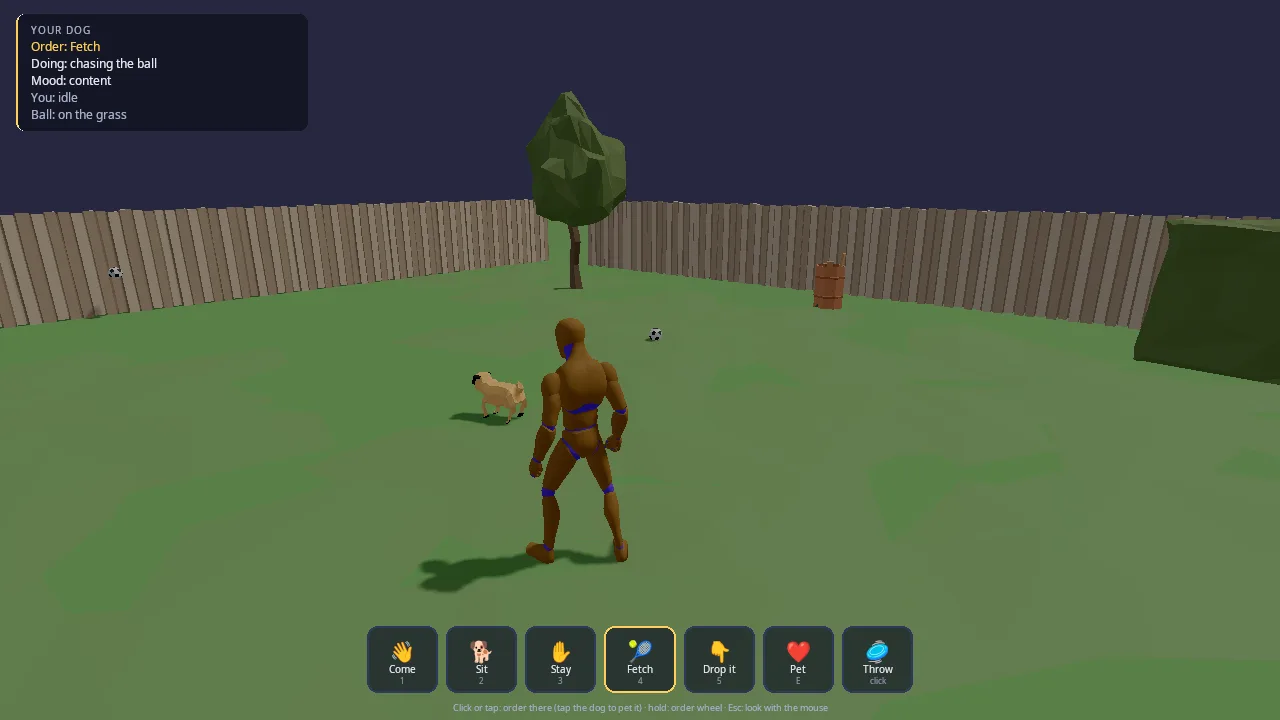
A game built on the kit gets, with no code of its own:
- a status panel (title plus coloured lines) in the top-left,
- a row of large picture buttons that give an order in one tap (Simple mode: good for touch and for young players), each with the glyph of its key or button under it and a highlight for the active order,
- a radial wheel of up to eight orders around the pointer,
- a reticle in the middle when a controller or a captured mouse is the pointer, and a drag-box while selecting,
- a toast for what just happened ("Good dog!"),
- people who walk, run and act, and a level that falls back to blocks.
The rules (which order, for whom, what it means) stay in the game.
How it works
The frame, in a game that uses the kit
Both demos use the kit the same way. In init:
kke::InputModule::defineCharacterActions(in);
command_kit::CommandInput::defineActions(in);
m_scenery = std::make_unique<command_kit::Scenery>(app, *m_models, *m_rigid);
m_kit = std::make_unique<command_kit::HumanoidKit>(app);
m_kit->load(*m_models);
m_hud = std::make_unique<command_kit::CommandHud>(app);
m_hud->build("YOUR DOG");
m_hud->onButton = [this](int b) { pressButton(b); };
m_hud->setWheel(std::move(wheel));
m_cmd.overUi = [this](const glm::vec2& p) { return m_hud->overButtons(p); };
(from PetModule.cpp, shortened). Then:
onEventpasses every SDL event tom_cmd.onEvent(e).updatecallsm_cmd.update(in, app, captured, dt)and reacts to the returnedFrame:click,context,boxDone,wheelGiven.- It moves its people and calls
Humanoid::updatefor each. - It fills the HUD (
setLines,setButtons,setHint,toast) and callsm_hud->update(frame, dt). renderandrenderShadowcallScenery::renderand eachHumanoid::render(which draw only the fallback blocks; models are drawn byModelModule).shutdownresets the HUD, the people, theHumanoidKitand theScenerybefore the engine modules they depend on go away (Pet Companion's comment: "Everything holding GPU or UI resources goes before the modules that own them").
CommandInput: from devices to a Frame
CommandInput.h, CommandInput.cpp.
Which device is the pointer. onEvent sets m_pad when a gamepad
button goes down or a stick moves past 12000 (of 32767), and clears it
when the mouse moves more than 2 points or a mouse button goes down. In
update, the pointer is the middle of the window when captured (the
mouse turns the camera) or m_pad; otherwise it is the mouse position.
Frame::reticle says which, and the HUD draws the reticle from it.
The left button and one finger. SDL delivers touches as mouse events
with which == SDL_TOUCH_MOUSEID, so one code path serves both. A press
records where it started and whether it began over the HUD's buttons
(overUi; if so the whole press belongs to the HUD). Moving more than
dragPixels (12) turns it into a drag. On release, a drag becomes
boxDone with its two corners; anything else becomes click at the
release point (touch set for a finger).
The wheel. There are two ways to open it, remembered in
m_wheelSource:
- The wheel button (
cmd.wheel, source 1). It opens on press, centred in the middle of the view for a reticle, else at the pointer. The right stick picks when pushed past 0.3; otherwise mouse motion since it opened picks (relative motion when captured, the offset from the centre when not). Releasing the button gives the pick. - A held press (source 2). A left press or finger held for
longPressSeconds(0.5 s) without dragging opens the wheel under it; the finger's offset picks; lifting gives the pick.
cmd.cancel closes the wheel with nothing given. When a pick is given,
Frame::wheelGiven is the item index for exactly one frame, and
Frame::wheelTarget is where the pointer was when the wheel opened, so
"Go there" goes where you pointed before you moved the mouse to pick. The
wheel itself is an engine kke::RadialMenu (kke/Orders.h), which turns
a stick or a pointer offset into an item with hysteresis.
The context order. cmd.context pressed with the wheel closed sets
Frame::context, unless a free mouse pointer is over the HUD buttons.
The Frame is rebuilt from scratch every update, so every flag in it is
true for one frame only, and frame() returns the last one for code that
runs later in the frame (the HUD).
CommandHud: the RmlUi side
CommandHud.h, CommandHud.cpp and ui/command_hud.rml.
build(title) creates an RmlUi data model named cmd with three struct
arrays (buttons, lines, items) and plain values (title, hint,
toast, reticle, box, the box and wheel positions), binds a press
event callback, then loads and shows the document. The document binds to
those names; for example the button row:
<div class="btn" data-for="b, i : buttons" data-class-on="b.on" data-event-click="press(i)">
    <div class="icon">{{b.icon}}</div>
    <div class="label">{{b.label}}</div>
    <div class="key" data-rml="b.key"></div>
</div>
A click on a button calls press(i), which calls the game's
onButton(i). body has pointer-events: none and only #bar (the
button row) has pointer-events: auto, so the HUD takes clicks on its
buttons and lets every other click through to the game. overButtons
tells CommandInput the same thing by hit-testing the #bar element.
Prompt text. Button keys and the hint line go through
InputModule::promptText, which turns {pet.come} into the glyph of the
button bound to that action on the device in use, and {touch:tap} into a
gesture picture. Without an InputModule the text is escaped with
kke::escapeRmlText.
Only what changed. setButtons, setLines, setHint, toast and
update compare the new values with the old and call DirtyVariable only
when something differs, so RmlUi does not rebuild the HUD every frame.
Points and pixels. CommandInput works in window points; RmlUi lays
out in pixels. update multiplies positions by
Window::pixelsPerPoint() before writing them as "123px", and
overButtons does the same before hit-testing. The wheel's items are
placed on a ring of radius 120 points around the centre using
RadialMenu::direction(i), so the drawn items match the directions the
input picks with.
Never an empty style. The box and wheel position strings start as
"0px": the header's comment says "an empty data-style value is an RmlUi
parse warning", and the project treats warnings as bugs.
HumanoidKit and Humanoid: people
HumanoidKit is loaded once per game. Its constructor builds the
fallback body (a grey torso box with a dark visor on the front, -Z) into a
DynamicMeshRenderer. load finds UAL1_Standard.fbx with
kke::findAssetFolder("assets/animations", {"KKE_ANIMATIONS_DIR"}, ...),
loads it into ModelModule once, keeps a copy of its bones and clips as
the rig, builds one AnimationSet, and works out modelYaw, the turn
that points the model's own forward (kke::modelForward) at yaw 0.
A Humanoid is one person. Its constructor spawns an instance of the
shared model with a tint and gives it its own Animator with a 1D blend
state over ground speed:
| Speed (m/s) | Clip |
|---|---|
| 0 | Idle_Loop |
| 1.6 | Walk_Loop |
| 3.6 | Jog_Fwd_Loop |
| 6.2 | Sprint_Loop |
act(clip, loop, speed, fade, restart) plays an action over that: the
clip is found by any part of its name (AnimationSet::find), and one
clip state per clip, loop mode and speed is created the first time and
cached in m_states. A name with no clip logs one warning and is cached
as missing, so it does not warn every frame. act("") goes back to the
move blend. Asking for the action already playing does nothing unless
restart is true, so a game can call act every frame with the state it
wants. actionFinished() is true once a one-shot action has played
through.
update(feet, yawDegrees, groundSpeed, dt) places the instance, feeds the
speed to the blend and writes the pose into the instance's bone locals.
Without the mannequin it only stores the transform, and render draws
the block there. The destructor removes the instance.
Scenery: ground, packs and blocks
The constructor finds the asset folder (assets/synty,
KKE_ASSETS_DIR or KKE_SYNTY_DIR) and scans it into an
kke::AssetCatalog. If nothing is there it logs at info level ("the
scene is blocks"), which is the normal case in CI.
ground(half, color): a box 1 m thick with its top at y = 0, drawn and added as a static Jolt body.model(name, packs, animations): looks a model up by name in the catalog (inpacksfirst), loads it with the pack's own texture and material settings (packLoadOptions), and records the name.place(name, pos, yaw, scale, collide, packs): spawns an instance and, withcollide, adds a static box matching the model's bounds, turned by the yaw. It returns 0 when the model is missing, so a game writesif (!s.place(...)) s.block(...)to fall back to a block.block(center, half, color, collide): adds a coloured box to one shared mesh (re-uploaded on the nextrenderwhen changed) and a static collider.logUsed(who)logs every pack asset the game used, in first-use order. The header's comment: "Every model a game asked for is remembered, so it can list what it used" (the lists live in docs/SCENES.md).
The destructor removes every Jolt body it added.
appendBox (24 flat-shaded vertices per box, winding fixed per face) is
exported too; both demos use it for their own small meshes.
Design decisions
- A shared library, not engine code and not a copy. The CMake comment says it is "Shared by the command demos"; the pieces are too specific (a mannequin crowd, one HUD layout) for the engine, and two demos needing them made a copy the wrong choice.
- Input becomes intentions, not orders.
CommandInputstops at "click here", "wheel item 3": "Which order each becomes is the game's call." The same input serves a dog (tap = go there or pet) and a platoon (click = select, right click = attack). - One pointer for every device. A reticle in the middle of the view is the pointer for a controller and a captured mouse, so every order that needs a place or a target works without a cursor (COMMANDS.md, "Controls").
- A radial wheel for everything, buttons for the common few. Every order is reachable from the wheel on every device; the picture buttons and the game's quick keys cover the frequent ones in one press.
- Touch through mouse events. SDL's synthesized mouse events carry
SDL_TOUCH_MOUSEID, so tap, drag and long-press share the mouse's code path. - The wheel stick is not inverted. The comment: "SDL's stick Y is
down-positive, which is what the wheel wants: no invert" (unlike
move, where up is forward). - The HUD takes only its own clicks.
pointer-events: noneon the body andautoon the button bar, plusoverUiin the input, so a click on a button never also gives an order in the world. - Every piece degrades to blocks. No mannequin: grey blocks with a visor. No packs: coloured blocks with the same colliders. The demos start in CI with no optional assets.
- The ground does not cast shadows.
Scenery::renderShadowdraws only the blocks; the ground only receives.
Tuning
| What | Where | Effect |
|---|---|---|
longPressSeconds 0.5 |
CommandInput.h, public | how long a held press or finger takes to open the wheel |
dragPixels 12 |
CommandInput.h, public | how far a press may move and still be a click |
| stick threshold 12000 | CommandInput::onEvent |
how far a stick must move to make the controller the pointer |
| wheel stick threshold 0.3 | CommandInput::update |
how far the right stick must tilt to pick |
RadialMenu deadzones (0.45 stick, 28 pointer) and hysteresisDegrees 6 |
kke/Orders.h | how easy it is to pick the wrong item |
wheel slots m_wheel{ 8 } |
CommandInput.h | how many directions the input picks from (see the pitfall below) |
LT threshold 0.4 for cmd.force |
defineActions |
how far LT must be pulled |
| ring radius 120 points | CommandHud::update |
how far the wheel's items sit from its centre |
toast(text, seconds = 2) |
CommandHud.h | how long a toast stays |
| blend speeds 1.6, 3.6, 6.2 | Humanoid::Humanoid |
walk, jog and sprint thresholds; match them to your movement speeds |
| sizes, colours, positions | ui/command_hud.rml | the whole look |
Engine features it uses
| Feature | Header / module | Doc |
|---|---|---|
| Radial menu | kke/Orders.h (RadialMenu) |
COMMANDS.md |
| Rebindable actions, axes, triggers | kke/InputMap.h, InputModule |
INPUT.md |
| Button prompts and gestures | kke/ButtonPrompts.h, InputModule::promptText |
INPUT.md |
| RmlUi documents, data models, events | UiModule |
|
| Safe text in RML | kke/RmlTextSafety.h (escapeRmlText) |
|
| Skinned instances, tints, visibility | ModelModule |
SCENES.md |
| Clip states, 1D blend space | kke/Animator.h |
PROCEDURAL_ANIMATION.md |
| Model forward, pose to bone locals | kke/AnimRig.h |
PROCEDURAL_ANIMATION.md |
| Finding and scanning packs, per-pack load options | kke/AssetCatalog.h, kke/SceneLoader.h |
SCENES.md |
| Static colliders | kke/RigidWorld.h, RigidBodyModule |
MOVEMENT.md |
| Box meshes drawn from code | kke/SphereImpostors.h (DynamicMeshRenderer) |
What the demos add on top of the kit (orders, the board, the AI bridge,
intent reading, order.* scripts) is in
docs/COMMANDS.md and
docs/AI.md.
Assets
The kit loads only one file itself:
- Quaternius' Universal Animation Library mannequin (CC0),
assets/animations/UAL1_Standard.fbx, which is in the repository (see DEPENDENCIES.md). Clips the kit uses:Idle_Loop,Walk_Loop,Jog_Fwd_Loop,Sprint_Loop, plus whatever names the game passes toact(Pet Companion:Spell_Simple_Shoot,PickUp_Table,Fixing_Kneeling; Platoon:Pistol_Shoot,Pistol_Idle_Loop,Hit_Chest,Death01,Crouch_Idle_Loop). Missing: a warning ("people are blocks") and grey blocks.
Scenery loads whatever Synty models the game names. It scans the whole
asset folder; nothing is loaded until asked. The packs each demo uses are
listed in its README and in docs/SCENES.md (Pet
Companion: POLYGON Town and Quaternius Farm Animals; Platoon: POLYGON
Prototype). A missing model makes place and model return 0.
Run-time files copied by command_kit_game: ui/command_hud.rml,
theme.rcss (from games/rmlui_demo/ui/), Noto Sans Regular and Bold and
Noto Color Emoji (SIL Open Font License, see
DEPENDENCIES.md). Button glyphs are Xelu's
CC0 prompts, shipped with every game.
Make a game like this
- Start from the closer demo. Copy
games/pet_companion for one companion, or
games/platoon for a squad with selection. Rename
the folder, target and namespace, and add it to the root
CMakeLists.txtnext to them, inside theif(KKE_ENABLE_JOLT AND ENGINE_ENABLE_LUA)block (the kit target only exists there). - Keep the two CMake lines:
target_link_libraries(<game> PRIVATE kke_command_kit)andcommand_kit_game(<game>). - Decide what each input means. In your
update, read theFrame: what doesclickdo, what doescontextdo, what is in the wheel? Keep that mapping in one function (the demos call itgiveContextandgiveWheel) so every device ends in the same place. - Fill the HUD.
build("TITLE"),setWheelwith up to eight items, and each framesetLinesfor the status,setButtonsfor the picture buttons (with{action}prompt text as the key),setHintfor the controls line,toastfor events. - Add people and a level. One
HumanoidKit, oneHumanoidper person,Scenery::groundandplace/blockfor the level. CallHumanoid::updateevery frame with the speed your movement code produced. - Give orders with the engine. Turn intentions into
kke::Orders on anOrderBoardand letAiOrderBridgehand them to AI core agents (COMMANDS.md). - Test on every device. Mouse and keyboard, a controller (the
reticle and the wheel), and touch (
longPressSeconds, taps).
Pitfalls the code shows:
CommandInput's wheel has eight slots (kke::RadialMenu m_wheel{ 8 }) while the HUD draws as many items as you pass tosetWheel. With a different count, also callwheel().setItems(n)on yourCommandInput, or the picked index and the drawn ring will not match.CommandHud::buildcreates a data model namedcmd; a second HUD in the same RmlUi context fails to build.Scenery::placewithcollidegives a model a box over its bounds, except trees (names containing_Tree), which collide on a trunk-sized column of their full height so units can walk under the canopy.Humanoid::updatetakes a yaw that it subtracts from the model yaw (modelYaw - yawDegrees); Platoon passes180 - yawfor its own convention. Check which way your people face on the first run.- Destroy the HUD, people,
HumanoidKitandSceneryin your module'sshutdown, before the engine modules go. Scenery's constructor takes the packs to scan (onlyPacks); pass the ones your game uses, as Platoon and Pet Companion do, because scanning every pack of a large shared library is slow.
Files
| File | What is in it |
|---|---|
| CMakeLists.txt | The kke_command_kit static library and the command_kit_game(<target>) function |
| Humanoid.h | HumanoidKit (the shared mannequin) and Humanoid (one person) |
| Humanoid.cpp | Loading UAL 1, the move blend, actions, the block fallback |
| Scenery.h | Scenery and appendBox |
| Scenery.cpp | The pack catalog, ground, placing models with colliders, blocks |
| CommandInput.h | The Frame a game reads and the action list |
| CommandInput.cpp | Action bindings, device detection, click/drag/long-press, the wheel |
| CommandHud.h | CommandHud and its view structs |
| CommandHud.cpp | The RmlUi data model, prompt text, change detection, wheel layout, button hit test |
| ui/command_hud.rml | The HUD layout and style |