Physics
Every box and ball a script makes is a rigid body in Jolt: it has mass,
it falls, it bounces, it pushes other things. The settings on
physics.box and physics.sphere decide how, and the same world is
there from C++ as kke::RigidWorld.
Bounce and friction, side by side
Front row: balls from no bounce (bounce = 0) to very bouncy (0.9). Back
row: boxes given the same shove, from icy (friction = 0.02) to grippy
(0.82), sliding different distances. R drops them again.
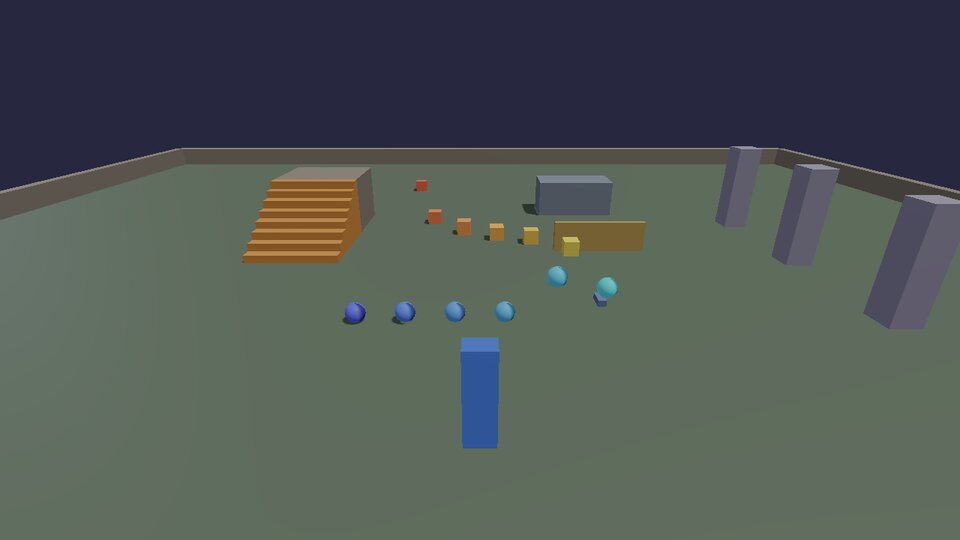
-- bounce.lua: what the physics settings do, side by side. Front row:
-- balls from no bounce to very bouncy. Back row: the same push on boxes
-- from icy to grippy, sliding different distances. R drops them again.
-- (docs/cookbook/physics.md)

input.define("bounce.again", "Drop them again", "R")
local made = {}

local function drop()
  for _, id in ipairs(made) do physics.remove(id) end
  made = {}
  for i = 0, 5 do
    local bounce = i / 5 * 0.9                               -- 0 .. 0.9
    table.insert(made, physics.sphere { pos = Vec(-3 + i * 1.2, 4, 2), radius = 0.25, bounce = bounce,
                                        color = Vec(0.3, 0.4 + bounce * 0.6, 1) })
    local friction = 0.02 + i / 5 * 0.8                      -- ice .. rubber
    local box = physics.box { pos = Vec(-3 + i * 1.2, 0.26, -1), size = Vec(0.5, 0.5, 0.5), friction = friction,
                              density = 300, color = Vec(1, 0.4 + friction * 0.6, 0.3) }
    physics.setVelocity(box, Vec(0, 0, -6))                  -- the same shove for all
    table.insert(made, box)
  end
end

drop()
hook.Add("Think", "bounce.keys", function()
  if input.pressed("bounce.again") then drop() end
end)
| Setting | Means | Default |
|---|---|---|
density |
kg per cubic metre: how heavy for its size (water is 1000, wood ~500, steel ~8000) | 500 |
bounce |
0 = lands dead, 1 = bounces back as high as it fell | 0.1 |
friction |
0 = ice, 1 = rubber; the lower of the two touching surfaces wins | 0.6 |
static |
never moves: floors, walls, platforms | false |
velocity |
starting velocity, m/s | 0 |
material |
a sound material, for impact sounds (Sound) | none |
Things that really break
With FEMFX (the everything preset, Install and build),
breakable.box makes objects that bend, crack and shatter for real, into
pieces that are bodies of their own. F throws an iron ball at what
you're looking at.
-- glass.lua: things that really break (FEMFX). A pane of glass, a
-- wooden plank and a stone slab; press F to throw an iron ball at
-- whatever you look at. The Break hook says when one comes apart.
-- Needs a build with FEMFX (the "everything" preset, docs/BUILDING.md).
-- (docs/cookbook/physics.md)

if not breakable then
  print("glass.lua: no breakable table in this build (configure with the 'everything' preset)")
  return
end

breakable.box { pos = Vec(-2, 1.1, -1), size = Vec(1.2, 1.6, 0.06), material = "glass" }
breakable.box { pos = Vec(0, 1.1, -1), size = Vec(0.2, 1.6, 0.9), material = "wood", pattern = "splinters" }
breakable.box { pos = Vec(2, 0.8, -1), size = Vec(1, 1, 0.3), material = "stone" }

input.define("glass.throw", "Throw an iron ball", "F")
hook.Add("Think", "glass.keys", function()
  if input.pressed("glass.throw") then
    breakable.ball { pos = camera.position() + camera.forward(), radius = 0.12, velocity = camera.forward() * 18 }
  end
end)

hook.Add("Break", "glass.broke", function(id)
  print(string.format("Crash! (%d pieces)", breakable.pieces(id)))
end)
Materials (glass, stone, wood, ice, iron) set how much force it
takes and how it comes apart; pattern overrides the pattern
(shards, voronoi, splinters, radial). Tutorial 2
builds a whole shooting gallery of them; Physics bridge
explains how the pieces hand over to Jolt.
Physics from C++
kke::RigidWorld (engine/include/kke/RigidWorld.h) is what the Lua
physics table calls. The cookbook's games/cookbook/PhysicsRecipes.h
has the two things every game does with it, and the unit test
Cookbook.CrateLandsWhereTheRaySaysTheGroundIs runs them in a world of
their own:
// A crate: a dynamic box, 60 cm on a side, dropped at `at`.
inline kke::RigidWorld::BodyId dropCrate(kke::RigidWorld& world, const glm::vec3& at) {
    kke::RigidWorld::BodyDesc d;
    d.shape = kke::RigidWorld::Shape::Box;
    d.halfExtents = glm::vec3(0.3f); // half the size
    d.position = at;
    d.density = 150.0f;   // kg/m^3: light wood
    d.restitution = 0.1f; // hardly bounces
    return world.add(d);
}
// How high the ground is below `from` (the first thing a ray straight down
// hits within 50 m). False when there's nothing there.
inline bool groundBelow(const kke::RigidWorld& world, const glm::vec3& from, float& height) {
    const kke::RigidWorld::RayHit hit = world.raycast(from, glm::vec3(0.0f, -1.0f, 0.0f), 50.0f);
    if (!hit.hit) return false;
    height = hit.point.y;
    return true;
}
In a game, the world belongs to RigidBodyModule
(app.getModule<kke::RigidBodyModule>()->world()), which steps it at 60
Hz and draws script bodies. Contacts come out of frameContacts() each
frame; the character controller (addCharacter) is what
Locomotion drives. For a whole world of your own
(a server, a test, a tool), make a RigidWorld and call step()
yourself, as the test does.
Other physics
- Jiggle (
kke::JiggleRig): soft parts on a skeleton. Jiggle physics. - Ragdolls on Jolt and FEMFX. Ragdolls.
- Water: an ocean with buoyancy (
sea_demo), particle liquids and things that melt (melt_demo). - Performance: how many bodies a single core can take, and what to do about it. Optimization.
Next: sound.