Farm demo: you are the dog
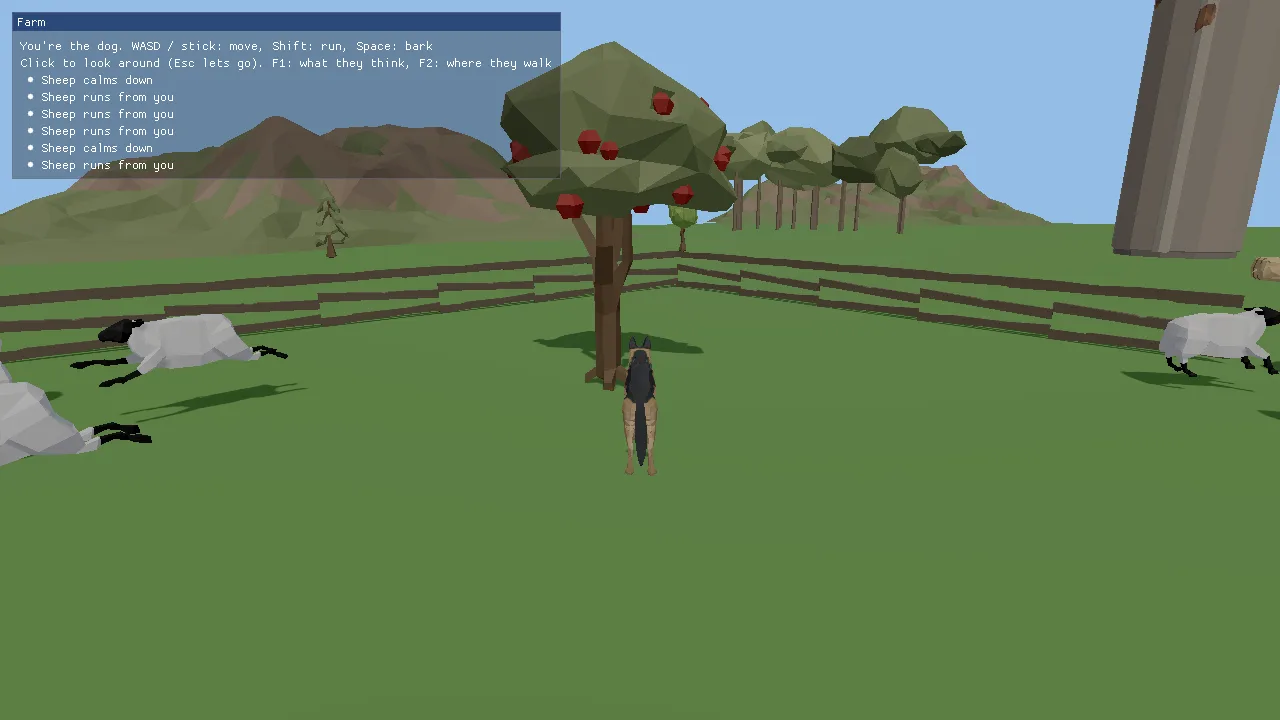
You play a German Shepherd on a farm. Every other animal lives its own life on the engine's AI core (docs/AI.md):
- Sheep graze in their meadow. Run at them and they bolt as a flock, regroup, and calm down once you are gone.
- Cows in the pasture are curious and come over to look at you.
- Pigs root around their pen and wander to the hay pile.
- Horses in the north field spook and gallop off.
- The fox in the woods keeps its distance.
A bark is a noise that every animal in range hears. Fences, the barn and the trees are obstacles on a navmesh (Recast/Detour) built from the level itself when it loads. You can also teach the animals by example: show one what to do in a moment like this, then let its whole species learn from what you showed.
This demo is the starting point for any game where creatures act on their own: wildlife, herding, stealth (being seen and heard), a zoo or farm sim, or a world that feels alive around the player. The game code is small on purpose (one module, about 570 lines): the AI core does the thinking, and the game only places animals, feeds it the player's position and copies the result onto models.
Run it
The executable is farm_demo (CMakeLists.txt). It is
always built: the root CMakeLists.txt adds it with no KKE_ENABLE_*
guard. The build copies scenes/farm.scene.json next to the executable;
without that file the farm does not start (see "The level" below).
| Variable | Effect |
|---|---|
KKE_SKIP_INTRO=1 |
skip the logo intro |
KKE_ASSETS_DIR=/path/to/packs |
where the packs are (default assets/synty/; KKE_SYNTY_DIR also works) |
KKE_FARM_AUTOPILOT=1 |
the dog runs a lap through the meadow and barks by itself (headless checks, screenshots) |
KKE_FARM_DEBUG=1 |
start with the F1 panel open |
KKE_FARM_NAV=1 |
start with the navmesh drawn |
KKE_FARM_LINEUP=1 |
one of each animal in a row, all facing +X, with their AI off (a check that every model faces its yaw) |
Any value other than empty or 0 turns a switch on (envOn in
FarmModule.cpp).
Controls
| Action | Keyboard and mouse | Controller |
|---|---|---|
| Move | WASD | left stick |
| Run | hold Left Shift | click the left stick (toggles) |
| Look around | move the mouse after a left click captures it | right stick |
| Bark | Space | A (south) |
| Open the panel (settings, the two switches below, Quit) | F3 or Esc | View / Back |
| Show what the animals think | F1, or "What they think" in the panel | "What they think" in the panel |
| Draw the navmesh | F2, or "Where they walk" in the panel | "Where they walk" in the panel |
| Next lesson (graze, rest, investigate, watch, regroup, flee, wander) | Tab | D-pad right |
| Show the nearest animal the lesson | E | Y (north) |
| Let every species that was shown something learn | L | D-pad up |
| Ping the surroundings (hear the fences and the barn) | Q | D-pad down |
| Quit | Esc, then Quit | View, then Quit |
All of these are rebindable actions in the InputModule; the user's
bindings are saved to farm_input.json. Esc releases the mouse in
FarmModule::onEvent and opens the panel like a pause menu; it no longer
quits, because kke::DemoPanelModule turns the window's quit-on-Esc off
and adds a Quit row (docs/DEMO_PANEL.md).
How it plays
There is no goal, score or end. You walk around and watch how each species
reacts to you. The panel in the top left (RmlUi, kke::DemoPanelModule) lists the
controls, the current lesson, and the last six things that happened ("sheep
runs from you", "cow comes to see you", "Woof!"), with button prompts for
the device you use. F1 (or "What they think") adds one line per
animal from AiWorld::describe: its action, score, fear, hunger and
animation.
Teaching: press Tab until the lesson you want shows, walk within 10 m of an animal, press E. That records one example for its species. Press L and every species with examples trains a small neural network on them; the log shows how many examples it learned from and how many it now gets right.
How it works
Startup and the frame
main.cpp builds the app and adds modules in this order:
InputModule("farm_input.json"): actions and bindings.UiModule: RmlUi, for the panel.AudioModule, its panel hidden: it plays the mood's ambience loop (meadow_day) and the ping.ModelModule: loads and draws the farm, the animals and the dog.DemoPanelModule("Farm")withsetDeveloperPanelsKey(false): the HUD and settings. F1 is the farm's own "what they think".farm::FarmModule: the game (FarmModule.h).StatsModulewith its panel hidden.
It also sets the mood clear_day, a far plane of 300 m and a 55 degree
field of view. FarmModule::init then does four things in order:
defines the input actions, sets up the third-person camera rig, calls
loadLevel(), buildNavMesh() and setupAi().
Each frame, FarmModule::update:
- Clamps
dtto 0.1 s so a hitch never teleports anyone. - Reads the toggle actions (F1, F2, Tab, E, L).
updatePlayer(dt): moves the dog, handles the bark, tells the AI where the dog is.m_ai.update(dt): every animal perceives, updates its needs, decides and moves (skipped in lineup mode).- Turns
m_ai.takeEvents()into log lines. - Copies each agent's position, yaw and
animonto its model. updateCamera(dt).
render draws the ground quad and, when on, the navmesh; the HUD is the
RmlUi panel buildPanel fills once in init (its text rows read live values).
The level
loadLevel() reads scenes/farm.scene.json from the executable's folder
with kke::SceneFile::load. If that fails, the error goes to the panel and
init stops: no navmesh, no AI, no animals. The scene also sets the mood,
the sun and the ambient light.
The grass is one quad the size of the scene's ground.size (170 x 170 m),
drawn by a DynamicMeshRenderer. The buildings, fences and trees come from
POLYGON Farm: kke::findAssetFolder looks for assets/synty (or
KKE_ASSETS_DIR / KKE_SYNTY_DIR), AssetCatalog::scan indexes it, and
if SM_Bld_Barn_01 is found, kke::loadScene places every object. Missing
single assets are logged as warnings. The list of objects is in
docs/SCENES.md.
The navmesh
buildNavMesh() gathers triangles and hands them to
kke::ai::NavMesh::build:
- the ground quad;
- for each scene object with collision, the triangles of its placed
instance. It walks
m_scene.objectsin the same orderloadSceneplaced them (grid objects takegridCount.x * gridCount.yinstances), so the n-th instance belongs to the n-th cell; - objects marked
Collision::Box(the trees) get only a thin box around the trunk: 18% of the model's width and depth, full height. The comment says it: "the trunk is what's in the way, not the canopy". Using the whole model would block the ground under every crown.
kke::ai::NavMeshSettings s;
s.cellSize = 0.25f;
s.agentRadius = 0.35f;
s.agentHeight = 1.0f;
s.agentMaxClimb = 0.3f;
One navmesh serves every species, sized for a sheep-to-dog animal. The build time and polygon count go to the log and the F1 panel. Without POLYGON Farm the mesh is only the ground, so everything walks on open grass.
The animals
setupAi() starts from the built-in species (sheep, cow, pig,
horse, fox) and changes one thing on each, homeRadius, so they stay
in their fields:
auto tweak = [&](const char* id, float homeRadius) {
    kke::ai::Species s = *m_ai.species(id);
    s.homeRadius = homeRadius;
    s.actions.clear();
    m_ai.defineSpecies(s);
};
tweak("sheep", 11.0f);
actions.clear() makes defineSpecies rebuild the default action list for
the changed species (docs/AI.md, "Actions").
It then:
- registers the player as an actor of species
dog(id 1). An actor is perceived but never moved by the AI. Every farm species already has an attitude to dogs, so no extra rules are needed. - adds a
waterplace (radius 2.2 m) at everySM_Prop_Trough_01and agrainplace (2.0 m) at everySM_Prop_Hay_Pile_01in the scene. The graze and drink actions find food and water through these. - spawns herds with a small seeded random generator (an LCG with seed 7),
so the farm looks the same every run: 14 sheep, 5 cows, 4 pigs, 3 horses
and 1 fox, each around a centre point.
spawnAnimalsnaps each start to the navmesh withnearestPoint.
The AiWorld itself is seeded with 2026 (m_ai{ 2026 } in the header),
which makes the decisions repeatable too.
Models and clips
makeLook loads one model per species the first time it is needed and
remembers it in m_looks:
- Sheep, cow, pig and horse are Quaternius' Farm Animals FBX files, scaled down (0.23, 0.3, 0.2, 0.28) because the files are "made a few metres tall".
- The dog and the fox both come from POLYGON Dogs
Unity_SK_Animals_Dog_01. That file holds every breed on one skeleton;loadDogkeeps only the meshes whose material name starts withGermanShepherd_orFox_. The fox is drawn at 0.8 scale.
POLYGON Dogs keeps its animations in separate files. appendClip loads each
animation-only FBX and copies it onto the dog's skeleton by bone name;
bones the file does not move stay at their rest pose. Ten clips are named
after the AI's anim values: idle, walk, run, eat, drink, sniff,
bark, alert (the tail wag), attack (a bite) and rest (sleeping).
showAnim plays the right clip only when the name changes. It asks
kke::ai::clipForAnim (kke/ai/Clips.h), which finds a clip by name for
each model, and falls back to hopping on Jump when there is no walk clip
(the Quaternius sheep and pigs only have Idle and Jump). attack and
bark play once; everything else loops.
The player's dog
updatePlayer is a plain kinematic controller, no physics body:
move(a 2D axis) is turned into a direction relative to the camera (m_rig.forward()andm_rig.right()).- The wanted speed is 3.2 m/s walking or 7 m/s holding
sprint. - The velocity eases toward it:
m_vel += (want - m_vel) * (1 - exp(-8 dt)). Theexpform gives the same feel at any frame rate. NavMesh::moveAlongSurfaceslides the step along the walkable surface, so the dog cannot walk through fences either. The real velocity is then worked out from where it actually ended up.- The dog turns toward its velocity at up to 540 degrees a second.
- A bark (0.9 s cooldown) calls
m_ai.makeNoise({ m_pos, 25.0f, kPlayer, 0 }): a noise heard 25 m away. m_ai.setTransform(kPlayer, m_pos, m_vel, m_yaw)tells the AI where the dog is and how fast it goes. Fear of a fast dog comes from this velocity.- The clip is
barkfor the first half second of a bark, thenrunabove 4.5 m/s,walkabove 0.3 m/s, elseidle.
The autopilot replaces steps 1 and 6 with a route of seven points, six seconds each, sprinting on legs 1 to 4 and barking once on leg 2.
The camera
A kke::CameraRig in third-person mode: pivot 0.9 m up, arm 5.5 m, no
shoulder offset, pitched 14 degrees down. The mouse turns it only while
captured (left click captures, Esc releases); the right stick
(look.rate) always turns it, at 140 degrees a second across and 70% of
that up and down. The rig's collision callback returns the full distance,
so the camera never pulls in. In autopilot the rig swings behind the dog.
Note the two yaw conventions: the dog and the AI use 0 = +Z, while the rig
uses 0 = -Z, hence m_rig.yaw = 180.0f - m_yaw in loadLevel.
Events and the log
After AiWorld::update, takeEvents() returns what happened. The farm
turns four kinds into log lines: Scared by the player, Calmed,
ActionChanged to investigate the player, and Attack. It keeps the
last six.
Teaching by example
teachNearest()finds the closest animal within 10 m and callsm_ai.teach(id, lesson). This stores the numbers that animal's considerations read right now, plus the lesson, as one example for its species. It fails ("can't") when the species has no such action.learnAll()callsm_ai.learn(id)for every species with examples. It trains a genann network and returns an accuracy, which the log shows as a percentage.
The theory, the weights and how the learned policy mixes with instinct are in docs/AI.md, "Teaching by example".
Design decisions
- The AI core decides, the game only shows it.
FarmModulehas no animal logic at all. Every behaviour (flocking, fleeing, curiosity, grazing) is a built-in species. docs/AI.md calls the demo "the whole core in one small game", and the same species run the sandbox's animal blocks. - Built-in species with one tweak, not new species. The only farm rule
is
homeRadius, so the animals stay in their fields. Everything else is whateverbuiltinSpecies()says, which keeps the demo honest as a test of the defaults. - The navmesh is built from the scene itself at load, not authored or
cached. Moving a fence in
farm.scene.jsonchanges where animals can walk with no extra step.NavMesh::save/loadexist for levels where the build is too slow. - Tree trunks, not tree shapes, block the navmesh, as the comment in
buildNavMeshexplains. - The player's dog is kinematic and slides on the navmesh, with no
physics body. The farm has no physics module at all;
moveAlongSurfacekeeps the dog out of fences with the same data the animals use. - The player is an actor of species
dog. Every species already has an attitude to dogs, so the player gets the right reactions for free. - Seeded everything (world seed 2026, herd seed 7): the same farm and the same decisions every run, so autopilot runs and screenshots repeat.
- Dog clips are copied by bone name from animation-only files. The
first farm commit added
allowNoMeshestoloadModelfor this, so clip-only FBX files (POLYGON Dogs animations) load as skeletons. - A missing POLYGON Farm is logged at info, not warning. Commit 34fadf2 says why: it is the normal case in CI and for anyone without the packs, and the panel already says so. A pack that is there but missing one asset still warns.
Tuning
| What | Where | Value | Raising it |
|---|---|---|---|
| Dog walk / run speed | updatePlayer |
3.2 / 7 m/s | faster dog, animals scare sooner (fear reads your speed) |
| Dog acceleration | updatePlayer, exp(-8 dt) |
8 | snappier starts and stops |
| Dog turn rate | updatePlayer |
540 deg/s | quicker turns |
| Bark range | makeNoise, loudness |
25 m | animals further away hear it |
| Bark cooldown | m_barkTimer = 0.9f |
0.9 s | fewer barks |
| Home radius per species | setupAi, tweak(...) |
sheep 11, cow 13, pig 3.5, horse 14, fox 18 m | they roam further from their start |
| Herd sizes and centres | setupAi, herd(...) |
14 / 5 / 4 / 3 / 1 | more animals (more CPU in perception) |
| Water / grain place radius | setupAi, addPlace |
2.2 / 2.0 m | they drink or graze from further away |
| Model scales | makeLook, specs[] |
0.2 to 0.3 | bigger animals |
| Navmesh cell size, agent radius | buildNavMesh |
0.25 m, 0.35 m | coarser mesh, faster build, gaps close up |
| Teach range | teachNearest, bestDist |
10 m | show from further away |
| Camera arm, pitch | init, m_rig.settings |
5.5 m, -14 deg | wider view |
| Mouse / stick look speed | m_mouseSensitivity, m_stickSpeed |
0.15, 140 | faster look |
Species values themselves (speeds, senses, temperament) are data: change
them in a JSON or YAML file with AiWorld::loadSpecies
(docs/AI.md, "Species").
Engine features it uses
| Feature | Header / module | Doc |
|---|---|---|
| AI core: species, perception, needs, utility decisions, events | kke/ai/AiWorld.h |
AI.md |
| Navmesh (Recast/Detour) | kke/ai/NavMesh.h |
AI.md |
| Teaching by example (genann) | kke/ai/Learning.h |
AI.md |
Clip choice per anim |
kke/ai/Clips.h |
AI.md |
| Scene files and loading | kke/SceneFile.h, kke/SceneLoader.h |
SCENES.md |
| Asset packs and catalog | kke/AssetCatalog.h |
SCENES.md |
| Models, clips, instances | kke/modules/ModelModule.h, kke/ModelAsset.h |
|
| Rebindable input | kke/modules/InputModule.h |
INPUT.md |
| Third-person camera | kke/CameraRig.h |
(header comments) |
| Moods (sky, light) | Application::setMood |
MOODS.md |
| Debug meshes | DynamicMeshRenderer (kke/SphereImpostors.h) |
Assets
None of these are in the repository. Put each pack in assets/synty/ (a
symlink to a shared cache works) or point KKE_ASSETS_DIR at the folder
that holds them. tools/fetch_assets.sh POLYGON_Farm POLYGON_Dogs downloads
the two Synty packs from the owner's share (it needs KKE_SHARE_HASH).
| Pack | Files | Used for |
|---|---|---|
| POLYGON Farm (Synty) | the 60 objects of scenes/farm.scene.json (list) |
the level |
| POLYGON Dogs (Synty) | Unity_SK_Animals_Dog_01 (GermanShepherd and Fox parts); clips from Animations/: Locomotion/_POLYGON_Dog_Locomotion_Standing/Walking/Running.fbx, Actions_Standing/_POLYGON_Dog_Action_Standing_Eat/Drink/Sniff/Bark/TailWag.fbx, Attack/_POLYGON_Dog_Attack_Bite.fbx, Sleep/_POLYGON_Dog_Sleep_Idle.fbx |
the player and the fox |
| Farm Animals Animated by Quaternius (CC0) | Sheep, Cow, Pig, Horse |
the livestock |
What happens when a pack is missing:
- No POLYGON Farm: the panel says so, the level is a bare green field, and the navmesh is only the ground. The AI still runs.
- No POLYGON Dogs: the dog and the fox have no model. You still move (the camera follows an invisible dog) and the fox still lives. A missing clip file logs a warning and that clip is skipped.
- No Quaternius animals: those agents still run in the AI (F1 lists them) but nothing is drawn for them.
- No packs at all: you see the grass and the panel only.
Make a game like this
- Start from this folder: copy
games/farm_demotogames/<your_game>, rename the executable inCMakeLists.txt, the namespacefarmand the classFarmModule, and givegame.jsona newidandtitle. Addadd_subdirectory(games/<your_game>)to the rootCMakeLists.txt(or togames/my_games.cmake, whichtools/new_gameuses). If your game is mostly Lua, start withtools/new_game <name>instead and add the AI from C++ later. - Keep the
DemoPanelModule: it is the HUD, and Esc opens it instead of quitting (setEscapeMenu(false)gives Esc back to your game). - Make your level a scene file (docs/SCENES.md)
and mark what blocks walking with
collision. The navmesh follows. - Pick species. Use the built-in ones, tweak one field like
setupAidoes, or write your own in YAML and load them withAiWorld::loadSpecies. Read docs/AI.md "Species" and "Actions" before writing actions. - Add places (
addPlace) for anything a need should find: food, water, beds. - Register the player with
addActorand a species the animals already have feelings about, and callsetTransformwith a real velocity every frame. A zero velocity makes a sprinting player look calm to the AI. - React to
takeEvents(): play a sound onHeard, deal damage onAttack(the AI never deals damage itself). - Check it: run with
KKE_FARM_DEBUG=1style panels of your own (AiWorld::describe) and a headless autopilot so the game can be checked without anyone playing.
Pitfalls the code shows:
- Keep the navmesh agent size close to your smallest walker. A big
agentRadiuscloses gaps in fences that small animals should get through. - Models may face a different way than +Z.
Look::yawOffsetis there for that, andKKE_FARM_LINEUP=1is the quick visual check. - Quaternius sheep and pigs have no walk clip;
clipForAnimmakes them hop. Check each model's clips before blaming the AI.
Files
| File | What is in it |
|---|---|
| main.cpp | the app, the mood and camera settings, the module list |
| FarmModule.h | the module class, its data (animals, looks, dog state, lessons) |
| FarmModule.cpp | input actions, level and navmesh, species and herds, dog, camera, teaching, the RmlUi panel (buildPanel) |
| CMakeLists.txt | the farm_demo executable, copies game.json, the scene file and shaders |
| game.json | the marketplace entry (id, title, tags, modules) |
| ../../scenes/farm.scene.json | the level: objects, spawn, sun, ground |