Platoon
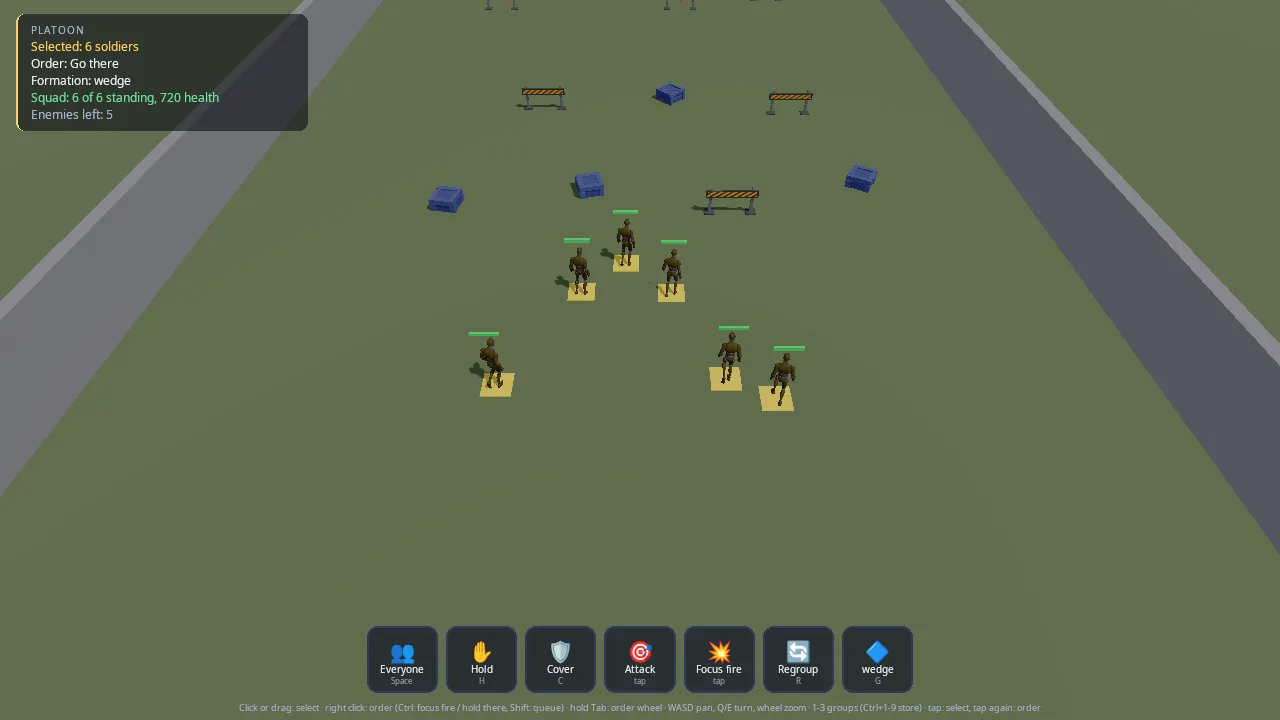
A squad of six on a training ground, five enemies dug in behind barriers across it. Select soldiers and order them, all together or one at a time, with a mouse and keyboard, a controller or a finger: go there in a line, wedge, column or circle, hold position, take cover, attack a target, focus fire, follow a soldier, regroup, and queue orders with Shift. Without orders your soldiers fight whatever they see; the enemy holds its line.
This demo is the starting point for real-time strategy and squad games: anything where the player selects units and tells them what to do instead of steering them. It shows how the pieces split:
- Orders: the engine's command layer (
kke/Orders.h, docs/COMMANDS.md): selection, formations with slots matched to soldiers so paths do not cross, queues, and the sameorder.*Lua and nodes every game has. - Brains: every soldier on both sides is an agent of the AI core
(
kke/ai/AiWorld.h, docs/AI.md), onesoldierspecies with the team deciding who is an enemy. Orders reach it throughkke::AiOrderBridge. - This game's layer: cover spots behind the crates and barriers, and the shots. The AI says who fires at whom; the game rolls the hit (line of sight and cover count) and deals the damage.
The input, HUD, people and scenery come from the shared command kit, which the pet companion demo uses too.
Run it
The executable is platoon (CMakeLists.txt). The root
CMakeLists.txt only builds it when KKE_ENABLE_JOLT and
ENGINE_ENABLE_LUA are both on (both default to ON).
| Variable | Effect |
|---|---|
KKE_SKIP_INTRO=1 |
skip the logo intro |
KKE_ASSETS_DIR=/path/to/packs |
where the packs are (default assets/synty/; KKE_SYNTY_DIR also works) |
KKE_ANIMATIONS_DIR=/path |
where UAL1_Standard.fbx is (default assets/animations/) |
KKE_PLATOON_DEMO=1 |
plays a whole assault by itself, logs it, then quits (after 150 s at most unless KKE_PLATOON_QUIT says otherwise) |
KKE_PLATOON_QUIT=60 |
quits after 60 seconds |
Controls
| Action | Mouse and keyboard | Controller | Touch |
|---|---|---|---|
| Select one soldier | left click it | tap A with the reticle on it | tap it (each tap adds or removes) |
| Add or remove from the selection | Shift + click | none | tap |
| Select by box | drag with the left button (Shift adds) | hold A: a box grows around the reticle, let go to select | drag |
| Select everyone | Space, or the Everyone button | D-pad up | the Everyone button |
| Next / previous soldier (the camera jumps there) | . / , | D-pad right / left | none |
| Recall group 1 to 9 (1 = all, 2 = Alpha, 3 = Bravo) | 1 to 9 | groups 1 to 4: hold RT, then d-pad up, right, down, left | none |
| Store the selection as a group | Ctrl + 1 to 9 | hold LT and RT, then the d-pad | none |
| Context order at the pointer | right click | RB (at the reticle) | tap the ground or an enemy with soldiers selected |
| Take cover behind a crate or barrier | right click on the ground next to it | RB next to it | tap next to it |
| Focus fire (on an enemy) / hold there (on the ground) | Ctrl + right click | hold LT + RB | the Focus fire button, then tap an enemy |
| Queue after the current order | Shift + right click | none | none |
| Order wheel | hold Tab, or hold the right or left button still for a moment | hold LB, the right stick picks, B cancels | hold a finger, drag to pick |
| Hold position | H | X | the Hold button |
| Take cover | C | Y | the Cover button |
| Regroup | R | D-pad down | the Regroup button |
| Next formation | G | Right stick click | the formation button |
| Attack an enemy | right click it | RB on it | the Attack button, then tap the enemy |
| Move the view | WASD / arrows, drag with the middle button, the window's edge (Settings > Camera) | left stick | no touch binding yet |
| Turn and tilt the view | drag with the right button; Q / E turn | right stick left / right | the right touch stick |
| Zoom | mouse wheel | right stick up / down | no touch binding yet |
| Centre on the selected | F, or double-click a soldier | left stick click | none |
| Pause menu (settings, controls, quit) | Esc | Start or Select | none |
| Settings panel (formation, the HUD's orders) | F3, or the pause menu | the pause menu | none |
| Developer panels | F1 | none (developer tools) | none |
| Quit | Esc, then Quit | Start, then Quit | none |
What the context order does depends on what is under the pointer
(kke::contextOrder): an enemy is Attack (Focus fire with the force
modifier), one of your soldiers is Follow them, the ground is Go there
(Hold there with the force modifier). Soldiers never fetch.
The HUD bar buttons are clickable with the mouse and tappable; a
controller reaches the same orders through its buttons, the wheel and the
menu (kke::DemoPanelModule, right side, folded until Start, F3 or Esc
opens it). All game actions are rebindable and saved to
platoon_input.json; storing a group uses cmd.force (Ctrl, LT) as the
modifier. Esc opens the menu rather than quitting; its Quit row ends the
game.
How it plays
Your six soldiers (Alpha 1 to 3 and Bravo 1 to 3, blue, 120 health) start at the south end. Five enemies (red, 100 health) hold posts behind four barriers at the north end, with a back wall behind them. Between you lie crates and barriers to hide behind. Concrete side walls close the range.
Select soldiers, give orders, and clear the field. When the last enemy falls the HUD says "Area clear!". There is no lose screen: if your squad falls, nothing more happens. The HUD panel shows the selection, the first selected soldier's order and target, the formation, how many of your soldiers stand with their total health, and how many enemies are left.
In the world: a yellow ring marks each selected soldier, a red ring marks the enemy your selection is told to shoot, a health bar floats over every head, tracers show each shot, and a blue marker flashes where you sent them.
How it works
Startup and the frame
main.cpp adds, in order: SettingsModule("settings.json"),
InputModule("platoon_input.json"), RigidBodyModule (Jolt),
ModelModule, UiModule (RmlUi), AudioModule (panel hidden),
ScriptModule, platoon::PlatoonModule and StatsModule (panel hidden).
The mood is clear_day. Scripts load from the source folder when it
exists, so saving scripts/platoon.lua reloads it.
PlatoonModule::init:
- Defines the actions: the character set (
movepans,look.rateturns), the command kit's, and therts.*ones. It clears the bindings of the character actions a top-down squad does not use (jump, sprint, walk, crouch, fire, aim, interact, camera toggle, ping, push-to-talk), so Space, E, Q, RT and the d-pad down only do theirrts.*job (BUG-065). - Builds the field (
buildField) and loads the mannequin kit. - Defines the
soldierspecies and the line-of-sight test. - Adds six soldiers (team 1) and five enemies (team 2). Each enemy gets its own AI Hold order at its post.
- Stores groups 1 (everyone), 2 (Alpha) and 3 (Bravo), then selects everyone.
- Sets up the order board, its listener, the bridge, Lua, the ring and bar meshes, and the RmlUi HUD.
Each frame PlatoonModule::update (with dt clamped to 0.05 s):
m_cmd.update(...)turns input into aFrame: click, drag-box, context order, wheel pick, force and queue modifiers.- Clicks select or order (
click), a finished box selects your soldiers inside it (kke::unitsInRect), context orders and wheel picks become orders, and therts.*keys run while the wheel is closed. runDemoin self-play.- New board orders are marked running,
m_ai.update(dt)runs, and its events go to bothm_bridge->handleandhandleEvents(the shots). - The "Area clear!" check, then
updateCamera,updateBodies, Lua events and the HUD.
Soldiers: one species, two teams
kke::ai::Species s;
s.id = "soldier";
s.walkSpeed = 1.6f;
s.runSpeed = 4.2f;
s.senses.sightRange = 30.0f;
s.senses.fovDegrees = 200.0f;
s.senses.eyeHeight = kEye;
s.attackRange = 11.0f;
s.attackCooldown = 1.6f;
Needs, food, drink and scent are cleared: soldiers do not get hungry. The
temperament is bold and aggressive ({ 0.95, 0.1, 0.9, 0.3 }). Both sides
are this species; m_ai.setTeam(id, 1 or 2) makes them enemies, because
the AI's attitude rules treat different nonzero teams as hostile
(docs/AI.md, "Species").
m_ai.lineOfSight is set to clearShot, a Jolt ray cast, so soldiers only
see through gaps. Soldiers are moved kinematically by the AI (the comment:
"no bodies to push: the field is flat"); updateBodies copies each agent's
position onto its mannequin.
The field and cover
buildField makes a 90 x 90 m ground, then calls addCover for seven
pieces on your side (crates and barriers at z = 0 to 9.5) and four barriers
on the enemy side (z = -12 to -14). Each piece:
- is a POLYGON Prototype model with a static collider, or a brown block;
- becomes a row of AI obstacle circles along its length, each as wide as the piece is deep (one big circle round a 3 m barrier would cover the spots behind it and push soldiers off them);
- is a
CoverObject(position, half size, yaw).
Cover spots are worked out when an order needs them (coverSpots): for
each piece, the face turned most away from the middle of the living
enemies, 0.75 m out, one spot for a crate and one per 1.4 m of a barrier,
facing the piece. So the enemy's own barriers become cover too once you
reach them, and spots move round if the enemy does. The enemies'
protection comes from the barriers blocking line of sight. The back wall and side walls are plain blocks; the
side walls also get a row of 0.8 m obstacle circles every 1.5 m so the AI
steers clear of them.
Giving orders
give() makes one kke::Order for the whole selection, with the current
formation and 2.2 m spacing. When there is a point more than 1 m from the
squad's centre, it sets yawDegrees so the formation faces the way they
travel. Regroup with no point gathers in a circle around the first
selected soldier. m_board.issue then hands each soldier its slot; the
board uses the Hungarian method (kke::assignSlots) so the total walk is
the least and paths rarely cross.
takeCover() is this game's own order. It takes the free spots (nobody
else holds one within 0.9 m), then matches soldiers to spots shortest run
first: the closest soldier-and-spot pair is settled, then the next, so
nobody crosses the squad. Given a point (a right click next to a crate,
or the wheel's Take cover), spots of the piece under the pointer win.
Each soldier gets a Stay at its spot, and the bridge makes a Stay more
than stayRunBeyond (1.5 m) away a run. The board listener takes a
soldier out of cover when any new order arrives, except the Stay that put
it there:
if (Soldier* s = soldier(unit);
    s && s->covering && !(o.kind == kke::OrderKind::Stay && o.hasPoint && glm::length(o.point - s->coverPos) < 0.1f))
    s->covering = false;
Follow from the wheel: everyone else selected follows the soldier under the pointer (it is taken out of the selection for the order, then put back).
The Attack and Focus fire buttons have no key: they "arm" (m_armed) and
the next click or tap on an enemy is the target.
Selecting
screenUnits()projects every living soldier's chest point to the screen.pick()finds the soldier within 34 pixels of the pointer (kke::unitNear, "a finger's width"), else the ground point under it.click()selects (Shift or touch toggles), clears on empty ground, or, for a finger with soldiers selected, gives the context order (a finger has no right button).kke::Selectionstores and recalls groups.
The fight
The AI decides when to shoot: an Attack event means a soldier is in
range and its cooldown is over. handleEvents passes each one to shoot,
which does everything else:
- Plays
Pistol_Shootand aims at the target's chest (1.25 m up). - Works out whether the target is covered: it holds a cover spot, is within 0.8 m of it, and the shooter is on the cover's far side. Then only the head shows, so the aim drops to 1.05 m.
- The hit chance is 0.45 for your soldiers and 0.38 for enemies, times
0.35 when covered, and 0 if
clearShotsays the ray hits something. - The roll is a seeded LCG, not
rand(): "the same fight every run (replays, the self-play)". - A tracer is added for 0.09 s (off to the side on a miss). A hit takes
20 health and plays
Hit_Chest; at 0 the soldier dies.
kill() plays Death01, frees its cover spot, removes it from the AI, the
selection and the board, and calls m_board.targetGone(id) so every attack
or focus fire on it ends as done. The body stays for 6 s, then hides.
Bodies and stances
updateBodies eases each soldier's yaw toward: its target while it has
shot in the last 2.5 s and stands still, else its cover facing, else the
AI's yaw. It picks a stance clip unless a shot or hit clip is still
playing: moving (no clip, the mannequin's locomotion), Crouch_Idle_Loop
in cover, Pistol_Idle_Loop for 6 s after a shot or while the AI has a
focus, else at ease.
The camera
An XCOM-style orbit around m_focus: 50 degrees down, 19 m away (8 to
50 m). Every control moves a goal (m_focusGoal, m_yawGoal,
m_pitchGoal, m_distanceGoal) and the view glides there, so nothing
jumps. move pans relative to the yaw, faster when zoomed out, kept
inside the field (x -20..20, z -28..30). The mouse works like the
procedural demo's camera: right-drag turns and tilts (22 to 82 degrees),
middle-drag moves the ground with the pointer, the wheel zooms. A right
click without dragging is still the order, and a held one opens the wheel:
CommandInput::rightButtonGestures tells the three apart (12 points of
movement make it a drag). The right stick turns (110 degrees a second) and
zooms; Q/E turn; F or L3 centres on the selection, and so does a double
click on a soldier.
The HUD
command_kit::CommandHud (RmlUi, ui/command_hud.rml): five status lines,
seven buttons (Everyone, Hold, Cover, Attack, Focus fire, Regroup,
formation), the eight-item wheel (Go there, Attack, Focus fire, Hold, Take
cover, Regroup, Follow, Formation), toasts ("Alpha 1, Attack: Enemy 2"),
and a hint line for controller or mouse. See the
command kit README.
Lua
PlatoonModule is a kke::IOrderHost whose selected() is the current
selection, so order.* in Lua acts on whoever you have selected.
scripts/platoon.lua prints when a soldier reaches
its spot and every focus-fire order:
hook.Add("OrderDone", "in position", function(e)
    if e.order == "move" and e.ok then print("soldier " .. e.unit .. " in position") end
end)
Self-play
KKE_PLATOON_DEMO=1 runs runDemo with the camera following the squad:
everyone moves to (0, 0, 13) in a wedge and the log reports the closest
two soldiers' distance; everyone takes cover and, once all are in or after 9 s, the log counts
who is behind cover; Alpha 1 alone attacks the nearest enemy; after 6 s
everyone focuses fire on one enemy until it is down (40 s time-out); then
everyone focuses on the nearest remaining enemy, one at a time, until the
field is clear or the squad is lost (90 s time-out); then regroup, log the
result and quit.
Design decisions
- Orders and brains are separate. The board knows what each soldier was told; the AI core decides how. docs/COMMANDS.md says the platoon keeps "formations, cover spots and the hit rolls" in the game while the AI "moves and decides who to shoot".
- One species for both sides; teams make enemies. The header comment:
"one species for both sides; the team makes them enemies". Balancing
friend against foe is then only the numbers in
shootand the health. - The AI says when to shoot; the game rolls the hit. docs/AI.md: on
Attack"the game deals damage". Hit chance, cover and damage are game rules, so they live here. - Cover is the game's, not the AI's. docs/AI.md: "Group formations and cover are the platoon demo's to build on top of this." A cover order is a Stay on a spot the game picked.
- Formation slots are assigned with the Hungarian method so paths do not cross (docs/COMMANDS.md, "Squads and formations").
- Deterministic rolls, for replays and a self-play that gives the same result every run.
- No physics bodies for soldiers. The field is flat, so the AI moves them kinematically; Jolt is used only for line of sight and cover colliders.
- Picking works on screen, in pixels. A 34 pixel radius is the same size for a mouse and a finger at any zoom.
- Every input device reaches every order: mouse and keys, a controller through the reticle and wheel, touch through taps, holds and the button bar (docs/COMMANDS.md, "Controls").
- Everything has a fallback. Without the packs, cover is blocks and soldiers can be blocks, so the demo runs in CI.
Tuning
| What | Where | Value | Effect of raising it |
|---|---|---|---|
| Soldier speeds | init, s.walkSpeed / runSpeed |
1.6 / 4.2 m/s | a faster fight |
| Sight range, field of view | s.senses |
30 m, 200 deg | they spot enemies sooner |
| Attack range, cooldown | s.attackRange, s.attackCooldown |
11 m, 1.6 s | longer-range, faster shooting |
| Run beyond | m_bridge->runBeyond |
6 m | they walk further before running |
| Health | addSoldier, maxHp |
120 yours, 100 enemies | longer fights |
| Damage per hit | shoot, at.hp -= 20 |
20 | shorter fights |
| Hit chance | shoot, chance |
0.45 yours, 0.38 enemies | |
| Cover factor | shoot, chance *= 0.35f |
0.35 | cover protects less |
| Formation spacing | give, o.spacing |
2.2 m | a looser formation |
| Cover spot distance | addCover, half.z + 0.75f |
0.75 m behind | |
| Pick radius | pick, unitNear(..., 34.0f) |
34 px | easier to hit a soldier |
| Camera | m_camPitch, m_camDistance, clamp |
48 deg, 19 m, 10 to 50 m | |
| Turn speed | updateCamera |
90 deg/s |
Engine features it uses
| Feature | Header / module | Doc |
|---|---|---|
| Orders, selection, formations, context orders, groups | kke/Orders.h |
COMMANDS.md |
| Orders to AI | kke/OrderBridge.h |
COMMANDS.md |
order.* in Lua |
kke/OrderScript.h, kke/modules/ScriptModule.h |
COMMANDS.md, SCRIPTING.md |
| AI core (species, teams, Hold, Attack events, line of sight, obstacles) | kke/ai/AiWorld.h |
AI.md |
| Ray casts for line of sight and colliders (Jolt) | kke/RigidWorld.h, kke/modules/RigidBodyModule.h |
|
| Picking rays | kke/Picking.h |
|
| Rebindable input, button prompts | kke/modules/InputModule.h, kke/ButtonPrompts.h |
INPUT.md |
| RmlUi HUD | kke/modules/UiModule.h via the command kit |
|
| Moods | Application::setMood |
MOODS.md |
| Debug boxes (rings, bars, tracers) | DynamicMeshRenderer (kke/SphereImpostors.h) |
Assets
Not in the repository unless marked. Put packs in assets/synty/ or set
KKE_ASSETS_DIR; tools/fetch_assets.sh POLYGON_Prototype downloads the
Synty pack from the owner's share.
| Pack | Files | If missing |
|---|---|---|
| POLYGON Prototype (Synty) | SM_Prop_Crate_01, SM_Prop_Crate_02, SM_Prop_Crate_03, SM_Prop_Barrier_01 |
each piece of cover is a brown block of the same size |
| Universal Animation Library mannequin by Quaternius (CC0, in the repository) | assets/animations/UAL1_Standard.fbx |
soldiers are blocks (the startup log says so) |
The clips used from the mannequin are Pistol_Shoot, Pistol_Idle_Loop,
Crouch_Idle_Loop, Hit_Chest and Death01, plus its locomotion. Fonts
(Noto) and the RmlUi theme are copied next to the executable by
command_kit_game().
Make a game like this
- Copy
games/platoontogames/<your_game>. Rename the executable, the namespace andPlatoonModule, and givegame.jsona new id. Keepkke_command_kitandcommand_kit_game(<target>)inCMakeLists.txt, and add the folder to the rootCMakeLists.txtinside theKKE_ENABLE_JOLT AND ENGINE_ENABLE_LUAblock. - Define your unit species (or several). Clear the needs for units that
should not eat or sleep, and set teams with
setTeam. - Set
m_ai.lineOfSightto a real ray cast against your level. - Handle
Attackevents with your own damage rules, and on death callm_ai.remove,m_selection.remove,m_board.forgetandm_board.targetGone, in that spirit, so nothing keeps ordering or targeting a dead unit. - Add game-specific orders the way
takeCoverdoes: work out a point per unit, then issue a standard order (Stay, Move) for it. - Change the wheel (
Wheel,kWheelIcons,kWheelLabels) and the button bar (Button,setButtons) together with therts.*actions. - Put reactions in Lua with
hook.Add("Ordered", ...)andhook.Add("OrderDone", ...). - Keep a
KKE_<GAME>_DEMOself-play likerunDemo: it is how you check a change to the rules without playing by hand.
Pitfalls the code shows:
- Pass the AI's events to the bridge and to your own handler from one
takeEvents()call; a second call returns nothing. - Mark new orders running (
m_board.markRunning) before the AI update. - A formation faces
yawDegreesin the camera's convention (0 = -Z, seekke::yawForward), while AI yaws are 0 = +Z. - A ray at ankle height hits the ground;
clearShotignores hits below 2 cm for that reason.
Files
| File | What is in it |
|---|---|
| main.cpp | the app, the mood, the module list, where scripts load from |
| PlatoonModule.h | the module (also a kke::IOrderHost), soldier, cover spot and tracer structs |
| PlatoonModule.cpp | input, field and cover, species and soldiers, orders, selection and picking, shots, camera, bodies, HUD, self-play |
| scripts/platoon.lua | Lua reactions to orders |
| CMakeLists.txt | the platoon executable, script and game.json copies, command_kit_game |
| game.json | the marketplace entry |
| ../command_kit/ | shared input, RmlUi HUD, mannequin people, pack scenery |