KKE Showcase (kke_demo)
A walkable course where every spot shows one part of the engine. You run an animated character around a 60 x 60 m yard: push and shoot crates, break glass, wood and stone, vault fences, climb blocks, hang from ledges, run along a wall, wade through a pool where props float on waves, and watch lava melt a block. Up to four people can play on one machine in split screen, and others can join over the network. Near each station the HUD tells you what to try there.
This is the player-facing tour in docs/SHOWCASE.md. This README is the developer deep-dive: how each station and system is built, and why. It is the starting point for any third-person action game: a platformer, a parkour or traversal game, a physics playground, a co-op or online game with a character you walk around.
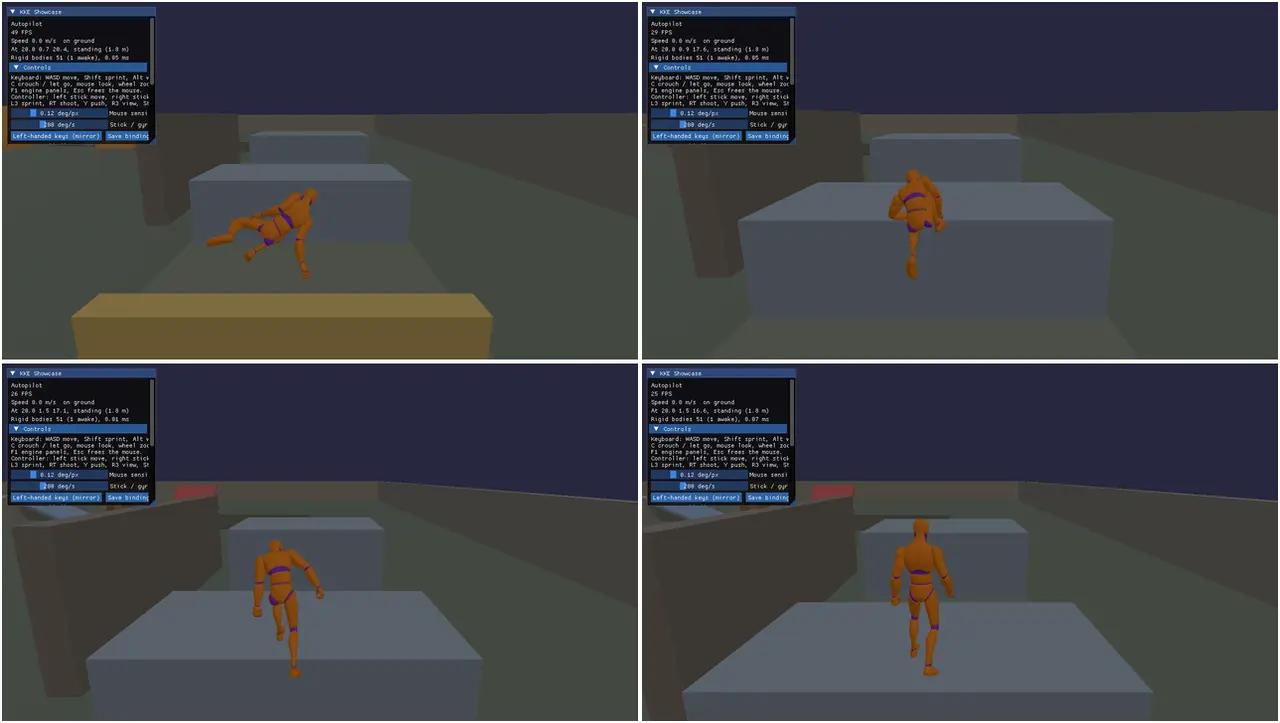
Other pictures from this demo: ledge-hang.webp, parkour.webp,
crate-rain.webp (the stress test) and split-screen.webp, all in
website/static/media/.
Run it
The executable is kke_demo (add_executable(kke_demo ...) in
CMakeLists.txt). The root CMakeLists.txt only adds this
folder when KKE_ENABLE_JOLT is on, which is the default.
cmake --preset default && cmake --build build
cd build/bin && ./kke_demo
KKE_SKIP_INTRO=1 ./kke_demo      # no logo intro (needed when headless)
Build options change what you get:
| Option | Default | Without it |
|---|---|---|
KKE_ENABLE_JOLT |
ON | The demo is not built at all |
KKE_ENABLE_FEMFX |
OFF (ON in the everything preset) |
No breaking yard, no FEMFX balls when you shoot, the stress test's impact phase fires Jolt iron blocks instead |
ENGINE_ENABLE_LUA |
ON | No scripts/ folder, no ScriptModule (no toys, no break-the-targets) |
KKE_ENABLE_NET |
ON | No NetModule: offline only |
KKE_ENABLE_VOICE |
ON (needs NET) | No voice chat |
So cmake --preset everything is the way to see the breaking yard.
Environment variables for scripted runs (screenshots, checks). All of these
are read in ShowcaseModule::init unless noted:
| Variable | What it does |
|---|---|
KKE_SKIP_INTRO=1 |
No logo intro (engine) |
KKE_START_AT=x,y,z[,yaw] |
Start there, facing yaw degrees (the camera too) |
KKE_DEMO_AUTOPILOT=1 |
The character runs the parkour lane (or a scene's trail) by itself and logs each vault and climb |
KKE_DEMO_HANG=1 |
Jump at the 3 m wall, hang, shimmy round its end, jump off. Loops every 10 s |
KKE_DEMO_TRICKS=1 |
Wall run and wall jump, pillar leaps, the leap up to the beam. Loops every 13.5 s |
KKE_DEMO_WORLD=1 |
Opens the world map for a few seconds, then visits every zone in turn (5 s each) and logs the ground there |
KKE_DEMO_ITEMS=1 |
At the supply table: picks up what's in reach, opens the bag, equips an axe, a rifle, a helmet, a canteen and a lantern, closes it and turns the camera to see them worn. Logs the bag and the weight. =2 leaves the bag open (drive it with keys or the mouse; each place and drop is logged) |
KKE_DEMO_CARRY=1 |
Spawns a crate, lifts it, carries it a few steps and throws it, and logs where it is. Loops every 7 s |
KKE_DEMO_GUNS=1 |
At the firing range: takes the guns off the bench, knocks down plates with the rifle, breaks the glass, the plank and a stone wall, sets off the red barrels, switches to the pistol, throws a grenade. Logs every hit and blast |
KKE_DEMO_DRIVE=1 |
At the race track: gets in the red hatch and drives a lap of the oval (logs its progress and the lap time), then flies the plane from the airfield round four waypoints and dives it into the runway (the crash). =2 skips the car |
KKE_DEMO_NATURE=1 |
In the nature park: takes the axe, fells a tree, splits a log, picks three flowers, then walks a trail through the snow field and looks back at it |
KKE_DEMO_PARKOUR=1 |
In the parkour park: runs up the 3.6 m wall and climbs onto it, vaults over a thin wall from a hang, shimmies round the corner of the shimmy wall and leaps the gap, then runs the rooftops. Logs every move. =2 starts at the hang vault, =3 the shimmy, =4 the rooftops |
KKE_DEMO_BRIDGE=1 |
Drops an iron ball on the yard glass, then rolls one into a crate, and logs how far the crates moved (FEMFX builds) |
KKE_BRIDGE=0 |
Turns the FEMFX-Jolt bridge off, to compare |
KKE_SPLIT=2..4 |
Start with that many local players |
KKE_OVERHEAD=1 |
An overhead picture-in-picture view of player 1 |
KKE_MAIN_MENU=pause |
Opens the pause menu 1.5 s after start (the game shell's switch; KKE_MAIN_MENU=0 skips the title) |
KKE_SCENE=town_block |
Start in the Synty scene whose path contains this text |
KKE_COURSE_ART=0 |
Leaves the Synty art off the course |
KKE_CHARACTER=SK_Character_... |
Play as a Synty character, retargeted |
KKE_LEFT_HANDED=1 |
Mirror the keyboard bindings across the G/H line |
KKE_STRESS_TEST=1 |
Runs the 36 s stress test at start and quits when done |
KKE_BENCH_DIR=dir |
Where the stress report goes (default benchmark/) |
KKE_NET=host / KKE_NET=join:ADDRESS |
Host or join (read by NetModule) |
KKE_DEMO_ONLINE=1 |
Run it on a host and a guest: the host spawns a barrel; the guest asks for a crate, walks to it, lifts it, carries it, throws it and clears. Both log what they see (online demo (host), online: player 1 picked up body ...) |
KKE_VOICE=off |
No microphone (read by VoiceModule) |
KKE_SCRIPTS_DIR=<repo>/games/showcase/scripts |
Run the Lua scripts from the source folder, so edits reload live |
KKE_ANIMATIONS_DIR, KKE_SCENES_DIR, KKE_ASSETS_DIR / KKE_SYNTY_DIR, KKE_COURSE_DIR |
Where to find the animations, scenes, Synty packs and the course art |
Controls
Player 1. The bindings come from InputModule::defineCharacterActions
(InputModule.cpp) plus four
actions the showcase adds in ShowcaseModule::init (reset, pickup,
panels and zoom.pad, the d-pad's held zoom) and the spawn menu's
(spawn.menu, and spawn.up, spawn.down, spawn.pick, spawn.close
while its list is open: Spawner.cpp). init also moves the
ping off the d-pad down and push-to-talk off B, which the showcase uses
for other things (BUG-065). Everything except Esc is rebindable and
saved in input.json.
| Action | Keyboard and mouse | Controller |
|---|---|---|
| Move | W A S D | Left stick |
| Look | Mouse (click the view first to capture it) | Right stick |
| Sprint | Left Shift (hold) | L3 (toggle) |
| Walk | Left Alt (hold) | Tilt the stick a little (analog speed); no button |
| Jump, vault, climb, grab a ledge | Space | A |
| Crouch, or let go of a ledge | C (toggle) | B (toggle) |
| Shoot (or throw what you hold); with a gun in your right hand, fire it (the rifle is automatic), with a grenade, throw it | Left click (hold for 4 shots a second) | RT |
| Aim down the sights (the camera comes in over the shoulder, a crosshair shows) | Right mouse (hold) | LT (hold) |
| Push what you look at | E | Y |
| Pick up / put down the crate, barrel or ball in front of you; an item goes in your bag. Next to a car or the plane: get in (and out) | F | X |
| Bag (inventory and equipment) | Tab or I | View |
| World map: the zones, travel there | M | the pause menu's World map |
| Spawn menu: crates, barrels, balls, a tower, a ragdoll dummy; clear, reset the world | G | RB |
| First / third person | V | R3 |
| Camera distance | Mouse wheel (while captured) | D-pad up / down (hold) |
| Reset the world (also in the spawn menu) | R | none (spawn menu) |
| Pause menu: settings, button remapping, quit | Esc | Start |
| Engine panels (ImGui, developer tools) | F1 | none |
| Ping the surroundings (hear the walls) | Q | D-pad left |
| Push to talk (voice builds) | P (B is a toy) | LB |
On a ledge: A/D (or the stick) shimmies along it and round corners, Space climbs up, back plus Space jumps off, C lets go. Jump with left or right held leaps to the next edge. Running fast beside a wall and jumping starts a wall run; jump again to kick off.
The pause menu is the one every KKE game shares (kke::GameShellModule,
GAME_SHELL.md): the mouse, the arrows and
Enter, or the d-pad / left stick and A; B, Esc or Start closes it. The
HUD's corner hint shows the pause button of the device in use.
Players 2 to 4 (split screen) get a controller each: move, look, sprint, walk, crouch, jump, shoot (RT), push (Y), zoom (d-pad) and the pause menu (Start or View / Back) all work from it; shots and pushes go along that player's own view.
The Lua scripts add their own actions:
| Script | Action | Keyboard | Controller |
|---|---|---|---|
toys.lua |
Build a crate tower / throw a ball / clear | H / B / N (or hold B) | none: the spawn menu (RB) has towers and balls |
targets.lua (from games/first_lua_game) |
Start break-the-targets | T | D-pad right |
How it plays
There is no win or lose: it is a playground. You spawn at (0, 0, 6). The stations, with their positions from Layout.h:
| Station | Where | What to try |
|---|---|---|
| Crate pile | (4, -3) | 15 crates in a pyramid, plus three big light boxes at z = 10. Push (E) or shoot |
| Breaking yard | (14, -6) | A glass pane on two supports with three small crates under it, a wooden plank bridge, a stone wall. Shoot them (FEMFX builds only) |
| Parkour lane | x = 20, z 28 down to 5 | A 1 m fence and a 0.6 m wall to vault, a 1.5 m block to climb, a 2.1 m ledge only a sprint reaches, a 3 m wall at x = 16 to hang from |
| Trick course | x = 26 | A 12 m wall to run along (z 11 to 23), three thin pillars (tops 2.9, 3.2, 3.5 m) to leap between, a thin wall under a beam to leap up to |
| Lava | (0, 20) | Lava pours onto a block that melts: ice, then wax, then aluminium. Push a crate in |
| Pool | (-18, 20) | Vault the 1 m wall and wade in (no running). Crates, planks and a raft float, a steel block sinks |
| Moving platform | (-14, 6) | Stand on it: it carries you side to side and up and down |
| Low roof | (10, 6) | 1.2 m clearance: crouch to get under |
| Stairs, ramp, steep slope, pillars | around (-8, -4), (8, -10), (-14 to -6.5, -14) | 0.25 m steps, a 24 degree ramp you walk, a 55 degree slope you slide off, pillars that push the camera in |
| Supply table | (-4.5, 2.5) | One of every item: pick them up, open the bag, equip them |
The open world
The yard is the middle of an open world 1.4 km across (World.cpp).
Each yard wall has a gate; outside, the ground rolls on to a ring of hills,
with a mountain to the north west. Roads run from the gates to the zones
(their table is layout::kZones in Layout.h); a post at each
gate has a board in each zone's colour, and every zone flies a 14 m flag
in its colour so you can find it from far away. The HUD names the zone you
are in.
| Zone | Where | Road |
|---|---|---|
| Parkour park | (0, -160) | north gate |
| Firing range | (170, -150) | north gate, then right |
| Airfield | (380, 40), runway x 185 to 575 | east gate |
| Race track | (0, 255) | south gate |
| Nature park | (-230, 40) | west gate |
| Snow field | (-300, -280), 30 m up the mountain | west gate, then the dirt trail up |
M (or the pause menu's World map) opens the map: the zones, the roads and you (the yellow dot points the way you face). Choose a zone with up and down (or the mouse) and A, Enter or a click takes you there.
The terrain is one mesh with a vertex every 5 m and one static Jolt mesh
body; groundHeight(x, z) reads the same grid, so what later rounds put
out there sits on it. Roads are cut level across so cars sit flat. The
camera's far plane is 1500 m and the mood's fog hides the edge.
The pause menu (Esc / Start) has Resume, World map, Reset the world, 1 to 4 players, Engine panels (developer builds), Settings, Controls, Main menu and Quit. Offline it pauses the game; online the others keep playing. The KKE Showcase ImGui window (always shown) has the controls, a Scenes list to visit the Synty levels, and panels for movement, performance and the stress test, character, lighting, lava, split screen and camera. F1 shows the other modules' panels too.
The firing range
North of the yard (zone 2, Range.cpp, the guns in Guns.cpp). The bench holds a rifle, a pistol, rifle and pistol rounds and two boxes of grenades; picking a gun or a tool up with an empty right hand puts it straight in that hand. Down range, from left to right:
| Lane | What is there |
|---|---|
| Plates | 10 steel plates on plinths at 15, 28 and 45 m. A hit knocks one down; the HUD counts "Plates down" |
| Breakables (FEMFX) | A glass pane, a plank on two blocks, a stone wall at 14 m and a bigger one at 23 m. Bullets break them for real; each piece is its own body |
| Barrels and crates | 5 red barrels, a crate pyramid and two ragdoll dummies. A shot barrel burns for a moment and blows up, setting off the barrels near it |
How a shot works: the crosshair point is a ray from the camera; the shot
leaves the muzzle towards it with a little spread (0.25 degrees aimed,
1.6 from the hip). Jolt (kke::physicsRaycast) and FEMFX each find their
nearest hit and the nearer wins. A Jolt hit gets an impulse and an effect
by material (sparks on steel, chips on wood and stone); a FEMFX hit gets a
small fast iron slug spawned just short of it, so the break is FEMFX's own
fracture, not a fake one. Magazines refill from the bag's rounds when
empty (30 rifle, 12 pistol); no rounds left is a click and a toast.
Grenades and barrels call explode: kke::physicsBlast pushes everything
in both physics engines away (7 m), FEMFX walls crack, barrels and
grenades in reach go up after it, and there is a fireball, smoke, a
shockwave ring, a point-light flash, camera shake and a synthesized boom.
Fuses count in physics time (fixedUpdate), so a slow machine does not
blow a grenade up in mid-air. Every sound is synthesized at startup
(buildGuns): no audio files. The effects are the built-in
kke::ParticleLibrary ones, drawn in renderTranslucent; their shaders
are copied by this game's CMakeLists.
While aiming, the character turns with the camera and walks; the arms
are placed by IK (aimHands: rifle to the shoulder with the left hand on
the fore-end, pistol out in both hands, a grenade raised to throw).
Cars and the plane
Vehicles.cpp. Walk up to a car or the plane and press pickup (F / X) to get in; the same button gets you out once you have stopped. The camera chases what you ride and swings in behind it when you stop turning it; the wheel or the d-pad moves it out (V: from the seat).
| Keyboard | Controller | |
|---|---|---|
| Car: steer, gas, brake / reverse | A D, W (or Shift), S (or Ctrl) | Left stick, RT, LT |
| Car: handbrake, back on its wheels | Space, R | A, none |
| Plane: stick (forward: nose down), roll | W S, A D | Left stick |
| Plane: throttle up / down, wheel brakes | Shift / Ctrl, Space | RT / LT, A |
The race track (zone 5): an oval 585 m round (two 120 m straights and
two bends of 55 m radius), kerbs on the bends, a start gantry, a slalom of
cones on the far straight and a jump beside the car park. Three cars wait
in the car park, each its own kke::VehicleDesc on Jolt's vehicle physics
(VEHICLES.md): a light front-drive hatch, a
rear-drive coupe and a heavy all-wheel-drive truck that sits higher. Go
once round the oval on the track and the HUD gives the lap time (physics
time, so it is the same on a slow PC).
The airfield (zone 4): a stunt plane at the west end of the runway.
It flies on the Flying demo's flight model (games/flying_demo/Flight.h,
compiled into this game): lift, drag, stalls and the nose that comes up
by itself at take-off speed, so full throttle and a straight run is a
take-off. A kinematic Jolt body follows it, so it pushes crates and people
out of the way. Land on the runway or any flat field; a hard landing, a
hillside or anything built is a crash: an explosion (the guns' explode),
a wreck, and a new plane on the runway four seconds later.
Each machine drives its own cars and plane: they aren't shared online
yet (see "Online" below). The engine note is kke::EngineSound, synthesized from the rpm
and the throttle like the racing demo's.
The parkour park
Parkour.cpp. Zone 2 on the map, up the road north of the yard: seven sections, each built to show one move, and the HUD names the one you are in. Nothing in it is marked for the movement; Locomotion reads every box the same way (MOVEMENT.md).
| Section | What's there | The move |
|---|---|---|
| Vault field | fences (1.0, 1.1 m), low walls, a 1.2 m box, two fences close together | run and jump: a vault; sprinting, a speed vault that keeps the run |
| Wall climb | walls of 3, 3.6 and 4.2 m, a painted run-up to each | run at one and jump: you run up it and catch the top; jump again to climb on |
| Hang vault | thin walls of 2.6 and 3 m | hang from the top, jump: over and down the far side |
| Shimmy wall | a thin 3 m wall round an outside corner, a 1 m gap, a 3.5 m piece | hang, shimmy hand over hand round the corner, leap the gap |
| Ledge leaps | five thin pillars, tops 2.8 to 4 m | hang, jump with left or right to leap to the next |
| Wall run | two 4 m walls, 3.5 m apart | sprint beside one, jump: wall run; jump again to kick across |
| Rooftops | seven roofs 3.5 to 5.5 m, gaps of 2 to 2.5 m, a rail and a box on top | up the steps, sprint and jump the gaps; a roof too high is caught by the edge |
The wall climb and the hang vault are Locomotion moves (this round); the shimmy's hands and feet are IK steps here (Animation): no UAL clip has a hang or a shimmy.
The nature park and the snow field
Nature.cpp. The nature park (zone 6 on the map, west of
the yard): about 85 trees round a meadow, undergrowth, and grass that
sways in gusts of wind and bends away from your legs. With POLYGON Nature
installed the trees, stumps and plants are Synty's (each tree an instance
turned about its foot every frame, which is the sway); without it the
trees are built from shapes (round, pine and birch) and look the same
from a distance (KKE_NATURE_ART=0 shows those even with the pack). The grass blades are always this file's own: a blade or
two every half metre within 20 m of you, rebuilt each frame, no shadows.
Leaves drift down while you are in the forest.
Take the axe from the chopping block at the gate (or the supply table) and fire swings it (both hands on the handle, by IK). Four hits fell a tree: it tips away from you, slow at first then fast (a rod falling over its foot), crashes down with a shake, and after a moment lies as two to four logs (props: carry them, throw them, or swing at one to split it into firewood for the bag). The stump stays. Flowers in the meadow (poppies, buttercups, cornflowers) are picked with pickup straight into the bag. Reset the world and the forest grows back.
The snow field (zone 7, up the mountain): a layer of snow 22 cm deep that keeps every footprint and tyre track. It is a grid of how far each point is pressed (quarter-metre cells, 116 m across), drawn as 64 chunks of which only the pressed ones are rebuilt (at most six a frame). Feet stamp an oval every stride, left then right; a car's wheels stamp where they touch. Snow falls round the camera there. Reset the world for fresh snow.
Spawning and carrying
RB (G) opens the spawn menu on the right while the game keeps running: up and down to choose (d-pad, left stick, W/S, arrows, or the mouse), A, Space, Enter or a click spawns it in front of you, and the list stays open so you can spawn more; B, RB, G or Backspace closes it. It has a wooden crate, a small crate, a big light box, an iron crate (too heavy to lift), a barrel, a rubber ball, a crate tower and a ragdoll dummy, then Clear what I spawned and Reset the world (what you spawned goes, the course's crates go back, you're back at the start).
X (F) picks up the crate, barrel or ball in front of you, up to 60 kg: it rides in front of your chest in both hands and stays a physics body, so it bumps into walls and other crates instead of going through them (snag it on something and you let go). X (F) puts it down, RT (click) throws it where you look. Climbing, vaulting or hanging drops it. Heavier things you push (Y, E).
Online it all works the same for everyone. The host makes what anyone spawns, so every machine sees the same crate in the same place, and the host's physics moves it. Lift something on a guest and the host carries it in front of you; everyone sees it ride along and fly when you throw it. Clear what I spawned clears everyone's; Reset the world (host) resets everyone. What stays on each machine: the firing range's dummies, the forest (trees, logs, flowers), the snow's footprints, and the cars and plane.
Items, the bag and equipment
The supply table by the start (-4.5, 2.5) has one of everything: a wood axe, a hunting rifle, a pistol and their rounds, a first-aid kit, a lantern, a helmet, a canteen, firewood, apples and flowers. Walk up and X (F) puts the one in front of you in your bag; the HUD says what it is.
Tab, I or View opens the bag over the game: a 10 x 6 grid where every item takes its cells (the rifle 4 x 1, the axe 1 x 3), with what you wear and hold on the left and the details of the item under the cursor (description, weight, size, where it equips) on the right. Move with the arrows, WASD, the d-pad, the stick or the mouse. A, Space or a click takes an item and places it again: on a cell (the cells turn green where it fits, red where it doesn't), on a stack of the same kind (they merge), or on an equipment slot. R or Y turns what you're moving, E, X or a right-click equips or takes off, Q or RB drops it in front of you, T or R3 sorts the bag biggest first. B, View, Tab or Esc closes it.
What you equip is drawn on the character (kke::Equipment): the axe or the rifle in the right hand or across the back, the pistol or the canteen on a hip, the lantern in the left hand, the helmet on the head, the fingers closed round what a hand holds. Carrying a crate stows the hands' things. The weight shows under the grid: past half of 30 kg you get slower, near the limit you can't sprint. The kinds of item are data, data/items.json (name, description, size, weight, stack, slots); Items.cpp makes their meshes.
How it works
Startup and the frame
main.cpp builds the kke::Application (1280 x 720, mood
clear_day, far plane 1500 m: the open world is 1.4 km across) and adds modules in this order:
SettingsModule("settings.json"): first, so the resource budget (threads, frame caps) is set before physics starts its workers.InputModule("input.json"): actions and bindings.RigidBodyModule: Jolt collision, rigid bodies, character controllers.NetModule(NET builds), game id"kke_demo": added before the showcase "so a join is under way when the crates spawn".ModelModule(the animated character),UiModule(RmlUi),AudioModule,VoiceModule(voice builds),SoundVisualizerModule(on by default here).PhysicsModuleandPhysicsBridgeModule(FEMFX builds). The FEMFX ground plane is not drawn: the course has its own floor.kke_showcase::ShowcaseModule: the demo itself.ScriptModule("scripts")(Lua builds),DebugControlModule,StatsModule.
Every module except the showcase goes into a panels list whose ImGui
windows start hidden; setEnginePanels hands the list to the showcase so
F1 can show them. Modules are initialised in dependency order:
ShowcaseModule::dependencies() requires RigidBodyModule, InputModule
and ModelModule, and optionally wants UiModule and NetModule, so
those are ready when its init runs.
ShowcaseModule::init wires the net callbacks, defines the extra input
actions, builds the level (buildLevel, dressCourse, spawnCrates,
spawnBreakables, setupPlayer), builds the HUD, finds the Synty scenes,
then reads the environment variables above.
Each frame the engine calls, in this order:
frameStart: follows the game shell's menu (open or closed) and lets go of the mouse when it opens. It runs even while the game is paused.fixedUpdate(60 Hz): the lava station, the moving platform and the pool's buoyancy.update: stress test, crate batch, lava mesh, HUD, crouch, input, the scripted demos,Locomotion::update, animation, network state, other players' avatars, the model transform and IK, the camera, the split screen players, and the sun from the Lighting panel.prepass,render,renderShadow: level, pool, lava, scene grounds, the crate batch, the platform, and a box stand-in when there is no character model.renderUi: the ImGui window (skipped while the pause menu is open).
The code is split by topic, all methods of the one ShowcaseModule class
declared in ShowcaseModule.h:
ShowcaseModule.cpp (level, player, animation,
networking, ImGui), Stations.cpp (pool, lava basin, course
art), LavaStation.cpp (its own class),
SplitScreen.cpp, StressTest.cpp and
Hud.cpp.
The layout
Layout.h holds every station's position as constexpr
values in kke_showcase::layout (kYard, kCratePile, kPoolCenter,
kLavaCenter, kLaneX, kTrickX, kPlatform, kLowRoof). The level
builder, the stress test (which aims at the yard) and the HUD (which
decides which station you are at) all read it, so moving a station is one
edit. course_art.scene.json uses the same world coordinates.
The level
The course is boxes made in code, with no asset files. Two helpers do all of it:
appendBox(matrix, half, color, v, idx)(anonymous namespace inShowcaseModule.cpp) appends the 24 vertices and 36 indices of a box to a vertex list. Top faces keep the colour, sides get 85 %, the bottom 60 %, "so shape reads better without textures". It checks each face's winding against its normal and flips the triangles if needed.addStaticBox(Box, v, idx)appends the box to the mesh and also adds a matching static Jolt body (RigidWorld::Motion::Static, material 1, "stone" for impact sounds).
void ShowcaseModule::addStaticBox(const Box& b, std::vector<kke::Vertex>& v, std::vector<uint32_t>& i) {
    glm::mat4 m = glm::rotate(glm::translate(glm::mat4(1.0f), b.center), glm::radians(b.yaw), glm::vec3(0, 1, 0));
    appendBox(m, b.half, b.color, v, i);
    kke::RigidWorld::BodyDesc d;
    d.shape = kke::RigidWorld::Shape::Box;
    d.motion = kke::RigidWorld::Motion::Static;
    ...
    m_rigid->world().add(d);
}
buildLevel calls it for the floor (60 x 60 m, top at y = 0), four 3 m
perimeter walls, eight 0.25 m stair steps up to a 2 m platform, pillars and
the low roof, then buildParkourLane, buildTrickCourse, buildPool and
buildLava. The tilted ramp (-24 degrees round Z) and the too-steep slope
(55 degrees round X) are added by hand because they are rotated round
another axis than Y. Everything ends in one DynamicMeshRenderer
(m_level) uploaded once: the whole static course is one draw call.
The parkour lane is "not marked up": there is no "vault here" tag. Heights
are chosen so kke::Locomotion's sensors classify each piece by shape: a
1 m fence and 0.6 m wall are vaults, a 1.5 m block is a climb, the 2.1 m
ledge is only reachable with the sprint sensor, and the 3 m wall is too
high to climb so you hang from it. See MOVEMENT.md.
Crates and the moving platform
spawnCrates removes any old crates and adds, in this order: the 15-crate
pyramid (0.6 m, density 250, "wood"), three big light boxes (1.2 m,
density 60), the pool floaters (spawnPoolFloaters), and three small
crates under the yard's glass. Each is a Crate { body, half, cube }
where cube picks one of four colours. The order matters for networking
(below).
Crates are not drawn one by one. batchCrates rebuilds one mesh from every
body's current transform each frame and uploads it: "one draw (and one
shadow draw) instead of two per crate". The comment above it measures
about 0.1 ms for 300 crates on one core.
The platform is a kinematic body. fixedUpdate moves it with
moveKinematic along
glm::vec3 p(-14.0f + 5.0f * std::sin(m_platformTime * 0.5f),
            0.6f + 1.2f * (0.5f + 0.5f * std::sin(m_platformTime * 0.35f)), 6.0f);
moveKinematic gives Jolt the velocity, so a character standing on it is
carried. It is drawn with m_cubes[3] scaled to its half extents.
The player
setupPlayer adds a Jolt character (RigidWorld::addCharacter) at
m_spawn and wraps it in a kke::Locomotion, the movement layer that
does turning, air control, vault, climb, hang, leap and wall run.
readActions turns the input map into flags: move (2D), sprint,
walk, crouch, and a queued jump. The "game" input context is
switched off while typing in ImGui or while the menu is open. Then
update builds a Locomotion::Input:
in.move = m_rig.forward() * m_moveInput.y + m_rig.right() * m_moveInput.x;
in.move.y = 0.0f;
if (glm::length(in.move) > 1e-3f) in.move = glm::normalize(in.move) * std::min(1.0f, glm::length(m_moveInput));
...
in.fast = m_sprint && !m_crouch && !wading;
in.slow = m_walk || wading;
in.goUp = m_jumpQueued;
Movement is camera-relative, and the stick's length is kept so a small
tilt walks. goUp means "go up": whether that is a jump, a vault, a climb
or a ledge grab is Locomotion's decision from what its sensors see.
Crouch shrinks the capsule from 1.8 m to 1.0 m with
setCharacterHeight, which fails if there is no headroom, so standing up
waits until you are out from under the roof (the panel shows "No room to
stand up"). While hanging, crouch means "let go" instead. Inside the pool
(inPool) sprint is off and walk is forced. Falling below y = -20
teleports you back to the spawn.
The camera
A kke::CameraRig in third person (m_rig). Mouse look goes through
addLook scaled by m_mouseSensitivity (0.12 degrees per pixel), the
stick through look.rate times m_stickSpeed (200 degrees per second,
70 % of that vertically). The pivot height eases between 1.5 m and 0.85 m
when crouched.
m_rig.update takes a ray cast callback that uses Jolt, so the spring arm
pulls in when a wall or pillar is between the camera and the character.
During a wall run the shoulder offset swaps to the open side, because
"over the wall shoulder the spring arm would pull in to the back of the
head". In first person the body faces where you look and the model is
hidden.
Animation
The character is Quaternius' Universal Animation Library mannequin.
setupPlayer looks for assets/animations/UAL1_Standard.fbx (with
kke::findAssetFolder, or KKE_ANIMATIONS_DIR). If it is missing, the log
says so and the character is a blue box (m_capsule). If UAL2.fbx is
next to it, setupPlayer loads it as CPU data only, keeps just five clips
(SafetyVault, ClimbUp_1m, ClimbUp_2m, WallRun_L_Loop,
WallRun_R_Loop) and drops its meshes.
buildAnimator creates a kke::AnimationSet and removes the pelvis "lift"
from the traversal clips (removeLift): Locomotion already moves the
capsule up the wall, so the clip must not lift the body a second time.
addAnimatorStates defines the same states in the same order on every
animator (ours, split-screen players', network players'), so the state
indices m_stMove, m_stJump and so on mean the same everywhere:
move: a blend state of Idle (0), Walk (1.6 m/s), Jog (3.6 m/s) and Sprint (6.2 m/s). These are "the animations' own foot speeds, which are also kke::Locomotion's default walk/run/sprint/crouch speeds, so feet don't slide". The parameter is the measured ground speed.crouch: Crouch_Idle (0) and Crouch_Fwd (1.4 m/s).jump,fall,land: clip states.vault,climb_up,hang,climb_over: stand-in poses from the standard set, picked by name with fallbacks (pick({"Vault", "Jump_Loop"})), because volume 1 has no vault, climb or hang clips.vault_clip,climb_low,climb_high: the real UAL2 clips when present.animatecallssetProgress(Locomotion::traversalProgress())so the clip is posed by how far through the move the capsule is: the hands meet the edge whatever the timing.wall_run_l,wall_run_r: UAL2 loops, or the sprint.- The wall climb (a Leap with
wallClimbing()) plays the first 30% ofclimb_highby progress: the spring and the reach. The hang vault (a Vault withhangVaulting()) playsclimb_high's pull-up, then the second half ofvault_clip.
animate(Animator&, MotionInfo&, dt) is a switch on Locomotion::State
that picks the state and cross-fade time. A climb up a wall under 1.6 m
(kClimbHighFrom) uses the 1 m clip, higher uses the 2 m clip. A landing
from more than 0.6 m plays land. MotionInfo is a small struct so the
same function drives our player (from Locomotion) and remote players
(from network state).
Other characters. The Character panel (or KKE_CHARACTER) lists every
skinned SK_Character* in the Synty catalog. useCharacter loads it,
matches its bones to the mannequin's by name (kke::matchBones), and
retargets the UAL clips onto it (kke::retargetAnimations); the log says
how many bones matched. m_modelYaw turns the model so it faces -Z
(Synty characters face +Z).
IK and footsteps
applyIk runs after the animator, on the pose, before it is written to
the model's bone locals:
- Feet. A
kke::FootPlacercasts a ray down from each foot (Jolt, 1.2 m, only surfaces with normal.y above 0.5) and plants the foot on stairs and slopes, lowering the hips if needed. Its weight eases to 1 on the ground and to 0 in the air. - Footsteps.
kke::CharacterFootstepsplays step sounds when the placed feet actually touch down (AUDIO.md). - Hands. While hanging, at the end of a leap, and in the first part of
a climb (progress under 0.7) or vault (under 0.45),
kke::solveTwoBoneputs each hand on the edge, shoulder width apart, with the elbow pole pushed out and down. The grip point isLocomotion::hangEdge()or the last obstacle's top. - Shimmy. Hanging and moving along the edge, the hands go hand over
hand: each is planted while the body moves past it (60% of a 0.36 m
stride), then lifted 7 cm and moved on, the leading hand first. The
braced feet step along the wall in between (
m_shimmyDist). - Wall climb steps. Running up a wall, the feet plant two steps on it, left then right, each held where it first touched while the body rises.
Both can be switched off in the Character panel.
Shooting and pushing
shoot spawns a FEMFX iron sphere (radius 0.15 m, density 7800, 22 m/s)
1 m in front of the camera, sends a shot event online, then calls
forcePush. Without FEMFX spawnBall does nothing, so shooting only
pushes. forcePush casts a 30 m Jolt ray from the camera and, if it hits
a crate, applies an impulse of 60 along the view at the hit point. Fire
repeats every 0.25 s while held. The click that captures the mouse is
swallowed (m_swallowFire) so it is not a shot.
The breaking yard (FEMFX builds)
spawnBreakables builds three FEMFX objects with spawnPatternedBox:
| Piece | Size (m) | Material | Fracture pattern |
|---|---|---|---|
| Glass pane | 2.1 x 0.05 x 1.2 | glass: density 2500, stiffness 7e7, breaks at 1e5 | Radial, from the centre |
| Plank | 2.4 x 0.12 x 0.3 | wood: 600, 1e7, 1.5e5 | Splinters |
| Stone wall | 1.4 x 1.0 x 0.25 | stone: 2500, 3e7, 1e5 | Voronoi |
The supports under the pane and plank are unbreakable FEMFX blocks
(fractureStressThreshold = 1e12) and also Jolt static boxes so the
character collides with them. The bridge is told to ignore those Jolt
boxes: "FEMFX mustn't see a second one in the same place".
PhysicsBridgeModule mirrors Jolt bodies near moving FEMFX pieces into
FEMFX and feeds the pushes back into Jolt, so falling shards knock the
three crates under the glass
(PHYSICS_BRIDGE.md). KKE_DEMO_BRIDGE=1
(updateBridgeDemo) measures it: at 3 s it drops a ball on the glass,
at 7 s logs how far each crate moved and rolls a ball into the pyramid's
first crate, at 10 s logs how far that crate went.
The pool
buildPool (Stations.cpp) adds four 1 m stone walls
round an 8 x 8 m basin and a tile floor. The water is a
kke::OceanRenderer grid (40 cells, 20 cm each) drawing m_poolWaves, a
kke::OceanWaves with a light breeze (setWind(1.5f, 0.6f, 0.3f)) and
sea level 0.75 m.
floatBodies runs every fixed step. It asks Jolt for the bodies in the
basin (bodiesInBox) and, for each dynamic one inside it, calls
kke::boxBuoyancy with a WaterSurface callback that reads the same
waves the renderer draws. The result is a list of forces at sample points,
applied as impulses (force * dt). "So what bobs matches what you see."
The floaters differ only in density: pine 450 rides high, oak 750 sits low, a 300 raft stays flat, a 500 plank, and steel 7800 sinks.
The lava station
buildLava adds a low basalt basin (0.45 m walls, 2.8 m inside) and a
spout arm, then creates a LavaStation
(LavaStation.h, LavaStation.cpp).
It has three parts:
- The lava: a
kke::ParticleFluidof at most 700 particles, radius 4 cm, poured at 50 a second from 1.5 m up at 1200 C. Two substeps per fixed step "keep it from tunnelling" at the ~6 m/s the drop reaches. Below 550 C it turns to dark crust (solidifyTemperature). - The block: a
kke::MeltVolume, a 0.5 m cube of 2.5 cm voxels (24 x 24 x 24). Heat from the lava melts voxels into liquid particles of the block's own material. Three presets frommelt_democycle: ice, wax, aluminium (which glows as it heats). - Colliders: two callbacks on the fluid. One is the block's signed
distance. The other finds the nearest dynamic Jolt box (signed distance
to an oriented box,
boxDistance) or character capsule in the basin, so crates and the player push the lava aside.
When the block is under 3 % or the particle budget is full, it waits 4 s
(kNextAfter) and starts the next block (next). The Lava panel has a
"Next block" button.
Drawing: particles are coloured by material and temperature in prepass.
With one view, kke::FluidSurfaceRenderer draws a smooth screen-space
surface. In split screen it draws SphereImpostorRenderer spheres
instead, because the smooth surface is "made for the one main view".
Two cost rules. The station only simulates while a camera is within 18 m
(lavaWatched, checks every split-screen view): "a station nobody looks
at costs nothing". And the lava runs locally on every machine, not over
the network: "what it looks like isn't gameplay state".
Course art and scenes
dressCourse loads course_art.scene.json (copied
to bin/course/) on the course itself at origin 0. It is a normal
kke.scene file (SceneFile.h):
50 entries (8 of them grids) placing 37 POLYGON Nature and POLYGON Town
assets, 108 instances in all. Collision per object: 26 "box", 2
"mesh" (the rock piles), 22 "none" (mountains, trees beyond the walls,
grass). It stays out of the paths the stations need.
It is all or nothing: before loading, every object is looked up in the asset catalog, and if any is missing the log says which pack is needed and nothing is placed. The comment: "half the art would look like a bug".
findScenes lists scenes/*.scene.json (found by walking up from the
working folder, or KKE_SCENES_DIR). The Scenes panel's Go button calls
visitScene, which loads the scene the first time at its own origin
200 m along X per scene, adds a flat ground box if the file has one,
teleports you to its spawn, and copies its sun, ambient and up to two
point lights into the lighting. Missing assets are counted in the status
line. "Back to the course" returns you.
HUD and pause menu
Hud.cpp uses RmlUi through UiModule. buildHud creates one
data model, "demo", and binds HudState fields to it (move, speed,
trick, station, station_text, menu_hint, station_live,
panels, online, players). The document,
ui/showcase_hud.rml, shares theme.rcss from
games/rmlui_demo/ui/.
updateHud runs every frame. It turns the Locomotion state and speed into
a word (Standing, Walking over 0.2 m/s, Running over 2.2, Sprinting over
4.8, Vaulting, Hanging or Shimmying, and so on), then checks which station
box your feet are in and picks its title and hint. The lava adds a live
line ("Wax block, 40% left"). A small set lambda only marks a variable
dirty when its text changed, so RmlUi does not re-lay-out every frame.
menu_hint is the corner's menu prompt, promptText("{shell.pause} menu"):
the Esc keycap on the keyboard, the Start glyph on a controller.
Hints are written with action names in braces, such as
"Push them {interact} or shoot them over {fire}.", and passed through
InputModule::promptText, which swaps each {action} for the button
glyph of the device in use (INPUT.md).
The pause menu is kke::GameShellModule's (GAME_SHELL.md).
buildPauseRows adds the showcase's rows to it: Back to the start, the
number of players on this screen, and the engine panels in developer
builds. The shell pauses the Application only when not online, opens on
Esc, Start or View from any local player, and Esc is a raw key there too,
"so you can never lock yourself out".
Split screen
SplitScreen.cpp. setLocalPlayers(count) adds or
removes LocalPlayers: each has its own Jolt character, Locomotion,
CameraRig, Camera, model instance and Animator. It calls
InputModule::setPlayers, which copies player 1's actions and bindings
into each new player's map.
assignControllers runs every frame: connected gamepads, in the order
they were plugged in, go to players 2, 3, 4. Player 1 gets every other
device (keyboard, mouse, and any spare controller). A player without a
controller runs the parkour lane by itself, starting 2.5 s after the one
before, so split screen can be tried with no controllers at all.
updateLocalPlayers steps each player's Locomotion and camera, animates
them with the same animate function (no IK), then fills
Application::views(): kke::splitScreen(players, sideBySide) gives the
rectangles, player 1 uses the engine camera. With m_overhead a camera
14 m above player 1 is added as a picture-in-picture
(kke::pictureInPicture). Up to kke::kMaxViews (4) views are drawn;
each module's render runs once per view.
Players 2 to 4 also shoot, push (along their own camera: shoot(p.camera),
forcePush(p.camera)), zoom, reset themselves (X) and open or close the
pause menu (the game shell reads every player's map). The Lua toys and the
ping still read player 1's map only.
Networking (NET builds)
NetModule (NETWORKING.md) does the transport,
host or join, LAN list and input replay. The showcase decides what is
shared:
- Bodies.
replicateBodiesregisters the platform as network id 0 and the crates as 1, 2, 3... "The same bodies in the same order on every machine." The host simulates them; clients follow. That is why a client'sfixedUpdatereturns before moving the platform or floating the pool bodies. - Breakables. The three yard pieces are registered with
replicateBreakable, so when the host's glass breaks, clients break along the same borders. - Your player.
sendNetStatefills aNetPlayerState(position, velocity, yaw, Locomotion state, speed, progress, anauxvalue that means obstacle height, wall side or fall height depending on the state, and a crouch flag). A jump of more than 3 m setskPlayerTeleported. With input replay (stepNetPlayer), the host moves your character from your inputs andonCorrectionteleports you if you drift. - Other players.
updateAvatarsspawns a model and animator per remote player and feedsanimateaMotionInforebuilt from their state (a jump is a Ground to Air change going up faster than 1 m/s). - Events. Shots, pushes and resets are game events serialised with
serializetemplate functions overkke::net::WriteStream/ReadStream(one function per message for both directions). The host relays shots to everyone. A client's push is applied locally and sent to the host, which ignores it if the crate is more than 2 m from the pushed point ("a stale or made-up push does nothing"). A client's reset asks the host. The event structs live in NetEvents.h. - Spawned things (Online.cpp). A guest's spawn menu
sends the row and the spot to the host (
SpawnRowEvent); the host checks the spot is within 8 m of that player, builds it withspawnRowAtand shares each prop withNetModule::spawn(kind0x5301, aPropDescwith the shape, size, colour, material and rotation). Every machine's spawn listener builds the same prop andbindSpawnedBodyties it to the host's body, which then replicates like the crates.despawnremoves it everywhere when it's cleared or the oldest goes (the 60-prop cap). - Carrying. A guest's pick up sends
CarryEvent(net id, yaw); the host checks it is within 3 m and adds aRemoteCarry, thenstepRemoteCarriessteers that body toholdPointForthe guest's replicated position and facing, the same maths as your own carry (steerHeld). Put down and throw send their velocity. The guest's copy only lets go past 4 m, lifting too (the host's own limit is 2.5 m), since the copy arrives a little late.
The stress test
StressTest.cpp. The Performance panel button, or
KKE_STRESS_TEST=1 (which quits at the end). The same script on every
machine "so reports compare":
| Time (s) | Phase | What runs |
|---|---|---|
| 0 to 2 | warm-up | not recorded (teleport, first pipelines) |
| 2 to 12 | walk | autopilot on the parkour lane: animation, IK, shadows |
| 12 to 24 | crates | 300 crates rain at 30 a second over (0, -2), watched from 9 m |
| 24 to 36 | impacts | 4 shots a second: FEMFX iron balls at the glass, plank and wall, or without FEMFX, Jolt iron blocks into the crate area |
startStressTest saves the resource budget and vsync, then runs uncapped
("this measures the machine, not the player's cap"). A fixed random seed
makes the rain the same every run. stressShoot computes a ballistic
velocity that lands on the target at 18 m/s horizontal. Every frame a
kke::FrameStats::Frame records frame, GPU and physics time and body
count. finishStressTest removes the rain, restores the settings, and
writes a kke::BenchmarkReport (stress_<time>_<host>.txt and .json)
with the system, the settings, the list of running modules and the peak
memory. See BENCHMARKS.md.
The Lua scripts
ScriptModule runs every .lua in bin/scripts/ and reloads a file when
it changes. CMake copies two sets there:
- scripts/toys.lua: a small "Garry's Mod-style"
script. It defines three actions with
input.define, and in aThinkhook builds a 12-crate metal tower in front of the camera (physics.box), throws a rubber ball (physics.sphere) or removes what it made. AContacthook counts hits faster than 6 m/s. Save the file while the game runs and the old toys are replaced, not duplicated. targets.luaandtargets_hud.rmlfromgames/first_lua_game/scripts/: break-the-targets, a whole small game in one Lua file (see that game's README).
The copy in bin/scripts/ is what runs. Set KKE_SCRIPTS_DIR to the
source folder to edit live. API: SCRIPTING.md.
Design decisions
- The course is boxes made in code. It needs no asset pack, so it
runs in CI and on a fresh clone. Synty art is an optional layer on top
(
course_art.scene.json), loaded only when every asset is present. - Station positions live in one header. The commit that added
Layout.hmoved them there "so the level, the stress test and the HUD agree". - Nothing on the parkour lane is marked up.
kke::Locomotionreads the shapes with its sensors. A game built on this works on any level geometry, including Synty scenes (the autopilot runs their trails), without tagging every ledge. - Blend-space speeds equal Locomotion's speeds. Idle/walk/jog/sprint sit at 0, 1.6, 3.6 and 6.2 m/s, the clips' foot speeds and Locomotion's defaults, and the blend parameter is the measured speed, so feet do not slide, even in turns.
- Traversal clips are posed by progress with the lift removed. The comments say it: "Locomotion moves the capsule either way, the clips only provide the pose", and posing by progress means "hands meet the edge whatever the timing".
- Stand-in poses plus hand IK when clips are missing. Volume 1 has no vault or climb clips, so the closest poses are used and IK puts the hands on the edge. Real clips are picked up by name when a pack has them. The demo never requires the optional UAL2 file.
- One animator setup function for every character.
addAnimatorStatesandanimate(MotionInfo)serve our player, split-screen players and network players, so all three look the same and the state indices match. - All crates in one batched mesh. One draw and one shadow draw instead
of two per crate. The comment on
batchCrates: "~0.1 ms for 300 crates on one core; far cheaper than 600 draws". - The lava costs nothing when nobody looks. It simulates only within 18 m of a camera, uses 700 particles ("a quarter of melt_demo's: one station of many", citing OPTIMIZATION.md rule 5) and coarser 4 cm particles.
- Lava is local, crates are the host's. The lava's look is not gameplay state, so each machine runs its own. Crates, the platform and breakables are shared because players push and break them.
- The pool's physics reads the same waves it draws. Buoyancy samples
OceanWaves::heightandvelocityat the same time value as the renderer, so floating props match the surface. - Course art is all or nothing. "Half the art would look like a bug."
- Esc is fixed, not rebindable. It always frees the mouse and opens the menu, "so you can never lock yourself out" by rebinding.
- The menu only pauses offline. The game shell's rule for every game: online the others play on; only an offline game stops.
- Split screen works without controllers. Extra players with no pad run the lane on their own "so split screen can be tried alone".
- The stress test is scripted and uncapped. A fixed script and seed so reports compare between machines, and no vsync or frame cap so the numbers are the machine's, not the cap's. Settings are restored after.
Tuning
| What | Where | Effect |
|---|---|---|
kWalkSpeed, kJogSpeed, kSprintSpeed, kCrouchSpeed (1.6, 3.6, 6.2, 1.4) |
ShowcaseModule.cpp top |
Blend points; change with Locomotion::Settings speeds or feet slide |
kClimbHighFrom (1.6 m) |
ShowcaseModule.cpp |
Walls at least this high use the 2 m climb clip |
| Turn rate, sprint turn rate, speed in turns, air steering, vault clearance, climb time | Movement panel (Locomotion::Settings) |
Live feel of the character |
m_mouseSensitivity (0.12 deg/px), m_stickSpeed (200 deg/s) |
ShowcaseModule.h, Controls panel |
Look speed |
| Arm length (1.5 to 10), shoulder (0.45), lag, field of view | Camera panel (CameraRig::settings) |
Third-person camera |
| Capsule heights 1.8 / 1.0 m, pivot 1.5 / 0.85 m | ShowcaseModule::update |
Standing and crouched size and camera height |
| Fire cooldown 0.25 s, push impulse 60, ray 30 m | readActions, forcePush |
Shooting and pushing |
| Ball: radius 0.15, density 7800, speed 22 | spawnBall |
How hard shots hit the breakables |
Breakable materials and fractureStressThreshold |
spawnBreakables |
Lower breaks easier |
kPoolHalf 4 x 4, kPoolWall 1, kPoolWater 0.75, wind |
Stations.cpp |
Pool size, depth, wave size |
| Floater densities | spawnPoolFloaters |
Under 1000 floats; lower rides higher |
kLavaWatchDistance (18 m) |
Stations.cpp |
How close a camera must be for the lava to run |
kMaxParticles 700, kRadius 0.04, kPourRate 50, kNextAfter 4 |
LavaStation.cpp |
Lava amount, detail and cost |
| Melt presets (melting point, heat capacity, melt rate, conduction) | kPresets in LavaStation.cpp |
How fast each block melts |
kLaneGap 2.5 s, kLaneMaxTime 25 s |
SplitScreen.cpp |
Controller-less runners |
kPhaseEnd, kRainCrates 300, kRainPerSecond 30, kShotsPerSecond 4 |
StressTest.cpp |
Stress test load (changing them makes old reports incomparable) |
| Sun direction, height, strength, colour, ambient | Lighting panel | Light 0 each frame |
| Performance: use everything, background cap, render scale, worker threads | Performance panel (SettingsModule) |
Saved to settings.json |
Engine features it uses
| Feature | Header / module | Doc |
|---|---|---|
| Module system, views, pause | kke/Application.h, kke/Module.h | HISTORY.md |
| Jolt bodies, character controller, ray casts | kke/RigidWorld.h, RigidBodyModule |
|
| Character movement and parkour | kke/Locomotion.h | MOVEMENT.md |
| Camera spring arm | kke/CameraRig.h | |
| Animation blending, retargeting, IK | kke/Animator.h, kke/AnimRig.h, ModelModule |
cookbook/animation.md |
| Footstep sounds | kke/Footsteps.h, AudioModule |
AUDIO.md |
| Input actions, controllers, prompts | kke/InputMap.h, InputModule |
INPUT.md |
| RmlUi HUD and menu | UiModule |
|
| FEMFX breakables | PhysicsModule, kke/FracturePattern.h |
|
| FEMFX-Jolt bridge | PhysicsBridgeModule, kke/PhysicsBridge.h |
PHYSICS_BRIDGE.md |
| Buoyancy and waves | kke/Buoyancy.h, kke/Ocean.h, kke/OceanRenderer.h | |
| Particle liquid and melting | kke/ParticleFluid.h, kke/MeltVolume.h, kke/FluidSurface.h, kke/SphereImpostors.h | |
| Split screen and picture-in-picture | kke/Viewports.h | |
| Networking, input replay, voice | NetModule, VoiceModule, kke/net/ |
NETWORKING.md |
| Scene files and the asset catalog | kke/SceneFile.h, kke/SceneLoader.h, kke/AssetCatalog.h | SCENES.md |
| Frame stats and reports | kke/FrameStats.h, kke/BenchmarkReport.h | BENCHMARKS.md |
| Resource budget | kke/ResourceGovernor.h, SettingsModule |
|
| Lua scripting | ScriptModule |
SCRIPTING.md |
| Moods (sky, fog, ambience) | Application::setMood |
MOODS.md |
Assets
The course itself needs no asset pack. What it loads:
- Character and animations (optional, the character is a box without
them): Quaternius' Universal Animation Library, CC0.
assets/animations/UAL1_Standard.fbxis in the repository.assets/animations/UAL2.fbx(volume 2) is not; put it next to the first for the real vault, climb and wall-run clips. Without it the log says "vault and climb use stand-in poses". - Synty course art (optional): POLYGON Nature and POLYGON Town, in the
git-ignored
assets/synty/. The full list of 37 assets and counts is in SCENES.md. If any one is missing the course stays plain and the log names the missing asset and packs. - Synty scenes (optional, Scenes panel):
scenes/farm.scene.json(POLYGON Farm),scenes/forest_trail.scene.json(POLYGON Nature),scenes/town_block.scene.json(POLYGON Town). Missing assets are skipped and counted in the status line. - Synty characters (optional): any skinned
SK_Character*from an installed pack, from the Character panel. - Fonts: Noto Sans Regular, Bold, Italic and Noto Color Emoji (SIL
Open Font License 1.1,
assets/fonts/). - UI theme:
games/rmlui_demo/ui/theme.rcss. - Sky and ambience: the
clear_daymood (MOODS.md). - Licences for everything: DEPENDENCIES.md.
Synty packs are never committed. Get them with tools/fetch_assets.sh
(see SCENES.md).
Make a game like this
- Script game or C++ game? For a Lua game run
tools/new_game
   my_game
: it copiesgames/template/(with its ownPlayerModule), names it and adds it to the build. Read skills/make-a-game first. For a C++ game like this one, copygames/showcase/togames/my_game/, rename the executable inCMakeLists.txtand the namespace, and addadd_subdirectory(games/my_game)to the rootCMakeLists.txt. - Keep
main.cpp's module order. Settings first, input, physics, net before your module, then models and UI. Drop what you do not need (the stress test, split screen, the pool) by deleting the file and its calls. - Put your level's positions in a
Layout.hbefore you build anything, so the level, HUD and any scripted tests read one place. - Build the level. Start with
addStaticBoxfor blockout, then move to a scene file (SCENES.md) andkke::loadScenewhen you have art, likedressCourseandvisitScenedo. - Keep the player chain: input map to
Locomotion::Input(camera relative),Locomotion::update,animate,applyIk,CameraRig. Tune movement in the Movement panel, then copy the numbers intoLocomotion::Settings. - Match the blend-space speeds to Locomotion's speeds if you change either, or the feet slide.
- Write your HUD in RmlUi with one data model, and write hints with
{action}names throughpromptTextso the right buttons show. - For multiplayer, decide what is shared. Register shared bodies in
the same order everywhere (
replicateBody), send one-off actions as events, and let the host check them. Keep effects that are only looks local. - Give every cost a switch. Simulate stations only when watched, batch many small objects into one mesh.
- Check it:
KKE_SKIP_INTRO=1 ./my_game, then read the log for warnings. For a Lua game,tools/check_game. Read MOVEMENT.md, NETWORKING.md and INPUT.md next.
Pitfalls the code shows:
- Add
NetModulebefore your module, or a join is not under way when you spawn shared bodies. - A client must not simulate shared bodies (
fixedUpdatereturns early for clients). - A static Jolt body and a FEMFX object in the same place need
PhysicsBridgeModule::ignore, or FEMFX sees the object twice. - The pause menu must be driven from
frameStart:updatedoes not run while paused. - Screen-space effects (the fluid surface) are drawn for one view; give split screen a per-view fallback.
- The mouse-capture click must not also count as a shot.
defineCharacterActionsbinds keys you may use for something else (Q and the d-pad down ping, B talks).clearBindingsthe ones that clash, then bind them where they fit, beforecommitDefaults.
Files
| File | What is in it |
|---|---|
| main.cpp | The Application, mood, and the modules in order |
| ShowcaseModule.h | The one module class: every method and all state, grouped by topic |
| ShowcaseModule.cpp | Input actions, the level, crates, breakables, player, animation, IK, shooting, networking, rendering, the ImGui window |
| Stations.cpp | The pool (walls, waves, floaters, buoyancy), the lava basin, lavaWatched, dressCourse |
| LavaStation.h, LavaStation.cpp | The lava: fluid, melting block, colliders, presets, drawing |
| SplitScreen.cpp | Local players 2-4, controller assignment, views, the overhead view |
| StressTest.cpp | The 36 s stress test and its report |
| Guns.cpp | Guns, grenades, explosions: firing, hits, synthesized sounds, effects, aiming arms |
| Online.cpp, NetEvents.h | Spawned props and carrying online: the host makes what guests spawn, carries what they lift; the game's event messages; the KKE_DEMO_ONLINE run |
| Parkour.cpp | The parkour park's seven sections, the HUD's name for each, the KKE_DEMO_PARKOUR run |
| Nature.cpp | The nature park (trees, undergrowth, grass, wind), chopping trees and splitting logs, picking flowers, the snow field and its footprints, the KKE_DEMO_NATURE run |
| Vehicles.cpp | The race track (oval, kerbs, cones, jump), three cars, the plane and its crash, getting in and out, the chase camera, lap times, the engine sound, the KKE_DEMO_DRIVE run |
| Range.cpp | The firing range: bench, plates, barrels, crates, dummies, FEMFX glass and walls, the KKE_DEMO_GUNS run |
| Hud.cpp | RmlUi data model, HUD updates, the pause menu's rows |
| Layout.h | Station positions |
| course_art.scene.json | Synty art placed around the stations |
| ui/showcase_hud.rml | The HUD: movement state, station hint |
| scripts/toys.lua | Lua toys: tower, ball, clear, hit counter |
| game.json | Manifest (copied to marketplace/showcase/) |
| CMakeLists.txt | The executable, shaders, fonts, UI, scripts and course art it copies |