Play to make
KKE's founding idea is that a five-year-old can make a game: you start the engine inside a game, and making it is part of playing. There are three ways in, for three kinds of people, and they all work the same building blocks. This page shows one piece of game logic at all three levels: when the bat hits a person, they fall over.
Play to make is the design; this is the practice. Start the sandbox to follow along:
Level 1: pictures
In the sandbox's Play mode there's a row of big pictures along the bottom. Drag a Person into the world. Pick the Bat and click the person: they fly, with a wooden bonk, and ragdoll on the ground. Up! stands everyone up again.
That is the whole of level 1: things you put in the world, tools you use on them, and what happens comes built in. A phone finger or a gamepad works too. Nothing is irreversible (Clear has an undo), and nothing needs reading.
Level 2: the node graph
Every picture has a recipe behind it. Press Look, then the bat in the palette, and the bat's recipe opens as a node graph:
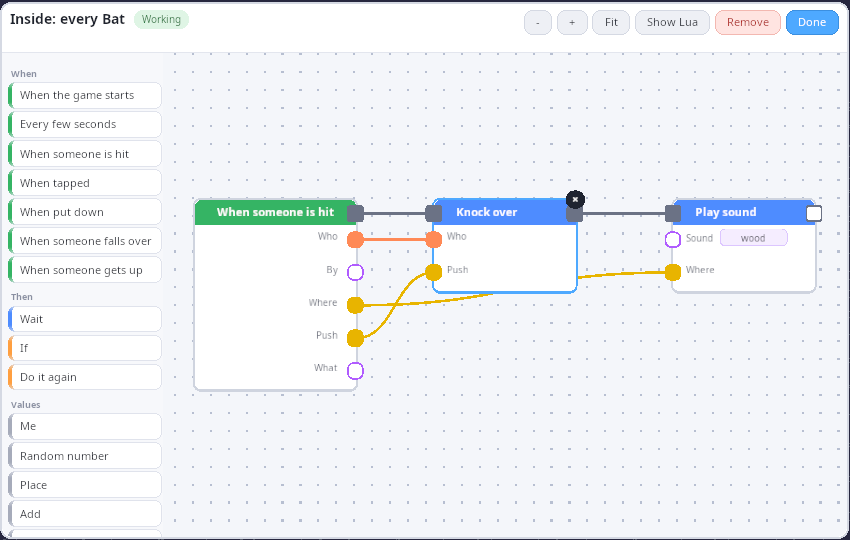
When someone is hit (by the bat) → Knock over (who, push) → Play sound "wood" (where). It's live: change the sound to "metal", or add Add score after Knock over, and the next swing does that. A wire only connects where it fits, so a graph can't be wrong in a way that crashes.
The blocks on the left are every play.* function and every event the
engine documents: the node library is generated from the Lua API, so a
new binding is a new block.
Level 3: Lua
Show Lua in the editor shows what the graph stands for. The bat's graph is this script:
-- bat.lua: what the bat's node graph says, written as Lua. The node
-- graph compiles to Lua much like this (kke/NodeGraph.h), so each node
-- is a line you could have typed. (docs/cookbook/play-to-make.md)

hook.Add("Hit", "bat.knock_over", function(e)
  if e.by ~= "bat" then return end
  play.ragdoll(e.target, e.push)   -- node "Knock over", its push from the hit
  play.sound("wood", e.point)      -- node "Play sound", where it was hit
end)
Writing it by hand opens the door to everything else in this cookbook. Here's the same idea grown a little: a hit knocks the person over, shows a word, scores a point, and stands them back up after three seconds.
-- ouch.lua: the Lua level of play-to-make, on the same blocks as the
-- pictures and the node graph. When the bat hits a person: they fall
-- over, say "Ouch!", you get a point, and three seconds later they get
-- back up. (docs/cookbook/play-to-make.md)

hook.Add("Hit", "ouch.hit", function(e)
  if e.by ~= "bat" or e.block ~= "person" then return end
  play.ragdoll(e.target, e.push)
  play.sound("bonk", e.point)
  play.say("Ouch!")
  play.addScore(1)
  timer.Simple(3, function()
    if play.isDown(e.target) then play.standUp(e.target) end
  end)
end)

hook.Add("StoodUp", "ouch.up", function(e)
  play.say("I'm OK!")
end)
The play table is the building blocks, listed in
Scripting in Lua: spawn, remove,
ragdoll, standUp, isDown, swing, sound, say, addScore,
position, and the events Hit, Clicked, Placed, FellOver and
StoodUp. Both scripts above run in the unit tests against a fake play
world (Cookbook.PlayRecipeKnocksOverScoresAndStandsBackUp,
Cookbook.BatLuaDoesWhatTheBatGraphDoes in tests/test_cookbook.cpp),
which is how the cookbook knows they still do what this page says.
Adding a block of your own
A new building block is written once, in C++, and appears at all three levels:
- The logic, pure and unit-tested (
kke::BatSwinginkke/PlayBlocks.his the model). - A Lua binding registered with a
kke::ApiFunction(label, doc, typed parameters), which is what makes it a documented function and a node (kke::bindPlayBlocksinPlayScript.cpp). - A picture, if it should be in the palette: a
kke::PlayBlockwith an asset name, and a recipe graph if it does something on its own (kke::playBlockRecipe).
C++ shows steps 1 and 2 for an ordinary game module.