Pet Companion
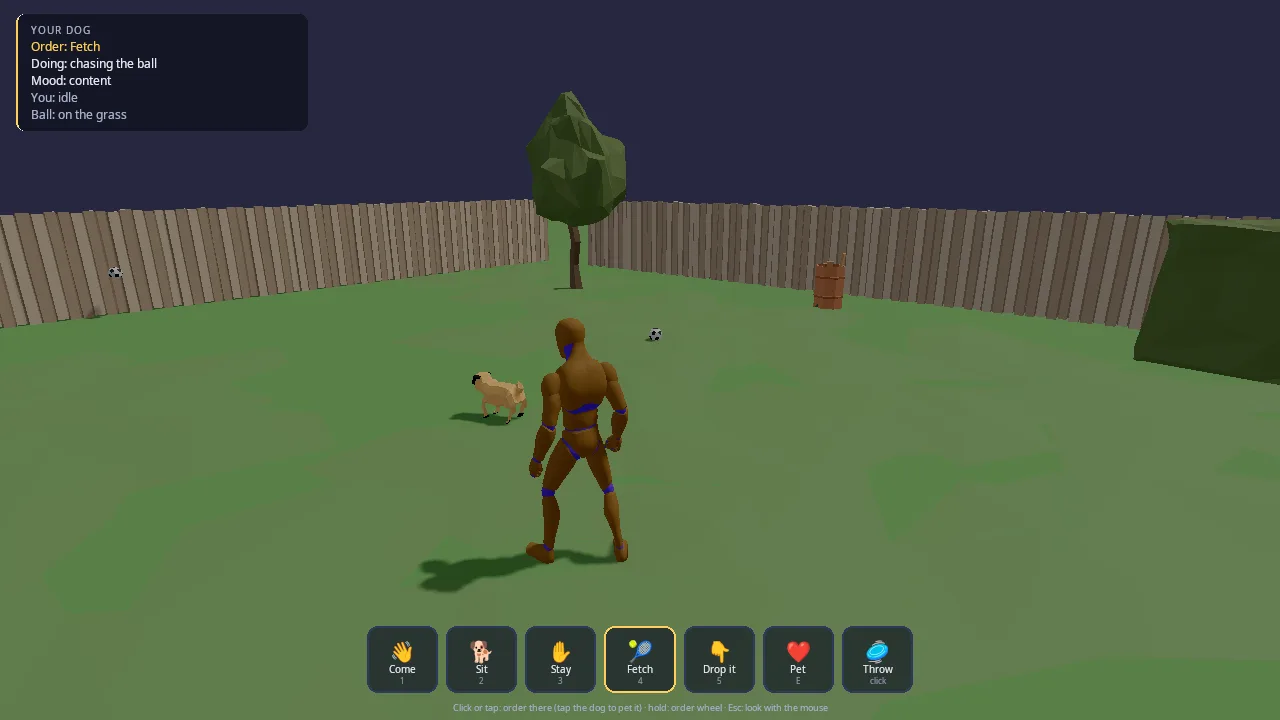
You and your dog in a fenced garden. Pick the pet (any POLYGON Dogs breed in three coats, or Quaternius' pug), look after it, play with its toys and run the agility course next to the garden together, with a mouse and keyboard, a controller or a finger. Feed it and keep its water bowl full, clean up after it, pat it and play with it, and it is happy; neglect it and it gets ill, and in the end it dies (adopt a new pet from the pause menu). Leave it alone and it lives its own life: it sniffs about, eats, drinks, naps in its bed and goes to a quiet corner for its business. Walk off and it trots along; look at a toy and it goes to have a look; walk up to it and it waits for a pat; throw a toy and it fetches without being told, round the fence through the gate if it has to.
This demo is the starting point for any game with a companion: a pet, a sidekick, a horse that comes when called, a follower in an RPG. It shows the three parts a good companion needs and how they fit together:
- Orders: the engine's command layer (
kke/Orders.h, docs/COMMANDS.md), with the sameorder.*Lua and nodes every game has. - A brain: the AI core's built-in
dogspecies (kke/ai/AiWorld.h, docs/AI.md), sized and paced for the breed. Orders reach it throughkke::AiOrderBridge. - A body: a Jolt character that moves where the brain wants, drawn
with the POLYGON Dogs clips (walk, run, sit, lie down, eat, drink, poop,
...) made in place, feet kept on the ground by
kke::LegPlacer, and a look-at head (DogBody). The pug has procedural legs (kke::ProceduralGait, docs/PROCEDURAL_ANIMATION.md).
The input, HUD, people and scenery come from the shared command kit, which the platoon demo uses too.
Run it
The executable is pet_companion (CMakeLists.txt). The
root CMakeLists.txt only builds it when KKE_ENABLE_JOLT and
ENGINE_ENABLE_LUA are both on (both default to ON).
| Variable | Effect |
|---|---|
KKE_SKIP_INTRO=1 |
skip the logo intro |
KKE_ASSETS_DIR=/path/to/packs |
where the packs are (default assets/synty/; KKE_SYNTY_DIR also works) |
KKE_ANIMATIONS_DIR=/path |
where UAL1_Standard.fbx is (default assets/animations/) |
KKE_PET_DEMO=1 |
plays through everything by itself (fetch, fetch outside the fence, sit, stay, come, pet, feeding, cleaning up, the agility course), logs what the dog did, then quits (after 150 s at most unless KKE_PET_QUIT says otherwise); it never touches your save |
KKE_PET_DEMO_STEP=10 |
self-play from that step (10 is feeding, 15 agility) |
KKE_PET_QUIT=30 |
quits after 30 seconds |
KKE_PET_BREED=husky |
the pet (labrador, golden, shepherd, husky, shiba, dalmatian, doberman, greyhound, pointer, ridgeback, wolf, fox, coyote, robot, scifi, hellhound, zombie, pug) |
KKE_PET_COAT=0..2 |
its coat (the pack's three textures) |
Your pet, its care, the bowls and your best agility time are saved in
pet_companion_save.json every 30 seconds and when you quit.
Controls
| Action | Mouse and keyboard | Controller | Touch |
|---|---|---|---|
| Move | WASD (Left Shift runs, Left Alt walks) | left stick (click it to toggle running) | no touch binding yet |
| Jump | Space | A | no touch binding yet |
| Look | the mouse, once Tab has captured it | right stick | no touch binding yet |
| Capture / free the mouse | Tab | none needed | a finger frees it |
| Pause menu (pet and coat, agility, settings, controls, quit) | Esc | Start or Select | none |
| Order at the pointer (the context order) | left click while the mouse is free; right click any time | RB (at the reticle) | tap |
| Pet, or what is next to you: clean up a poo, fill a bowl | click or right click the dog, or E | Y | tap the dog, or the button (it says what it does) |
| Send it over an obstacle | point at it (the context order), or run past it | RB at it, or run past it | tap it |
| Order wheel | hold Tab or the middle button, or hold the left button half a second; the mouse picks | hold LB, the right stick picks, B cancels | hold a finger, drag to pick |
| Force modifier (ground: stay there) | hold Left Ctrl | hold LT | none |
| Come / Sit / Stay / Fetch | 1 / 2 / 3 / 4 | D-pad up / down / left / right | the buttons |
| Drop it | 5 | X | the Drop it button |
| Pick up / throw a toy | left click while the mouse is captured | RT | the Throw button |
| Navigation ping (hear the walls) | Q | none | none |
| Developer panels | F1 | none (developer tools) | none |
| Every button on the HUD bar | click it | its button: the prompt under it (Pet is Y, Throw is RT) | tap it |
What the context order does depends on what the pointer is on
(kke::contextOrder): a toy is Fetch, an agility obstacle is Over it, the player is Follow, the ground is
Go there (Stay there with the force modifier). The dog itself is a pat
(giveContext checks for the dog first).
All game actions are rebindable and saved to pet_companion_input.json.
The HUD shows each prompt as the button on the device you used last
({pet.come} in the prompt text becomes the right glyph).
How it plays
There is no score and no end, except the agility clock. The HUD panel (top left) shows:
- Order: the dog's current order, or none.
- Doing: what it is doing in words ("chasing it", "eating", "begging:
its bowl is empty"), from
PetModule::doing(). - Mood: hungry, thirsty, sleepy, feeling poorly, dying, sad, content, happy, excited or over the moon.
- Toy: on the grass, in your hand, or in the dog's mouth.
- Agility (on the course): the next obstacle, the clock and the faults.
- Five bars: Food, Water, Energy, Happy and Health.
Orders and what they do:
| Order | The dog |
|---|---|
| Come (Follow) | stays beside and a little behind you, never in your way |
| Sit | stops and sits until the next order |
| Stay | holds its spot |
| Fetch | runs to the nearest toy nobody is holding (round the fence through the gate), brings it to you, puts it down in front of you |
| Drop it | lets go of the toy it carries |
| Go there (Move) | runs to the point, then stays there |
| Pet | comes to you; you kneel and pat its head with your palm, it sits and wags |
| At ease (Free) | back to its own life |
Pets. The pause menu's Pet and Coat rows list every breed the packs on this machine have (POLYGON Dogs has 17 on one skeleton, three coats each; the pug is Quaternius'). The breed changes its size and its walking and running speed (measured from its clips).
Care (Care.h, Tamagotchi and Digimon-tamer style). The AI core gives
it hunger, thirst and tiredness and acts on them: it walks to its food bowl,
its water bowl or its bed. The bowls empty as it eats and drinks; stand
next to one and press E / Y to fill it. What it eats and drinks comes out
again: it walks to a quiet corner for a poo or a wee, and you clean a poo up
with E / Y next to it. Happiness rises with play, pats and a good fetch and
falls with hunger, thirst, mess and being left alone. Health falls when it
goes hungry or thirsty for long or lives among old poo; ill, it is slow and
mopes. With no health left and still neglected, a minute later it dies:
the pause menu then offers Adopt a new pet (or pick another breed).
Toys (POLYGON Dogs): a tennis ball, a football (POLYGON Town), a frisbee that glides, a rubber bone, a rubber duck and a stick. You crouch to pick one up, it sits in your palm with your fingers round it, and you throw it from the hand; the dog carries each one across its jaws.
Agility (Agility.h): east of the garden, out through the gate, eight
numbered obstacles: bar jumps, tyres, weave poles, the A-frame and the
seesaw. Run past the next one (or point at it) and the dog takes it; the
clock starts at the first and stops at the last, and a wrong one is a fault
(5 s). The pause menu's "Run the agility course" puts you both at the
start; going back into the garden mid-run stops it.
A good fetch, a pat or a clear round makes it jump for joy and raises its happiness. When a toy it brought lands at your feet you crouch and pick it up. A toy that leaves the field comes back to the middle of the garden.
How it works
Startup and the frame
main.cpp adds, in order: SettingsModule("settings.json"),
InputModule("pet_companion_input.json"), RigidBodyModule (Jolt),
ModelModule, UiModule (RmlUi), AudioModule (panel hidden),
ScriptModule, pet_companion::PetModule and StatsModule (panel
hidden). The mood is clear_day.
ScriptModule loads scripts/ from the source folder when it exists
(GAME_SCRIPTS_SOURCE, so saving scripts/pet.lua
reloads it while the game runs), else the copy next to the executable.
PetModule::init:
- Defines the actions: the character set (
defineCharacterActions), the command kit's (CommandInput::defineActions), and the quick orders (pet.come..pet.drop,pet.mouse,panels). The d-pad down is Sit and Select is the pause menu, so the ping goes on Q only;cmd.queueloses its Left Shift, because Shift runs and orders do not queue in the garden (BUG-065). Esc is the pause menu (kke::GameShellModule); Tab captures and frees the mouse. - Builds the garden (
buildGarden). - Adds the player (a Jolt character with
kke::Locomotionand a UAL mannequincommand_kit::Humanoidwith hand and foot IK) and the dog (a smaller Jolt character, its height set from the breed). - Lists the breeds this machine has, adds the six toys, reads the save
(
loadSave), loads the pet (DogBody), sets up the AI (setUpAi) and builds the navmesh. - Creates the Lua
kke::OrderScriptand the RmlUiCommandHud, and adds the modes (garden, agility) and pause rows (pet, coat, adopt, agility) to the game shell.
Each frame PetModule::update (with dt clamped to 0.05 s):
- Handles F1 and Esc.
m_cmd.update(...)turns raw input into aFrame: a pointer, a click, a context order, a wheel pick. Clicks, context orders and wheel picks become orders. Quick-order keys work while the wheel is closed.runDemoin self-play.updatePlayer: moves you, the camera, and feeds the intent reader.updateDog: the AI decides and the Jolt body follows.updateAgility,updateToilet,updateCare: the course, its business, the bowls, happiness, health and death.animateDog: clips, postures, feet, head (DogBody::update).updateToys: toy positions, the frisbee's glide, carrying, the auto pick-up.m_script->fireEvents(): queued order events reach Lua.updateHud.
Orders: board, bridge, brain
The dog's orders live on a kke::OrderBoard (m_board). give() builds a
kke::Order for unit kDog (2), issued by kPlayer (1), and fills in the
blanks: Follow and Pet target the player; Fetch with no target picks the
nearest toy nobody holds (or shows "You have the toy: throw it first").
m_bridge = std::make_unique<kke::AiOrderBridge>(m_board, m_ai);
m_bridge->followDistance = 1.6f;
m_bridge->pickUp = [this](uint32_t, uint32_t thing) {
    Toy* t = toy(thing);
    if (!t || t->held != Toy::Held::No) return false; // you picked it up first
    grab(*t);
    return true;
};
The bridge turns every new board order into an ai::Order for the agent
(the mapping table is in docs/COMMANDS.md) and
the AI's Arrived events back into "done". The game fills in only the
steps it alone can do: pickUp (take the toy out of the physics world),
deliver (put it down, praise, joy), drop, and petStart (start the
3.2 s pat). Each frame updateDog calls m_ai.update(dt) and then
m_bridge->handle(m_ai.takeEvents()).
The board listener adds one rule: when a Move finishes well, it issues a Stay at the same point, so the dog waits where you sent it.
The brain: the AI core's dog
updateSpecies copies the built-in dog species and gives it the breed:
its label, its walk and run speed (60% when it is ill), the bowls' places
("dogfood", "water") and its needs' rates (hungry in about four minutes,
thirsty in three). setUpAi adds a toy species with no needs and no
scent: something to see and fetch with no life of its own. The player is an
actor of species farmer; the toys are actors too. The bowls are AI places
while there is something in them, and the AI paths on the navmesh.
A carried toy is disabled in the AI (m_ai.setEnabled(t.id, false) in
grab): "a toy in a mouth or a hand isn't a thing on the lawn", so the dog
neither sees it nor steps away from it.
Reading you: soft orders
When the dog has no order (or At ease), it plays along with what you do.
updatePlayer feeds a kke::IntentReader your position, velocity and view
direction, with the free toys and the dog as candidates. updateDog turns
the result into a soft AI order: it goes straight to m_ai.order, never
onto the board, so the HUD still says "Order: none".
if (in.kind == kke::Intent::Kind::Approaching && in.thing == kDog) {
    soft.kind = kke::ai::Order::Kind::Hold; // you're coming over: it waits for a pat
    soft.position = dog;
} else if (in.kind == kke::Intent::Kind::LookingAt && in.thing != kDog && exists(in.thing)) {
    soft.kind = kke::ai::Order::Kind::Follow; // what are you looking at?
    soft.target = in.thing;
    soft.distance = 1.0f;
} else if (in.kind == kke::Intent::Kind::Walking || in.kind == kke::Intent::Kind::Running) {
    soft.kind = kke::ai::Order::Kind::Follow; // off somewhere: it trots along
The soft order is only re-sent when the intent changes (m_reflex), and an
idle intent clears it so the dog goes back to its own wants.
One more reflex: with no order, At ease or Come, a toy you threw less than a second ago gets a real Fetch order ("the dog goes after the ball on its own"). Hungry, thirsty or very tired, it skips the reflexes and sees to that first.
The body: Jolt character driven by the AI
The AI plans; Jolt moves. Before m_ai.update, updateDog writes the real
positions and velocities of you, the dog and the free toys into the AI
with setTransform. After it, the dog's Agent::desiredVelocity becomes
the Jolt character's move input. The dog stands still while it sits, is
petted, rests or jumps for joy.
Facing: it faces where it runs; standing, it faces what it attends to
(lookAt, its focus, the thing you look at, or the toy it is sent for),
else you. The yaw eases there with 1 - exp(-8 dt), and the turn rate is
kept for the gait.
The body (DogBody)
DogBody::load takes the breed's meshes out of POLYGON Dogs'
Unity_SK_Animals_Dog_01.fbx (every breed is in it; a breed is its
materials) and appends the pack's clips (FBX/Animations/...): locomotion,
sit and lie-down transitions, eat, drink, sniff, bark, wag, beg, shake,
dig, poop, pee, yawn, cower, jump. Walk and run are measured (how far the
hips travel per second) and then made in place, so the Jolt body moves the
dog and the clip plays at the speed it really goes (BlendSpace1D on the
speed): no sliding feet. Sitting and lying down go through the pack's
transitions both ways; sitting it wags, barks, begs or yawns with the
sitting versions. kke::LegPlacer keeps each foot on the ground under it
(a Jolt ray down), and kke::LookAt turns the neck and head toward what it
attends to. Over a jump it plays the jump clip at the arc's phase.
The pug (Quaternius, two clips) keeps procedural legs: a
kke::ProceduralGait with a high step (0.45) so its feet clearly lift, and
a procedural sit.
The player and the camera
updatePlayer reads move, sprint, walk and jump, makes the move
relative to the CameraRig (third person, arm 4.2 m, pitch -16 degrees),
and runs kke::Locomotion. While petting, input is ignored, you face the
dog and play the Fixing_Kneeling clip. The camera ray-casts against the
Jolt world so it pulls in in front of walls. Throwing plays
Spell_Simple_Shoot, picking up plays PickUp_Table.
Toys and hands
A toy is a Jolt sphere or box (sized from its model) while it is loose.
grab removes the body; release adds a new one with a velocity. Your
hands are kke::CharacterIk on the mannequin (Humanoid::enableIk): to
pick a toy up you crouch and reach for it, it then sits in the right palm
with the fingers wrapped round it (kke::wrapFingers), and a throw lets it
go from the palm part way through Spell_Simple_Shoot. A pat is kneeling
(Fixing_Kneeling) with the palm going down on top of its head and up
again. The same crouch and reach fills a bowl and cleans up a poo.
The navmesh
buildNavMesh builds a Recast navmesh (kke::ai::NavMesh) from the field
and every collider the scenery placed (the fence, the gate, the house, the
obstacles), and the AI paths on it, so a toy outside the fence is fetched
through the open gate.
Picking
pick() turns the pointer into a ray (kke::screenToRay) and tests
generous boxes with kke::rayAabb: 0.7 m cubes around free toys ("a toy
is small, and a finger is big"), a box around the dog and one around you.
If none is hit, it ray-casts the Jolt world, then the ground plane. The
result is a kke::PointerTarget with a relation (Item, Own, Self) that
kke::contextOrder reads.
The HUD
command_kit::CommandHud is an RmlUi document (ui/command_hud.rml). The
game sets five status lines, seven buttons (Come, Sit, Stay, Fetch, Drop
it, Pet, Throw; the current order's button is highlighted), the eight wheel
items and a hint line that changes with the device: touch, controller or
captured mouse, or free mouse. See the command kit README.
Lua
PetModule is a kke::IOrderHost: player() is 1 and selected() is
always the dog, so order.sit(...) and friends in Lua go to the dog.
scripts/pet.lua counts fetches, prints every order, and
sits the dog after every third good fetch:
hook.Add("OrderDone", "praise", function(e)
    if e.order == "fetch" and e.ok then
        fetches = fetches + 1
        if fetches % 3 == 0 then order.sit(e.unit) end
    end
end)
Events queue during the frame and fire once in m_script->fireEvents().
Self-play
KKE_PET_DEMO=1 runs runDemo, steps that log what happened: pick up the
ball (logs how far it is from the palm), throw it, wait for the fetch, a
football outside the fence (it goes round through the gate), sit, stay
while you walk off (logs how far it moved), come, pet (logs how far the
palm is from the top of its head), an empty food bowl you fill (it walks
over and eats), a poo you clean up, then the whole agility course, then
quit. The camera turns toward the dog because nobody is at the controls.
(CI's headless smoke run starts the game for 8 seconds with virtual
controllers, without self-play.)
Design decisions
- Orders and brains are separate. The board says what the dog was told; the AI core decides how. docs/COMMANDS.md states the split: the command layer "never moves anyone". The same board, Lua and nodes then work for a pet and a platoon.
- The dog is the built-in
dogspecies, tweaked, not new AI code. With no order it already sniffs about, rests and watches. - Reading the player makes soft AI orders, not board orders. The header says "never a command: the board stays empty". A real order the player gave always wins, and the HUD never shows an order the player did not give.
- Following uses the AI core's follow slot. Commit 2ed140d removed a
game-side sidestep once
AiWorldFollow learned to keep out of the leader's way (kke::followSlot). - A carried toy is disabled in the AI instead of removed and re-added.
The same commit replaced that workaround with
setEnabled. - The AI plans, Jolt moves. The dog is a physics character reading
desiredVelocity, so it collides with the fence and props like you do. docs/AI.md describes this pattern for games that move their own bodies. - Pack clips made in place, feet on the ground. The POLYGON Dogs clips
carry their own travel; the speed they travel at is measured, then the
travel is taken out, so the physics body moves the dog and the legs play
at the speed it really goes, with
LegPlacerputting each foot on the ground under it (Kees: the legs didn't lift, the movement looked off). The pug only has Idle and Jump, soProceduralGaitwalks it, with a high step. - A neglected pet can die (Kees's choice, 2026-10-03), but slowly and with warnings: it gets ill first, the HUD says it is dying, and only a minute at zero health with no care ends it.
- Agility obstacles are crossed on a path, not by physics. For the few seconds over an obstacle the dog's Jolt body is kinematic and follows the obstacle's measured shape (bar height, tyre hole, pole positions, ramp surface), so it never clips through or gets stuck.
- Left click means two things. The comment in
updatesays it: "Left mouse throws while the mouse turns the camera; RT always". With a free mouse, left click is the context order, like a strategy game. - Everything has a fallback. Missing packs give a block garden, a block dog and block toys, so the demo and its CI run work without paid art.
- GPU and UI resources are released in
shutdown(), before the modules that own them go ("Everything holding GPU or UI resources goes before the modules that own them").
Tuning
| What | Where | Value | Effect of raising it |
|---|---|---|---|
| Pug speeds | setUpAi, dog.walkSpeed / runSpeed |
1.2 / 4.5 m/s | a quicker dog |
| Home radius | setUpAi, dog.homeRadius |
7 m | roams further on its own |
| Follow distance (order) | m_bridge->followDistance |
1.6 m | walks further from you |
| Follow distance (soft) | updateDog, soft.distance |
1.8 m walking, 1.0 m to a looked-at thing | |
| Pat length | petStart, m_petTime = m_kneel = 2.4f |
2.4 s | longer pats |
| Joy jump | m_joyTime = 1.2f |
1.2 s | longer celebration |
| Throw | throwBall, fwd * 10 + up * 4 |
10 and 4 m/s | throws further |
| Pick-up reach | throwBall, best = 1.8f |
1.8 m | pick up from further |
| Auto pick-up | updateBalls |
1.3 m, after 2 s | |
| Ball bounce | restitution |
0.6 | bouncier |
| Step height | loadDog, gs.stepHeight |
0.3 (a share of leg length; the default is 0.25) | higher steps |
| Dog height | kDogHeight |
0.55 m | a bigger dog (also the Jolt capsule) |
| Mood drift | updateDog, approach(...) |
happy to 0.55 at rate 0.02 | |
| Camera | m_rig.settings.armLength, m_rig.pitch |
4.2 m, -16 deg | |
| Intent thresholds | kke::IntentSettings defaults |
walk 0.5 m/s, run 4 m/s, look 0.6 s | pass your own to IntentReader |
Engine features it uses
| Feature | Header / module | Doc |
|---|---|---|
| Orders, selection, context orders, intent reading, follow slot | kke/Orders.h |
COMMANDS.md |
| Orders to AI | kke/OrderBridge.h |
COMMANDS.md |
order.* in Lua |
kke/OrderScript.h, kke/modules/ScriptModule.h |
COMMANDS.md, SCRIPTING.md |
| AI core (species, soft orders, obstacles) | kke/ai/AiWorld.h |
AI.md |
| Procedural gait, look-at | kke/ProceduralAnim.h |
PROCEDURAL_ANIMATION.md |
| Clips | kke/Animator.h, kke/AnimRig.h |
|
| Physics characters and balls (Jolt) | kke/RigidWorld.h, kke/modules/RigidBodyModule.h |
|
| Player movement | kke/Locomotion.h |
MOVEMENT.md |
| Picking rays | kke/Picking.h |
|
| Rebindable input, button prompts | kke/modules/InputModule.h, kke/ButtonPrompts.h |
INPUT.md |
| RmlUi HUD | kke/modules/UiModule.h via the command kit |
|
| Moods | Application::setMood |
MOODS.md |
Assets
Not in the repository unless marked. Put packs in assets/synty/ or set
KKE_ASSETS_DIR; tools/fetch_assets.sh POLYGON_Town downloads the Synty
pack from the owner's share.
| Pack | Files | If missing |
|---|---|---|
| POLYGON Dogs (Synty) | Unity_SK_Animals_Dog_01.fbx (every breed), its clips in FBX/Animations/, Textures/PolygonDog_* and AltTextures/ (the coats), SM_Prop_House_01, SM_Prop_Bed_01, SM_Prop_Bowl_Red_01, SM_Prop_Bowl_Blue_01, SM_Prop_Bowl_Food_01, SM_Prop_Bowl_Water_01, SM_Prop_FoodBag_01, SM_Prop_Poop_01, SM_Prop_Ball_01, SM_Prop_Disc_Red_01, SM_Prop_Toy_RubberBone_01, SM_Prop_Toy_Duck_01, SM_Prop_Stick_01, the agility props (SM_Prop_Obstacle_Jump_01, SM_Prop_Obstacle_TubeJump_01, SM_Prop_Obstacle_Poles_01, SM_Prop_Obstacle_Ramp_01, SM_Prop_Obstacle_SeeSaw_01) |
only the pug can be picked; house, bed, bowls and food bag are blocks; toys are coloured cubes; jumps, tyres and poles are blocks and the ramp and seesaw are left out |
| POLYGON Town (Synty) | SM_Env_Fence_Wood_Straight_01, SM_Env_Fence_Wood_Post_01, SM_Env_Fence_Wood_Gate_01, SM_Env_Tree_01, SM_Env_Tree_02, SM_Env_Hedge_01, SM_Prop_Barrel_01, SM_Env_Grass_01, SM_Item_Ball_Soccer_01 (SM_Prop_Doghouse_01 without POLYGON Dogs) |
the fence and first tree become coloured blocks; the rest is left out |
| Farm Animals Animated by Quaternius (CC0) | Pug |
no pug in the picker (without POLYGON Dogs too, the dog is a brown block) |
| Universal Animation Library mannequin by Quaternius (CC0, in the repository) | assets/animations/UAL1_Standard.fbx |
you are drawn as a block (the command kit logs a warning) |
Only these three packs are scanned at start (Scenery's pack list), so a
big asset folder doesn't slow it down.
Fonts (Noto) and the RmlUi theme are copied next to the executable by
command_kit_game(). The log lists every pack asset used
(Scenery::logUsed).
Make a game like this
- Copy
games/pet_companiontogames/<your_game>. Rename the executable, the namespace andPetModule, and givegame.jsona new id. Keeptarget_link_libraries(... kke_command_kit)andcommand_kit_game(<target>)inCMakeLists.txt, and add the folder to the rootCMakeLists.txtinside theKKE_ENABLE_JOLT AND ENGINE_ENABLE_LUAblock (the command kit is only built there). - Pick your companion's species. Copy a built-in one like
setUpAidoes, or define one in YAML (docs/AI.md, "Species"). Give it a friend: the player's actor species decides how it feels about you. - Decide which orders it takes. Change the quick-order actions, the wheel
(
kWheel,kWheelIcons,kWheelLabels) and the HUD buttons together.UnitAbilitiesingiveContextsays what a click can mean (a pet fetches but does not attack). - Fill in the bridge hooks for your game's physical steps (
pickUp,deliver,drop,petStart). Read the bridge table in docs/COMMANDS.md first. - Decide what the companion reads from the player: the
ifchain inupdateDogthat turns anIntentinto a soft order is the place. - Give it a body. A rigged quadruped with Quaternius-style bone names gets
legs from
quadrupedLegChains; other rigs needkke::QuadrupedBones(docs/PROCEDURAL_ANIMATION.md). - Put rules in Lua (
scripts/*.lua,hook.Add("OrderDone", ...)) so they reload while you play. - Add a
KKE_<GAME>_DEMOself-play likerunDemoso CI can check it.
Pitfalls the code shows:
- Call
m_board.markRunningfor new orders and feed the bridge the same events you read yourself:takeEvents()empties the list. - Write real positions and velocities into the AI with
setTransformbeforem_ai.update, or the brain plans from last frame's spot. - Disable carried things in the AI, or the carrier avoids them.
- Two yaw conventions meet here: the AI's (0 = +Z) and the camera rig's
(0 = -Z).
aiYawandkke::yawOfconvert.
Files
| File | What is in it |
|---|---|
| main.cpp | the app, the mood, the module list, where scripts load from |
| PetModule.h | the module (also a kke::IOrderHost), toys, bowls, poo, all state |
| PetModule.cpp | input, garden, navmesh, orders, AI setup, intent reflexes, care, toilet, agility runs, hands, toys, HUD, save, self-play |
| DogBody.h / .cpp | the breeds, the dog's model, clips, postures, feet on the ground and head |
| Care.h / .cpp | happiness, health, digestion, death: pure logic |
| Agility.h / .cpp | the course, how a dog crosses each obstacle, the clock and faults |
| scripts/pet.lua | the Lua rules: praise every fetch, sit after every third |
| CMakeLists.txt | the pet_companion executable, script and game.json copies, command_kit_game |
| game.json | the marketplace entry |
| ../command_kit/ | shared input, RmlUi HUD, mannequin people, pack scenery |