Flying
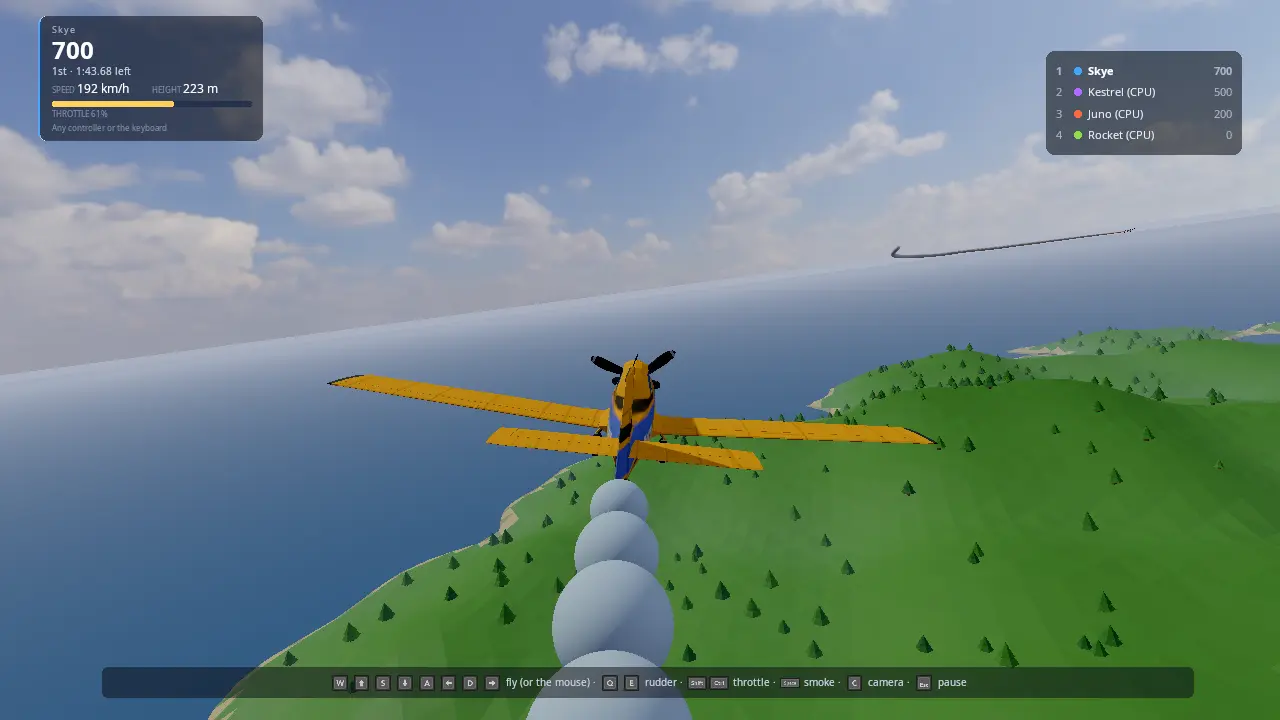
Stunt planes over a generated island, down a desert canyon or between the towers of a mega city. Race through a course of rings, score loops, rolls, inverted flight and low passes against the clock, shoot each other down over a town in a dogfight, or fly wherever you like. Every flight starts on the runway: open the throttle, roll, and the plane lifts off once it is fast enough. Up to four people play on one screen (split screen), more online, with up to five CPU pilots. Every player flies with the device they picked: a gamepad, the keyboard and mouse, or a flight stick, and can move to any other free one from the pause menu at any time.
It is the starting point for vehicle games that move fast in three dimensions (flight, space, boats: a small pure-maths model stepped at a fixed rate, chase and cockpit cameras that lean with the craft), for games where each player chooses their controller (flight sticks next to gamepads and the keyboard, swapped mid-game without touching anyone else's), and for arcade scoring (tricks recognised from how the vehicle moved, chained for a multiplier), and for arcade combat (guns with a little aim help, damage sent over the network, planes that dent, burn and break up).
Run it
The executable is flying_demo (CMakeLists.txt). It is
built when KKE_ENABLE_NET is on, which is the default: main.cpp always
adds kke::NetModule for online flights. It needs no Jolt and no art:
cmake --workflow --preset default
cd build/bin && ./flying_demo
KKE_SKIP_INTRO=1 ./flying_demo    # skip the engine's logo intro
Run it from build/bin: the HUD (ui/flying_hud.rml), the theme and the
fonts are copied there by the build. The start menu, settings and controls
are saved as flying_lobby.json, settings.json and flying_input.json
in the folder you start it from.
With Synty's POLYGON Stunt Plane pack (see "Assets") the planes are that plane in four paint jobs, propellers turning and control surfaces moving. Without it they are planes built from boxes in each pilot's colour, and a line on the screen says how to add the pack.
Switches for demos and tests (developer builds):
| Variable | What it does |
|---|---|
KKE_FLY_LOBBY=0 |
Straight into a flight, no start menu |
KKE_FLY_MODE=race\|stunts\|free\|dogfight |
The mode |
KKE_FLY_ISLAND=<seed or name> |
The map: an island's seed, canyon, city, or random for a new island each time |
KKE_FLY_CPUS=<0..5> |
How many CPU pilots |
KKE_FLY_AUTOPILOT=1 |
Player 1 is flown by the CPU pilot too (and no start menu) |
KKE_FLY_QUIT=<s> |
Quit after that long, logging where every plane is every 5 s |
KKE_FLY_STUNT_TIME=<s> |
The length of a Stunts round (default 120) |
KKE_FLY_WAIT=<n> |
Online host: start the flight once n players have joined |
KKE_FLY_CAMERA=chase\|cockpit\|far |
The camera every flight starts with |
KKE_FLY_BENCH=pileup |
Crash benchmark: every plane flies head-on into the others at full speed, again every 7 s. With KKE_BENCHMARK=30 it records frame times; kke_benchmark runs it as flying_pileup |
KKE_NET=host, KKE_NET=join:ADDRESS, KKE_NET_NAME=<name> |
Online without the menu (NETWORKING.md) |
KKE_LOBBY_JOIN=<n> |
The first n controllers already plugged in join the start menu |
KKE_VIRTUAL_INPUT=hosas,pad |
Two virtual flight sticks and a virtual gamepad, no hardware needed (INPUT.md) |
Controls
Every binding is defined in FlyingModule::defineActions
(Players.cpp) and can be rebound (F1, Input panel); the
hint line at the bottom shows the buttons of the device you fly with.
| Gamepad | Keyboard and mouse | Flight stick | |
|---|---|---|---|
| Pitch (pull back: nose up) | left stick up/down | S / W (or the arrows), or move the mouse | stick back/forward |
| Roll | left stick left/right | A / D (or the arrows), or move the mouse | stick left/right |
| Rudder | LB / RB | Q / E | twist the stick |
| Throttle | RT up, LT down | Left Shift up, Left Ctrl down | the throttle lever |
| Smoke on/off (Dogfight: fire) | A or B | Space or F, left mouse button | trigger (button 1) |
| Camera: chase, cockpit, far | Y | C | button 2 |
| Wheel brakes (on the ground) | X | B | button 3 |
| Look around | right stick | hold the right mouse button and move | the hat |
| Pause, change controller, settings | Start or Back | Esc | button 4 |
| After a flight: again / start menu | A / Back | Enter or R / M | trigger / - |
The mouse is a stick that centres itself: move it forward and the nose goes down, let go and the stick drifts back to the middle. The keyboard eases the controls over a third of a second, so a tap is a small correction, not a full deflection.
A flight stick's axes are "Axis 1" (roll), "Axis 2" (pitch), "Axis 3" (twist) and "Axis 4" (the lever) of the raw joystick: the usual layout of a Thrustmaster, Logitech or VKB stick. Rebind them in the Input panel if yours differs.
How it plays
The start menu
The start menu is the engine's kke::LobbyModule (LOBBY.md).
Each person joins with their device: A on a gamepad, Enter on the
keyboard, or the trigger on a flight stick (this game turns flight sticks
on with setFlightSticks(true); other games keep them out of their
menus). Each player picks a name, a colour (their smoke, their
HUD and the built plane) and a paint job (the Synty plane's four
textures). Player 1 also sets:
| Row | Choices |
|---|---|
| CPU players | 0 to 5, each Rookie, Pilot, Ace or Legend |
| Mode | Race, Stunts, Free flight, Dogfight |
| Map | Palm Key, Twin Bays, Gull Rock, Harbour Isle, Cloud Cape, Canyon, Mega City, Random |
| Laps | 1, 2, 3 (Race) |
| Rings | Big (18 m), Normal (14 m), Tight (10 m) (Race) |
| First to | 5, 10, 20 kills (Dogfight) |
| Sky | Day, Morning, Golden hour, Sunset, Stormy (a mood) |
| Online | Off, Join, Host |
Behind the menu the planes already fly round the island.
Taking off
Every mode starts on the runway, two by two, engines idling. Open the throttle and roll: past about 97 km/h the nose lifts by itself and the plane flies. That's all there is to it; pull back to climb sooner.
A plane can't hang on its propeller: point the nose straight up and the engine pulls less and less, the plane slows, and it tips over into a dive. Climb at an angle instead.
Race
After take-off, head for the first ring. The next ring for you is drawn gold, and an arrow at the top of your view points to it. Fly through the rings in order, the right way; after the last ring of the last lap you have finished. The HUD shows your place, lap, ring, speed, height and throttle; the standings are on the right.
Stunts
Two minutes to score. The game recognises what your plane did (Stunts.cpp):
| Trick | How | Points |
|---|---|---|
| Loop | the nose all the way round, pulling up | 500 |
| Outside loop | the same, pushing down | 800 |
| Roll | all the way round the nose | 200 |
| Inverted | upside down for 2 s or more | 60 a second |
| Knife edge | on a wing tip for 2 s or more | 80 a second |
| Low pass | under 15 m above the ground, over 40 m/s, 1 s or more | 150 + 100 a second |
Tricks within 3 s of each other chain: the second counts x1.5, the third x2, and so on. A crash costs 300 and breaks the chain.
Free flight
Take off and go where you like. Land again on the runway or any flat field, gently: coming down faster than 6 m/s or tilted more than 25 degrees is a crash.
Dogfight
Take off from the airfield beside a town of houses, shops and towers, and shoot the others down. The first to the kill target (5, 10 or 20) wins; after five minutes the most kills wins. The guns fire eleven rounds a second; a plane near the ring of your sight is led for you. Seventeen hits bring a plane down, and a shot-down plane counts as a kill for whoever hurt it last in the ten seconds before. Your health bar is in your panel, a mark flashes on your sight when you hit, and the feed says who shot down whom. Over every other plane in view is its name and its health. Buildings stop bullets, and flying into one is a crash.
Collisions
Planes bump off each other. Meet faster than 18 m/s and both explode: a fireball, smoke and pieces of the plane falling away. A slower bump dents both planes where they touched, and in a dogfight it costs health. A collision counts as a crash, not a kill.
Crashing
Hit the ground, the sea, a hill or a building and the plane explodes; 2.5 s later you are back on the runway (a race keeps your lap and ring). Until you are 10 m up, nothing can hit you: bullets and other planes pass through, and your guns are quiet. Fly more than 4.2 km out to sea and you are put back in the air over the island.
Changing controller
Press pause (Start, Back, Esc, or the stick's fourth button). The menu is run by whoever pressed it, with their own device. The Controls row shows the device you fly with; left and right go through the others that are plugged in, skipping any another player holds, and the list under it says who holds what. Choose it and you fly with that one from now on. It only changes this screen: online players see nothing of it. (Two copies of the game on one PC both read every device; keeping them apart is up to you.)
Offline the pause stops the flight; online the flight goes on around you, and the CPU pilot flies your plane until you're back.
The pause menu's Settings row opens the menus every KKE game shares
(kke::GameShellModule, GAME_SHELL.md):
display, sound, look speed and simple button remapping.
Online
Player 1 sets Online to Host, or to Join and picks a game found on the network (or on this PC). Everyone at each screen flies. The host's flight is everyone's: its island, mode, laps, rings, sky, and its CPU pilots.
How it works
Startup and the frame
main.cpp adds the modules: Settings, Input, Models, UI, Audio,
Lobby, Net, then flying::FlyingModule and Stats. FlyingModule::init
(FlyingModule.cpp) defines the controls, loads the
Synty plane, sets up the start menu and the online rows, builds the HUD
and the engine sound, and builds the island behind the menu.
Each frame, update():
updateNet()reads the network (Net.cpp).- In the start menu,
updateLobby()keeps the line-up in step with the menu and flies the planes round the island. - In a flight: the pause menu, the countdown, every plane's step
(
updatePilot), the results, the cameras and split screen, the engine sound, the HUD.
The flight model (Flight.h, Flight.cpp)
A pure-maths model with no engine types, so it is unit-tested
(tests/test_flight.cpp). step() turns the
plane by the controls (rates scaled by how much air flows over the
surfaces, so a slow plane is sluggish), then adds thrust, lift from the
angle of attack (it peaks at 16 degrees; past that the wing stalls),
induced and parasitic drag, a side force that kills sideways sliding,
weathervaning into the airflow, and gravity. On the ground the wheels roll
with friction and brakes and the rudder steers the tail wheel. Each step
is at most 1/120 s (updatePilot splits a frame).
The island, the town and the rings (Course.h, Course.cpp, Combat.h, World.cpp)
Island(seed) is a height function: rolling hills, a mountain, a flat
runway strip in the middle and a coast falling to the sea 1.5 km out.
World.cpp builds it into one flat-shaded mesh (a 24 m grid) with
about 1400 low-poly trees and a sea sheet. Town (Combat.h) places the
hangar and the control tower beside the runway and, for Dogfight, a
district west of it: 70 m blocks, towers near the middle and houses
further out. Towers and plain houses are boxes built in code; with
Synty's POLYGON Town pack the houses are its houses and shops. The town
is a list of boxes on a 40 m grid, so a plane or a bullet asks it
touches or blocks in a few lookups. The
rings (Island::rings) go round the island at heights smoothed so each
climb and dive between them can be flown, each facing the way you arrive.
throughRing() checks a plane's step crosses the ring's plane inside it.
The other two maps are the same pieces with other shapes, all built in
code (no art packs needed). The map rides in the seed's top byte
(mapSeed(Map, n)), so a guest online gets it from the host's seed.
- Canyon: a red plateau 190 m up with a gorge winding round it, 14 m deep at the floor and 90 to 180 m wide, its walls in two steps. The runway is on the plateau. The race runs down the gorge, every ring under the rim, past rock pillars (always off to one side, so there is a way past) and under five stone bridges. Climb out over the rim and you are flying over open plateau, but the rings are all down below.
- Mega City: a flat island packed with towers on a 100 m grid, up to 340 m tall downtown and lower further out, a park here and there, sky bridges between tall neighbours. The race runs down avenues left clear along the course; everywhere else you fly between walls, and a dogfight there means watching the buildings as much as the other planes.
CPU pilots (Course.h RingPilot, Flight.h steerToward)
steerToward flies to a point the way a pilot does: bank to turn, pull
to climb, hold a cruise speed with the throttle, pull up when the ground
gets close. RingPilot picks the point: lined up in front of the ring, a
point just past its centre; beside or past it, first a point 450 m in
front so the plane can turn in. The skill (Rookie to Legend) changes the
cruise speed and how hard they fly. They keep 30 m from each other, and a
CPU pilot that hasn't made a ring for 45 s is put back on the course. In
the Canyon they don't fly straight at the next ring (that cuts through
the rock on every bend): up on the plateau they first line up high over
the gorge, go down only once over its middle and flying along it, follow
the middle line, steer round the pillars, and on the last stretch line up
on the ring. Down there the walls don't count as ground ahead, or they
would climb out at every bend. (The first ring is a long way round, so
the lost time is 90 s there.) In the Mega City they fly the avenue,
the straight line from ring to ring that the city leaves clear, and only
count what is right under them as ground once in it. In
Stunts they circle the island, looping and rolling every 30 s. In a
dogfight each picks the nearest plane in front of it, flies to where it
will be, fires when it is near the sight and keeps above the rooftops.
Guns, damage and explosions (Combat.h, Combat.cpp, Damage.cpp)
A plane is a set of spheres (planeShape: nose, cockpit, tail and a
row along each wing), scaled to its span. planesTouch finds where two
planes came closest over the frame, not only where they ended up, so
two planes meeting head on at 100 m/s can't pass through each other
between frames. bulletHits tests a bullet's step against the spheres.
Bullets are points moving at 480 m/s, drawn as tracers.
Each screen tests its own planes and bullets. Damage to a plane another
screen flies is added up and sent as one Damage event every 0.12 s
(Net.cpp); that screen applies it, and when its plane goes down it sends
Down, so every screen shows the same kill once. Dents are sent as
Dent events. A dent moves the vertices near the hit inwards
(ModelModule::setDeformedVertices, as the racing demo's cars do).
Explosions are the engine's kke::ParticleEffects: fire, smoke and
sparks, drawn in renderTranslucent, plus pieces of the plane that fall
and tumble.
The plane's art (Planes.cpp)
loadArt() finds the pack with kke::findAssetFolder and
kke::AssetCatalog (only POLYGON_StuntPlane is scanned), loads
SM_Veh_Plane_Stunt_01, and splits its meshes by name into the body, the
propeller, the ailerons, elevators, rudder and the pilot's stick (the
crop-spraying kit is left out). Each part becomes its own model, turned
on its hinge (a surface's front edge) every frame by the controls
(poseArt). The nose is found from where the propeller is. The four
paint jobs are the pack's texture variants (setTextureOverride).
Smoke
updateTrail drops a puff every 1.5 m flown behind the tail (along the
way since last frame, so a slow frame leaves no gaps), tinted with the
plane's colour. The puffs are the engine's soft smoke
(kke::ParticleEffects, the same as the racing cars' tyre smoke): they
spread and drift up over 7 s, lit by the sun and the sky. Smoke thins
out right in front of a camera, so the chase camera sees through the
trail it follows.
Cameras and split screen
One camera per player at this screen, laid out with kke::splitScreen
(with three players the fourth quarter follows the leader from above).
The chase camera sits behind and above the plane in the plane's own
frame, smoothed, and leans only halfway into a bank so the horizon still
says which way is up; upside down it follows the plane. The cockpit
camera sits above the nose, halfway between the seat and the propeller,
so the wing and the long nose don't fill the view; from there the
propeller isn't drawn (it would be a blur). Look (right stick, hat, mouse) turns the
view around the plane and springs back when let go.
Players and controllers (Players.cpp, engine Lobby, LobbyModule)
Each lobby seat is one InputModule player whose map listens only to
that seat's device (LobbyModule::applyInput). A gamepad also shows up
as a joystick to SDL, so a flight stick's axes and buttons are their own
actions (stick.*), read only for a player whose device is a stick
(pressedBy, heldBy). The lever sets the throttle when it moves, so it
doesn't fight the buttons while it rests.
The pause menu's Controls row calls kke::Lobby::setSeatDevice(seat,
device), which refuses a device another seat holds (tested in
tests/test_lobby.cpp); the LobbyModule then
gives the seat's input map the new device.
Online (Net.cpp, FlyNet.h, FlyNet.cpp)
The same shape as Climb Race: this screen's players are NetModule's
player and local players, the host's CPU pilots are the host's local
players. Each plane goes out every frame as a NetPlayerState: position,
velocity, and in extra its attitude, throttle, smoke, guns firing,
crashed, lap, ring, finish time, stunt score, health, kills and deaths, so every screen can draw it and rank
it with no other messages. The host's Setup event starts each flight
everywhere. The server's movement limits are raised to a stunt plane's
speeds (NetModule::movementLimits), and remote planes turn smoothly to
the newest attitude.
The HUD (Hud.cpp, ui/flying_hud.rml)
An RmlUi data model: a panel per player in the corner of their view, the arrow to the next ring, the last trick, the health bar, the gun sight and hit mark, the standings, the countdown, results and the pause menu. Only what changed is marked dirty.
Sound
The engines are one live kke::AudioStream: each local plane's engine is
a buzzing note (a propeller's blades chopping the air) whose pitch follows
the throttle and speed, mixed and pushed a tenth of a second ahead.
Rings, tricks, the countdown and the finish are earcons; a crash is a
synthesised impact.
Design decisions
- An arcade model, not a simulator. Controls bite by airspeed, the wing stalls, the plane slides and weathervanes: enough to fly loops and feel a stall, forgiving enough to play with a gamepad on a sofa.
- Flight sticks are opt-in in the lobby. A game that doesn't expect
them shouldn't let a joystick join its menu, so
LobbyModuleonly seats them aftersetFlightSticks(true). - Device swaps are local. Which device flies which plane never goes over the network, so a swap can't upset anyone online.
- Planes collide. A fast meeting is an explosion and a slow one a dent, and neither counts as a kill, so ramming isn't a way to win.
- Take-off is one step. Every flight starts on the runway, and the plane lifts off by itself once it is fast enough: the feel of a take-off without having to learn one.
- A little aim help. Hitting a turning plane with a gamepad is hard; the guns lead a target near the sight, so a player who gets behind someone gets the kill.
Tuning
| What | Where |
|---|---|
| Thrust, stall speed, top speed, turn rates, lift, drag | FlightSettings in Flight.h |
| Ring count and sizes | FlyingModule::readSettings in FlyingModule.cpp, the Rings row in Players.cpp |
| Ring heights, how steep the course is | Island::rings in Course.cpp (kSlope) |
| Trick points, chains | Stunts.cpp |
| Respawn time, how far out to sea, the lost-CPU time | constants at the top of FlyingModule.cpp |
| Camera distance and lean | FlyingModule::updateCamera |
| Smoke | kTrailLife, kPuffSpacing and rebuildTrails in Planes.cpp |
| Take-off speed, how steep a climb the engine holds | rotateSpeed, steepThrust in Flight.h |
| Guns, damage, explosion speed, shield | constants at the top of Damage.cpp |
| The town | Town in Combat.cpp |
Engine features it uses
- The start menu:
kke::LobbyModule,kke::Lobby::setSeatDevice - Input: per-player maps, gamepads, flight sticks, rebinding, button prompts
- Networking:
kke::NetModule, local players, game events - Split screen (INPUT.md):
Application::views(),kke::splitScreen - Moods: the Sky row
- Synty packs:
kke::AssetCatalog,kke::loadModel, texture variants - RmlUi HUD,
kke::DynamicMeshRenderer,kke::SphereImpostorRenderer,kke::AudioStream kke::ParticleEffects(explosions),ModelModule::setDeformedVertices(dents),AudioModule::playImpact
Assets
- POLYGON Stunt Plane (Synty, not in the repo):
SM_Veh_Plane_Stunt_01fromSourceFiles/FBX/, withPolygon_Plane_Texture_01to_04. Found inassets/synty/next to the executable or underKKE_ASSETS_DIR. Without it the planes are built from boxes. - POLYGON Town (Synty, not in the repo, optional): Dogfight's houses,
SM_Bld_House_Preset_01to_11,SM_Bld_Shop_01to_03andSM_Bld_Church_01. Without it the houses are boxes. - Everything else (island, trees, hangar, tower, office towers, rings, smoke, explosions) is built in code. The sky is the mood's CC0 Poly Haven picture.
Make a game like this
- Copy
games/flying_demotogames/<yours>, rename the target in its CMakeLists.txt and addadd_subdirectory(games/<yours>)to the root CMakeLists.txt. - Change the vehicle:
FlightSettingsfor another plane, or replacestep()in Flight.cpp with your own model (a hovercraft, a spaceship) and keep the rest. - Change the world:
Islandis only a height function; ring courses come fromIsland::rings, or place your ownRings. - Change the scoring: StuntTracker is a small state machine over the
plane's attitude; add tricks in
StuntTracker::update. - Keep the controller handling:
defineActions, the lobby'ssetFlightSticks(true)and the pause menu'ssetSeatDevicework for any vehicle.
Files
| File | What's in it |
|---|---|
| main.cpp | The application and its modules |
| FlyingModule.h | The game module, the pilots, the HUD model |
| FlyingModule.cpp | The flight: start, countdown, steps, rings, crashes, results, cameras, engine sound, drawing |
| Flight.h, Flight.cpp | The flight model and the CPU pilot's steering (pure, tested) |
| Course.h, Course.cpp | The island, the rings, ring pilot (pure, tested) |
| Stunts.h, Stunts.cpp | Trick recognition and scoring (pure, tested) |
| FlyNet.h, FlyNet.cpp | What goes over the network (pure, tested) |
| World.cpp | Building the island, the town, the sea and the rings |
| Combat.h, Combat.cpp | Plane shapes, collisions, bullets, the town (pure, tested) |
| Damage.cpp | Collisions, dents, explosions, guns, kills |
| Planes.cpp | The Synty plane in parts, the built plane, the smoke |
| Players.cpp | Controls, the start menu, reading players and CPU pilots, the pause menu |
| Net.cpp | Online: host, join, the setup, planes in and out |
| Hud.cpp, ui/flying_hud.rml | The HUD and the pause menu |
| game.json | The marketplace entry |