Animation and IK
Two kinds of animation meet in a game. Authored animation is clips an artist made (walk, jump, wave), played and blended. Procedural animation is motion worked out while the game runs: a head turning to look at you, a hand reaching for a door handle, feet finding the stairs, a tail swinging behind. The best-looking characters are both: clips first, procedural touches on top.
The first two recipes are Lua with plain balls, so you can see the maths
move. The rest is C++ in the cookbook game, on a real skeleton: the
mannequin from Quaternius' Universal Animation Library
(CC0), which ships with the engine (assets/animations/UAL1_Standard.fbx).
Follow the leader
No clips at all. The head follows a figure eight; every segment is pulled to a fixed distance behind the one in front, so the body winds along the path the head took; and a sine wave running down the body makes it bob.
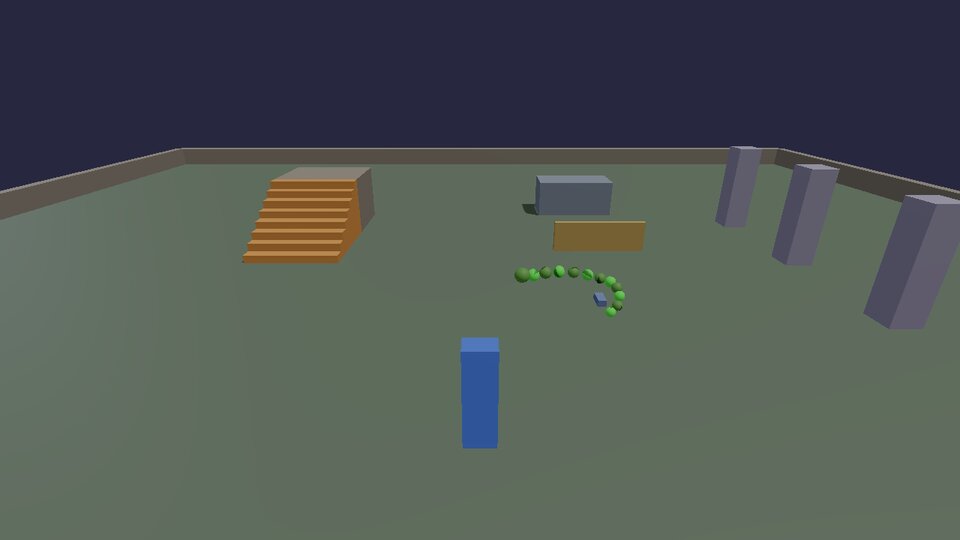
-- caterpillar.lua: procedural animation with no animation at all. The
-- head follows a figure eight; every segment keeps a fixed distance
-- from the one in front ("follow the leader"), so the body winds along
-- behind it, and each segment bobs a little out of step with the last.
-- (docs/cookbook/animation.md)

local SEGMENTS = 12
local GAP = 0.42            -- metres between segment centres
local CENTRE = Vec(0, 0, 1)

-- Moving a physics body to exactly where you want it, every frame:
-- give it the velocity that gets it there in this frame.
local function moveTo(id, target, dt)
  physics.setVelocity(id, (target - physics.position(id)) / math.max(dt, 1 / 240))
end

local body = {}
for i = 1, SEGMENTS do
  local r = i == 1 and 0.22 or 0.2 - i * 0.006   -- thinner toward the tail, never touching
  local green = 0.55 + 0.35 * ((i % 2 == 0) and 1 or 0)
  body[i] = { id = physics.sphere { pos = CENTRE + Vec(-i * GAP, r, 0), radius = r, density = 50, color = Vec(0.35, green, 0.25) },
              at = CENTRE + Vec(-i * GAP, 0, 0), r = r }
end

local t = 0
hook.Add("Think", "caterpillar.move", function(dt)
  t = t + dt
  -- The head: a figure eight (a Lissajous curve), 4 m by 2 m.
  body[1].at = CENTRE + Vec(math.sin(t * 0.5) * 4, 0, math.sin(t) * 2)
  -- Everyone else: pulled to exactly GAP behind the segment in front.
  for i = 2, SEGMENTS do
    local ahead = body[i - 1].at
    local offset = body[i].at - ahead
    if offset:length() > 0.001 then body[i].at = ahead + offset:normalized() * GAP end
  end
  for i, s in ipairs(body) do
    local bob = math.max(0, math.sin(t * 8 - i * 0.7)) * 0.12   -- a wave running down the body
    moveTo(s.id, s.at + Vec(0, s.r + bob, 0), dt)
  end
end)
The same constraint makes tails, tentacles, ropes, snakes and trains. Run it from the tail back toward the head as well, pinning the last segment, and you have FABRIK, a popular IK method for long chains.
Two-bone IK, in Lua
Inverse kinematics answers "where do the joints go so the hand ends up there?". For two bones (upper and lower arm, thigh and shin) there's an exact answer: the three sides of the triangle shoulder-elbow-hand are known (two bone lengths and the distance to the target), so the law of cosines gives the angle at the shoulder. A pole point says which way the elbow bends; without one, the elbow could be anywhere on a circle.
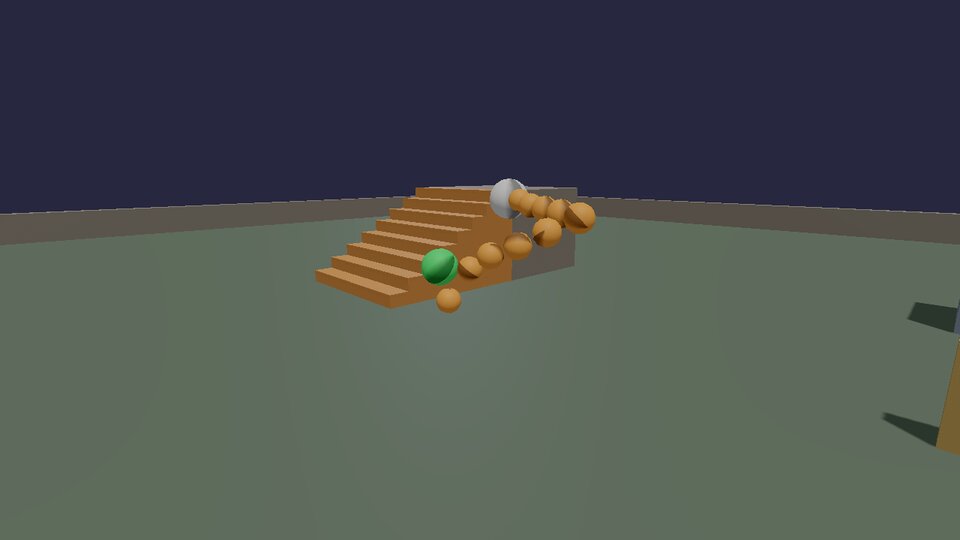
-- ik_arm.lua: two-bone inverse kinematics, worked out in Lua so you can
-- see the maths. Give it a shoulder, two bone lengths and a target, and
-- the law of cosines says where the elbow goes; a "pole" says which way
-- it bends. The engine's kke::solveTwoBone does the same for skeletons.
-- (docs/cookbook/animation.md)

local SHOULDER = Vec(0, 2.2, 0)
local UPPER, LOWER = 1.2, 1.0         -- bone lengths, metres
local POLE = Vec(0, 3.5, -2)          -- the elbow bends toward this point
local BEADS = 5                       -- spheres drawn along each bone

local function moveTo(id, target, dt)
  physics.setVelocity(id, (target - physics.position(id)) / math.max(dt, 1 / 240))
end

-- The solve: returns the elbow and hand positions.
local function solveTwoBone(s, a, b, target, pole)
  local toTarget = target - s
  local d = math.max(0.001, math.min(toTarget:length(), a + b - 0.001))   -- can't reach further than a + b
  local dir = toTarget:normalized()
  -- Law of cosines: the angle at the shoulder between dir and the upper bone.
  local cosA = (a * a + d * d - b * b) / (2 * a * d)
  local sinA = math.sqrt(math.max(0, 1 - cosA * cosA))
  -- The bend direction: the pole, minus its part along dir.
  local toPole = pole - s
  local bend = toPole - dir * toPole:dot(dir)
  if bend:length() < 0.001 then bend = Vec(0, 1, 0) end
  bend = bend:normalized()
  local elbow = s + dir * (a * cosA) + bend * (a * sinA)
  local hand = s + dir * d
  return elbow, hand
end

physics.sphere { pos = SHOULDER, radius = 0.15, color = Vec(0.9, 0.9, 0.9), static = true }
local beads = {}
for i = 1, BEADS * 2 do
  beads[i] = physics.sphere { pos = SHOULDER + Vec(0, -i * 0.2, 0), radius = 0.08, density = 50, color = Vec(0.95, 0.6, 0.2) }
end
local targetBall = physics.sphere { pos = Vec(1, 1, 1), radius = 0.12, density = 50, color = Vec(0.3, 0.9, 0.4) }

local t = 0
hook.Add("Think", "ik_arm.solve", function(dt)
  t = t + dt
  -- The target circles in front of the shoulder, sometimes out of reach.
  local target = SHOULDER + Vec(math.cos(t) * 1.6, math.sin(t * 1.3) * 0.9 - 0.4, 0.9 + math.sin(t * 0.7) * 0.7)
  moveTo(targetBall, target, dt)
  local elbow, hand = solveTwoBone(SHOULDER, UPPER, LOWER, target, POLE)
  -- Beads along shoulder->elbow, then elbow->hand.
  for i = 1, BEADS do
    moveTo(beads[i], SHOULDER + (elbow - SHOULDER) * (i / BEADS), dt)
    moveTo(beads[BEADS + i], elbow + (hand - elbow) * (i / BEADS), dt)
  end
end)
When the target is out of reach, the distance is clamped to the arm's length, so the arm points straight at it instead of breaking.
On a skeleton: the mannequin
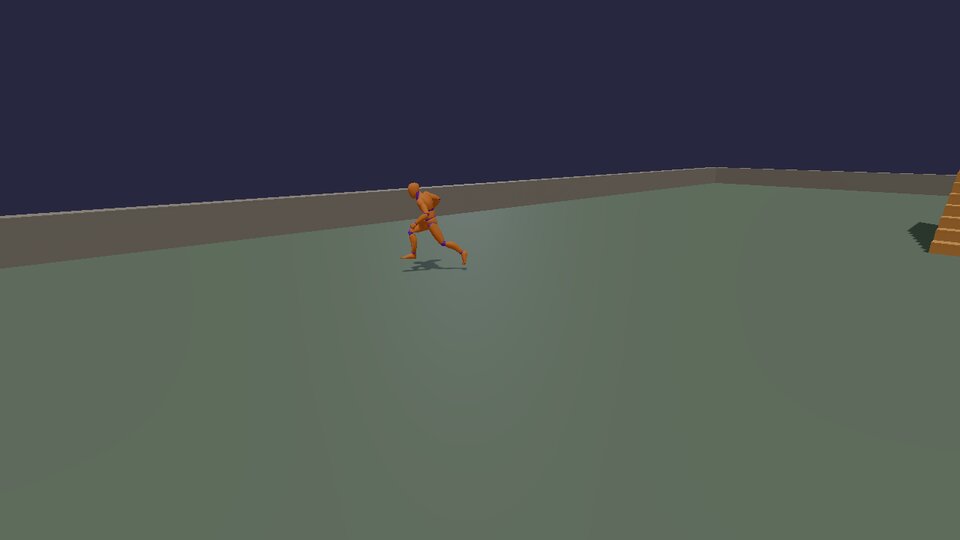
The cookbook game's Mannequin module (games/cookbook/Mannequin.cpp)
has two mannequins. One walks round a circle, speeding up and slowing
down. The other stands with one foot on a step, reaches for a floating
orb and turns its head to look at you.
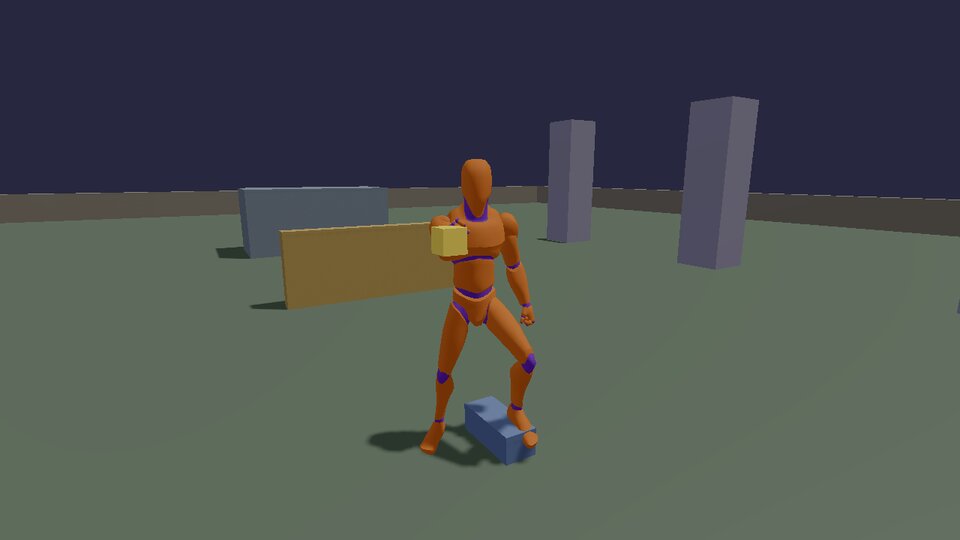
Poses are per-bone translation, rotation and scale (kke::Pose), in each
bone's parent's space. The order every frame is: the Animator plays and
blends clips into a pose, the procedural steps change that pose, and
poseToLocals hands it to the renderer.
Blend spaces
A 1D blend space puts clips along one number, here speed: idle at 0, walk at 1.4 m/s, jog at 3.2. Setting the parameter to the character's speed blends the two nearest clips, at a shared phase so the feet land together instead of sliding.
    // Clips once as poses (AnimationSet), then an Animator per character.
    // A 1D blend space: idle at 0 m/s, walk at 1.4, jog at 3.2. Setting
    // the parameter to the speed blends the two nearest clips, in step.
    m_set = std::make_unique<kke::AnimationSet>(*m_data);
    m_walkAnim = std::make_unique<kke::Animator>(*m_set);
    const int move = m_walkAnim->addBlendState(
        "move", { { { m_set->find("|Idle_Loop"), 0.0f }, { m_set->find("|Walk_Loop"), 1.4f }, { m_set->find("Jog_Fwd_Loop"), 3.2f } } });
    m_walkAnim->play(move, 0.0f);
Each frame the speed rises and falls, a spring smooths it, and the blend space follows:
void Mannequin::updateWalker(float dt) {
    // Speed goes up and down between standing and jogging; a spring keeps
    // the changes smooth, and the blend space follows the speed.
    const float wanted = 1.6f + 1.6f * std::sin(m_time * 0.35f);
    springTowards(m_speed, m_speedVelocity, wanted, 0.4f, dt);
    m_angle += m_speed / circleRadius * dt; // radians: arc length / radius
    m_walkAnim->setParameter(m_speed);
    m_walkAnim->update(dt);

    // Round the circle, facing along it (counter-clockwise seen from above).
    const glm::vec3 at = circleAt + glm::vec3(std::cos(m_angle), 0.0f, -std::sin(m_angle)) * circleRadius;
    const float headingDegrees = glm::degrees(m_angle) + 180.0f; // tangent of the circle
    m_models->setTransform(m_walker, glm::rotate(glm::translate(glm::mat4(1.0f), at), glm::radians(headingDegrees + m_turnToPlusZ),
                                                 glm::vec3(0, 1, 0)));
    if (std::vector<glm::mat4>* locals = m_models->boneLocals(m_walker)) kke::poseToLocals(m_walkAnim->pose(), *locals);
}
Beyond blend spaces the Animator has clip states that crossfade
(play(state, fade)), non-looping states that report when they're done
(finished()), and root motion. The showcase game (games/showcase/)
drives its whole character with one, from idle to vaulting.
Finding the bones
IK works on named chains of bones. findChain looks them up by name;
the head's forward axis is worked out once from the rest pose, because
every skeleton points its bones differently:
    // The chains IK bends (found by bone name) and the head's forward axis
    // in its own space, worked out once from the rest pose.
    m_armR = kke::findChain(*m_data, "upperarm_r", "lowerarm_r", "hand_r");
    m_feet = kke::FootPlacer(*m_data, kke::findChain(*m_data, "thigh_l", "calf_l", "foot_l"), kke::findChain(*m_data, "thigh_r", "calf_r", "foot_r"),
                             findBone(*m_data, "pelvis"));
    m_head = findBone(*m_data, "head");
    if (m_head >= 0) {
        const std::vector<glm::mat4> rest = kke::poseToModel(*m_data, m_set->restPose());
        m_headForward = glm::normalize(glm::inverse(rotationOf(rest[static_cast<size_t>(m_head)])) * fwd);
    }
1. Feet on the ground
kke::FootPlacer casts a ray down from each foot, lowers the pelvis if
one foot must go lower than the capsule's floor, bends the legs with
two-bone IK so each foot lands on what's under it, and tilts it to match
a slope. It works in the model's own space, so the ray's results are
turned into it:
    // 1. Feet on the ground: a ray down from each foot, in model space.
    kke::RigidWorld& w = m_rigid->world();
    auto ground = [&](const glm::vec3& from, glm::vec3& hit, glm::vec3& normal) {
        const kke::RigidWorld::RayHit h = w.raycast(glm::vec3(toWorld * glm::vec4(from, 1.0f)), glm::vec3(0, -1, 0), 1.2f);
        if (!h.hit || h.normal.y < 0.5f) return false;
        hit = model(h.point);
        normal = glm::normalize(glm::mat3(toModel) * h.normal);
        return true;
    };
    if (m_feet.valid()) m_feet.apply(*m_data, pose, kke::FootPlacer::SurfaceQuery(ground), dt);
2. A hand on a target
The engine's two-bone IK is the Lua recipe above, on real bones:
    // 2. The right hand on the orb: two-bone IK (shoulder, elbow, wrist).
    // The pole is where the elbow should point: out and down.
    if (m_armR.valid()) {
        const glm::vec3 orb = orbPosition();
        const glm::vec3 pole = standAt + glm::vec3(-0.8f, 0.6f, -0.3f);
        kke::solveTwoBone(*m_data, pose, m_armR, model(orb), model(pole), 1.0f);
    }
The last argument is the weight: 0 leaves the animated pose, 1 is the full solve. Fading it in and out over a few frames is what makes a hand reach for a ledge and let go without popping (the showcase does exactly that when vaulting).
3. Looking at you
A look-at is one rotation: from where the head faces now to where the target is, limited to what a neck can do. A spring smooths the target so the head doesn't snap when you move quickly.
    // 3. The head looks at the camera: a spring smooths where it looks,
    // turnTowards() limits how far the neck turns (Procedural.h), and the
    // turn goes into the head bone's local rotation.
    if (m_head >= 0) {
        springTowards(m_lookAt, m_lookVelocity, m_app->camera().position, 0.25f, dt);
        const std::vector<glm::mat4> bones = kke::poseToModel(*m_data, pose);
        const size_t head = static_cast<size_t>(m_head);
        const glm::quat headRot = rotationOf(bones[head]);
        const glm::vec3 facing = headRot * m_headForward;
        const glm::vec3 toTarget = model(m_lookAt) - glm::vec3(bones[head][3]);
        const glm::quat turn = turnTowards(facing, toTarget, 60.0f);
        const int parent = m_data->bones[head].parent;
        const glm::quat parentRot = parent >= 0 ? rotationOf(bones[static_cast<size_t>(parent)]) : glm::quat(1, 0, 0, 0);
        // model = parent * local, so a model-space turn T becomes
        // local' = parent^-1 * T * parent * local.
        pose[head].r = glm::normalize(glm::inverse(parentRot) * turn * parentRot * pose[head].r);
    }
The last line is the one piece of bone maths worth remembering: to turn a bone by a rotation given in model space, turn its local rotation by that rotation as seen from its parent.
The helpers
Both come from games/cookbook/Procedural.h, and the unit tests check
them (Cookbook.SpringArrivesWithoutOvershootAtAnyFrameRate,
Cookbook.TurnTowardsStopsAtTheLimit):
// A critically damped spring: `x` chases `goal` as fast as it can without
// overshooting, and `halfLife` is the time it takes to get halfway there.
// Frame-rate independent (the exact solution, not a step of it), so the
// same motion at 30 and 240 fps. After Daniel Holden, "Spring-It-On".
template <typename T>
void springTowards(T& x, T& velocity, const T& goal, float halfLife, float dt) {
    const float d = 2.0f * 0.69314718f / std::max(halfLife, 1e-5f); // ln 2 / (halfLife / 2)
    const T j0 = x - goal;
    const T j1 = velocity + j0 * d;
    const float e = std::exp(-d * dt);
    x = e * (j0 + j1 * dt) + goal;
    velocity = e * (velocity - j1 * d * dt);
}
A critically damped spring is the most useful smoothing there is: camera follow, UI slides, look targets, speed changes. Unlike "move 10% of the way each frame" it behaves the same at any frame rate.
// The rotation that turns direction `from` toward `to`, by at most
// `maxDegrees`. The core of every "look at" (a head following you, a
// turret tracking a target): apply it on top of the animated pose.
inline glm::quat turnTowards(const glm::vec3& from, const glm::vec3& to, float maxDegrees) {
    const glm::vec3 a = glm::normalize(from), b = glm::normalize(to);
    const float angle = std::acos(std::clamp(glm::dot(a, b), -1.0f, 1.0f));
    if (angle < 1e-4f) return glm::quat(1.0f, 0.0f, 0.0f, 0.0f);
    glm::vec3 axis = glm::cross(a, b);
    if (glm::length(axis) < 1e-6f) // opposite: any axis at right angles will do
        axis = glm::cross(a, std::abs(a.y) < 0.9f ? glm::vec3(0, 1, 0) : glm::vec3(1, 0, 0));
    return glm::angleAxis(std::min(angle, glm::radians(maxDegrees)), glm::normalize(axis));
}
More in the engine
- Jiggle physics (hair, tails, soft parts):
kke::JiggleRig, a Verlet chain on top of the pose. Jiggle physics. - Ragdolls: Ragdolls, from limp to getting back up.
- Retargeting one skeleton's clips onto another (the mannequin's clips
on a Synty character):
kke::matchBonesandretargetAnimationsinkke/AnimRig.h. - Locomotion: Movement, how the character decides what to do, and which animation goes with it.
Next: physics.