Jiggle demo
Two scenes about secondary motion: things that lag, overshoot and settle when what they are attached to moves.
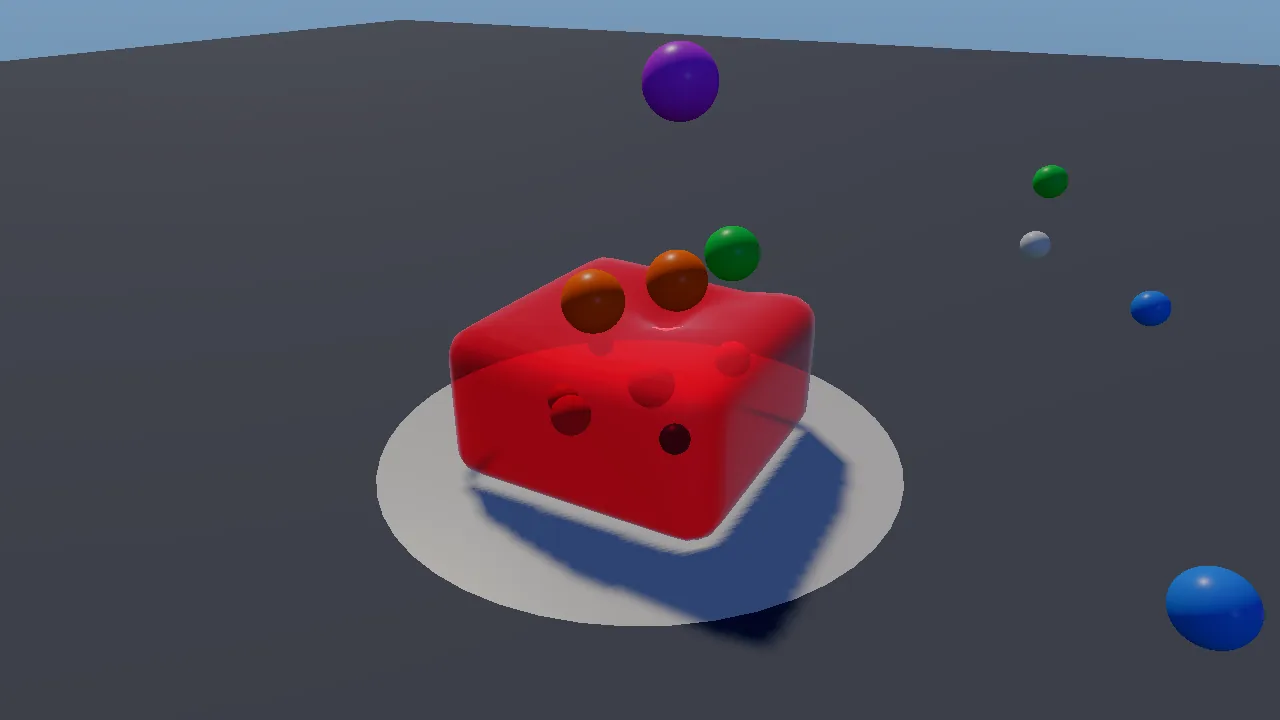
- Jelly. A strawberry jelly with fruit set in it stands on a plate. Coloured balls rain onto it; they dent it, it wobbles, and it throws them back. You can drop a big ball, squish it from above, change how firm it is and change its flavour and look.
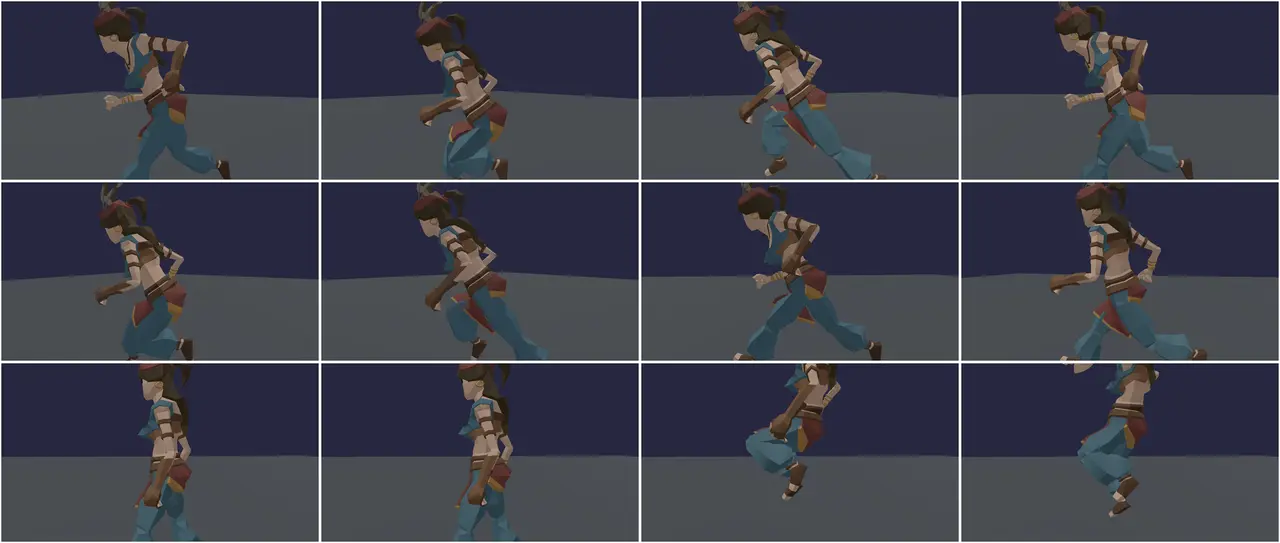
- Body. A realistic woman (
female_body, a free Character Creator 4 model from CGTrader) runs a circle on animation clips: stand, jog, jump, sprint, stop dead, jump, walk. Her file has no skeleton, so the engine rigs her when the demo starts (kke::autoRigHumanoid, docs/AUTO_RIG.md). Her breasts, glutes, belly and thighs jiggle, she wears our strand hair (box braids to start; the panel picks any style and colour), and a twin with the same body and clips but no jiggle can run with her to compare. Withoutfemale_bodya Synty character takes her place, given extra curves in code.
The demo teaches the engine's jiggle physics
(docs/JIGGLE.md): kke::JellyBody (a whole soft
object by lattice shape matching), kke::JiggleRig (bone chains that chase
the animated pose), kke::JiggleSkin (jiggle on the skin with no bones)
kke::addHumanoidSoftTissue (adding shape and soft-tissue bones to a
rig that has none) and kke::autoRigHumanoid (a skeleton for a mesh that
has none). Start here for characters with hair, tails, capes,
antennae or soft bodies; for slimes, jelly or gummy creatures; or for any
cartoon squash-and-stretch.
Run it
The executable is jiggle_demo (kke_add_game(jiggle_demo ...) in
CMakeLists.txt: add_executable on desktop, a shared
library on Android). The root CMakeLists.txt always adds it; it needs
no optional library (the hair needs Jolt, KKE_ENABLE_JOLT, on by
default). The jelly scene needs no files. The body scene needs
female_body or a Synty character pack (see Assets) and
assets/animations/UAL1_Standard.fbx, which is in the repository.
cmake --build build --target jiggle_demo
cd build/bin
./jiggle_demo
KKE_SKIP_INTRO=1 ./jiggle_demo                 # skip the logo intro
KKE_JIGGLE_SCENE=body KKE_JIGGLE_TWIN=1 ./jiggle_demo
| Variable | Effect |
|---|---|
KKE_JIGGLE_SCENE=body (or character) |
start in the body scene (default: jelly) |
KKE_JIGGLE_MOVE=0..4 |
the move: 0 idle, 1 walk, 2 jog, 3 sprint, 4 tour (default) |
KKE_JIGGLE_TWIN=1 |
show the twin without jiggle |
KKE_JELLY_LOOK=0..5 |
the flavour: strawberry, lime, blue raspberry, orange, panna cotta, clear gelatin |
KKE_JIGGLE_CHARACTER=SK_... |
a Synty character instead of the realistic body |
KKE_JIGGLE_BODY=<file> |
a body file to use (rigged or not); default: the first FBX, else OBJ, in <packs>/female_body/ |
KKE_JIGGLE_HAIR=<style> |
her hair at the start: bald, box braids (default), afro, puff, locs, wavy, ... (the panel's list) |
KKE_JIGGLE_VIEW=yaw,pitch,distance |
a set camera angle (radians, metres), for screenshots; in the body scene with "Side view" on, the yaw is from her side |
KKE_JIGGLE_TRACE=1 |
log time, speed, jump height, swing and stretch every frame |
KKE_ASSETS_DIR, KKE_SYNTY_DIR |
where the Synty packs are (else assets/synty/) |
KKE_ANIMATIONS_DIR |
where UAL1_Standard.fbx is (else assets/animations/) |
The benchmark suite runs it with KKE_JIGGLE_MOVE=4
(benchmarks/suite.yaml). Rebindings are
saved to jiggle_demo_input.json.
Controls
The actions are made in JiggleDemoModule::defineInput
(JiggleDemoModule.cpp), in the "Jiggle" group and
the game input context.
| Action | Scene | Keyboard / mouse | Controller |
|---|---|---|---|
Switch jelly / body (jiggle.scene) |
both | Tab | LB (left shoulder) |
Rain balls on / off (jiggle.go) |
jelly | Space | A (south) |
Jump (jiggle.go) |
body | Space | A (south) |
Drop a big ball (jiggle.ball) |
jelly | B | X (west) |
Squish from above (jiggle.squish) |
jelly | P | Y (north) |
Reset the jelly (jiggle.reset) |
jelly | R | B (east) |
Next move (jiggle.move) |
body | M | RB (right shoulder) |
Pick a move: idle, walk, jog, sprint, tour (jiggle.move1 to jiggle.move5) |
body | 1 to 5 | the panel's "Move" row |
Turn the camera (camera.orbit) |
both | left-drag | right stick |
| Pan the camera | both | right-drag | no controller binding yet |
Zoom (camera.zoom) |
both | mouse wheel | d-pad up (closer) / down (further) |
Settings panel (panel.toggle) |
both | F3 or Esc, or click it | View (Back) |
| Developer panels (ImGui) | both | F1, developer builds only | no controller binding yet |
Notes from the code:
readInputonly readsjiggle.ball,jiggle.squishandjiggle.resetin the jelly scene, andjiggle.moveonly in the body scene.jiggle.move1tojiggle.move5are keyboard-only actions, one per move, bound to keys 1 to 5. They can be rebound like the others and rest while the panel is Active.readInputreads them in both scenes, so a move picked in the jelly scene is the one she runs when you switch. They have no pad binding; on a pad, RB cycles through the same five moves.- The camera uses the orbit camera's default
Viewercontrols andsetPadControls(true)(main.cpp). In the body scene with "Camera follows" and "Side view" on, the demo turns the camera every frame to keep looking at her side as she runs round the circle. How far you turn it yourself (mouse or right stick) is kept as an offset from that side view (m_sideYawOffset), so turning left and right still works; pitch and zoom work as usual. Turn "Side view" off to orbit freely while it follows. - Button names are positions: on a PlayStation pad A is Cross, B is Circle, X is Square, Y is Triangle.
The settings panel
The settings are a kke::DemoPanelModule titled "Jiggle physics" on the
right edge (Side::Right), drawn with RmlUi
(docs/DEMO_PANEL.md). It starts open with the
game keeping the controls; the mouse can click and drag any row.
panel.toggle (View on a pad, F3 on the keyboard) makes it Active: up and
down pick a row, left and right change it (hold to sweep), A presses, B or
Esc hands control back. On the keyboard it reads the arrows, Enter and Esc
directly. While it is Active, player 1's game context is off, so A does
not also toggle the rain and B does not reset the jelly. The last row,
"Hide panel", collapses it.
Esc works like a pause menu: it opens the panel with the keyboard on
it, and Esc again goes back to the game. So Esc does not close the
window; the panel's "Quit" row, just above "Hide panel", does.
setEscapeMenu(false) gives Esc back to a game that needs it.
Rows that belong to one scene hide in the other (sectionIf, showIf):
| Section | Rows |
|---|---|
| Jiggle physics | Scene (Jelly / Body); a Tab / LB prompt, shown in the jelly scene |
| Jelly | controls line; Rain balls; Every (0.15 to 2 s); Big ball; Squish; Reset; Firmness (0.03 to 1); Iterations (1 to 8); Damping (0 to 0.2); Look: Flavour, Translucent, Fruit inside, Density (0 to 4), Milkiness (0 to 1); status (particles, triangles, balls, deformation in mm, solve time) |
| Body | the character's name, or why it could not load; controls line; Hair (Bald, box braids, afro, puff, high-top fade, twist-out, bantu knots, cornrows, locs, two-strand twists, straight, long, wavy, curly, short); Hair colour (black, dark brown, auburn, blonde), the realistic body only; Twin without jiggle; Move; Jump; Show points; Camera follows; Side view; Breasts: Stiffness, Soften, Stretch, Drag, Gravity, Blend; Glutes: Stiffness, Drag, Blend; status (bones, zones, points, time per frame, asleep, peak swing, stretch) |
When no character could be loaded, the Body section shows only the reason (the other rows return a null value and hide).
How it plays
It is a sandbox with no goal. In the jelly scene a ball of 7 to 12 cm falls from 1.4 to 2 m every 0.7 s; at most 14 balls exist, the oldest removed first. Balls that roll off the plate and stop, fly more than 4 m away, or go non-finite are removed. The big ball is 16 cm, dropped from 2.2 m. Reset makes a fresh jelly but keeps the firmness, iterations and damping you set.
In the body scene, the tour (move 5) repeats every 17 s:
| Time (s) | Target speed | Event |
|---|---|---|
| 0 to 2.5 | stand | |
| 2.5 to 6.5 | jog (3.6 m/s) | jump at 5 |
| 6.5 to 10 | sprint (6.2 m/s) | |
| 10 to 13 | stand: a dead stop | jump at 11.5 |
| 13 to 17 | walk (1.6 m/s) |
The comment above it: "Starts and stops are where jiggle shows (and where bad jiggle shows most)."
How it works
Startup and the frame
main.cpp creates the Application (1280 x 720), sets the mood
playful (a gradient sky, "a bright cartoon sky for bouncy things"), sets
the far plane to 100 m and adds the modules in this order:
InputModule(jiggle_demo_input.json)UiModule(RmlUi, for the panel)OrbitCameraModule(distance 2.6 m, pitch -0.45, yaw 0.5, target (0, 0.3, 0)),setPadControls(true)ModelModule: draws and skins the characterskke_jiggle::JiggleDemoModule, the demo; it declaresModelModuleas a required dependency ("draws the characters")DemoPanelModule("Jiggle physics", Side::Right)DebugControlModule, its ImGui window hiddenStatsModule
JiggleDemoModule::init builds the plate (a 48-sided disc of 0.8 m) and
the floor (a square of 24 m) as DynamicMeshRenderers, makes the jelly
(resetJelly), loads and prepares the character (setupBodies), reads
the environment variables, picks the scene (setScene, which also places
the camera), defines the input and builds the panel.
update reads the input, caps the frame time at 0.1 s, then runs either
updateJelly or updateBodies: only the visible scene is simulated.
render draws the floor, then the jelly scene (plate, balls and fruit as
sphere impostors, then the jelly over them) or, in the body scene, the
debug points when "Show points" is on. The characters themselves are
drawn by ModelModule. renderShadow adds the jelly to the shadow map.
The jelly: kke::JellyBody
kke/JigglePhysics.h,
JigglePhysics.cpp. A box filled with
a lattice of particles. resetJelly sets it up:
p.min = glm::vec3(-0.42f, 0.0f, -0.42f);
p.max = glm::vec3(0.42f, 0.5f, 0.42f);
p.cells = glm::ivec3(7, 4, 7);
p.stiffness = 0.22f;
p.iterations = 3;
p.damping = 0.015f;
7 x 4 x 7 cells means 8 x 5 x 8 = 320 particles. Each step, every 2 x 2 x 2
cell finds the rotation that best fits its eight particles to their rest
shape, and pulls them toward that rotated rest shape by stiffness.
Cells overlap, so the whole lattice holds its shape but can bend and
dent locally (lattice shape matching: Muller et al. 2005, per-cell
regions after Rivers and James 2007). The bottom layer is glued to the
plate (pinBottom). The body steps internally at 120 Hz
(Params::stepHz).
Balls collide with the particles, and with the top of the jelly as a height field, so a fast ball dents it but never ends up inside. The collision is two-way: the ball pushes the jelly, the jelly throws the ball back.
After step, deform() moves the render surface. The surface is a
rounded mesh (14 quads per box face, buildSurface(14)) embedded in the
lattice by trilinear weights. The fruit is the same idea: each piece has a
rest position, and deformedPoint(rest) says where the jelly has carried
it this frame.
squish() is one call: poke at the middle of the top with an impulse of
6 m/s downward over a 0.35 m radius.
The demo uploads the surface every frame with each vertex's uv holding
the look's density and milkiness, because that is where
DynamicMeshRenderer::drawTranslucent reads them:
// drawTranslucent reads uv.x = density, uv.y = milkiness.
for (size_t i = 0; i < pos.size(); ++i) v[i] = kke::Vertex{ pos[i], look.tint, nrm[i], glm::vec2(m_density, m_milkiness) };
drawTranslucent is a reusable material in two passes over the front
faces: the first multiplies what is already drawn by the transmittance
(Beer-Lambert through a thickness that grows toward the silhouette, so
edges look richer), the second adds Fresnel reflection, light scattered
inside and light shining through from behind. That is why render draws
the plate, balls and fruit first and the jelly last. With "Translucent"
off it is drawn as an ordinary opaque mesh.
The character: setupBodies
This runs once, at start:
- Find
UAL1_Standard.fbxwithkke::findAssetFolder("assets/animations", {"KKE_ANIMATIONS_DIR"}, ...). - Find the packs folder (
KKE_ASSETS_DIR,KKE_SYNTY_DIR, elseassets/syntynear the working directory or the executable). The realistic body comes first:KKE_JIGGLE_BODYif set, else the first.fbx, then.obj, underfemale_body/there (unlessKKE_JIGGLE_CHARACTERasks for a Synty character). - Load her. Character Creator's see-through shells (eye occlusion, tear
lines, eyelashes) are dropped: drawn opaque they would cover her eyes.
An OBJ has no units and hers is in centimetres, so a body over 10 m
tall is scaled by 0.01. With no skeleton in the file,
kke::autoRigHumanoid(body, ual)fits UAL's skeleton to her, weights her skin and lifts her arms from the A-pose into UAL's T-pose (about 25 ms; logged with the arm angle). If rigging fails she stands still and the panel says why. Without the realistic body, scan the folder into akke::AssetCatalogand pick a Synty character:KKE_JIGGLE_CHARACTERif set, else the first found ofSK_Character_Female_Gypsy,SK_Character_Female_Peasant_01,SK_Character_HipsterGirl,SK_Character_Female_Druid,SK_Character_Dummy_Female_01, with its pack's texture throughkke::packLoadOptions. - Add soft-tissue bones:
kke::addHumanoidSoftTissue(body, tissue). A Synty character is also reshaped (bust = 0.075,glutes = 0.06,hips = 0.03, metres of extra volume); the realistic body keeps the artist's shape (all 0). It finds the chest, pelvis and thighs by bone name, adds two breast and two glute bones, moves the nearby skin onto them, and returns the rig chains and the skin zones (belly and thighs). Anything it cannot find is logged at info: a character without a breast or belly bone just jiggles less. - Retarget the UAL clips onto the reshaped body (
kke::matchBones,kke::retargetAnimations). This comes after step 4 on purpose: the comment says "the new bones have no UAL counterpart and stay at rest in them", which is what lets the jiggle move them. - Register the model with
ModelModule::add, build anAnimatorwith a 1D blend spacemove(idle 0, walk 1.6, jog 3.6, sprint 6.2 m/s) and clip states for jump start, fall loop and land. -
Spawn two instances. The second (
jiggle = true) gets akke::JiggleRigfrom the chains and akke::JiggleSkinfrom the zones. The first is the twin without jiggle. -
Hair (realistic body only,
findHeadandbuildHair): her head is a sphere fitted to the top of the head's skin;kke::hairstyleOnHeadgrows the style on it, facing where she faces, its rest pose falling a little back so long hair lies down her back, not through it. The hair lives in its ownkke::RigidWorldwith a head sphere and neck, shoulder and chest proxies (seen only by hair) that follow her head andspine_03bones each frame. The scalp under the hair is painted the root colour (the head's own triangles near a root, lifted 1.5 mm), so skin between the drawn hairs doesn't read as thin hair. Changing the style or colour in the panel rebuilds it.
If a step fails, m_bodyStatus says why and the panel shows it; the jelly
scene is unaffected.
The character each frame: updateBodies
- Pick the target speed (the tour's schedule or the chosen move) and ease toward it: 5 m/s2 speeding up, 9 m/s2 slowing down ("real people take a moment to speed up and slow down").
- Move around a circle of 2.3 m radius. A jump is a simple ballistic height (3.6 m/s up, 9.81 down) with the jump-start, fall and land clips.
- Feed the speed to the blend space and update the
Animator. - For each instance: place it on the circle (the two are half a lap
apart), facing along it, and take the animated
Pose. For the jiggle one:
d.rig.apply(m_rig, pose, toWorld, dt);
d.skin.apply(m_rig, pose, toWorld, dt);
m_models->setSkinJiggle(d.instance, d.skin.offsets());
JiggleRig::apply moves verlet points toward where the pose puts
them, then turns (and with stretch, lengthens) the soft-tissue bones
in the pose to follow the points. JiggleSkin does the same for
points that displace the skin near them after skinning. Then
kke::poseToLocals writes the pose into the instance's bone locals.
5. The camera follows the jiggling one at 1 m height. With "Side view" it
looks from outside the circle at her side, "across the direction she
runs: where lag and bounce show best". Each frame it first adds how
far the camera was turned since the last frame to m_sideYawOffset,
then sets the yaw to her side plus that offset, so the player can
still look around her.
JiggleRig steps at a fixed 90 Hz inside apply and interpolates the
offset from the pose, not the positions, so it looks the same at any
frame rate (docs/JIGGLE.md "How it's built").
"Show points" draws each simulated point (pink, glowing) and the point the pose wants it at (blue). The distance between the two is the jiggle.
The body panel's sliders
The panel edits the live JiggleSettings of the rig through Ref
functions that return a pointer, or null to hide the row. Both breasts
share one setting and both glutes another, so the sliders edit chain 0 or
2 and the share callback copies it to chain 1 or 3:
for (size_t c = 1; c < m_bones && c < 2; ++c) rig->settings(c) = rig->settings(0);
if (m_bones >= 4) rig->settings(3) = rig->settings(2);
Design decisions
- Jiggle driven by the difference from animation. From docs/JIGGLE.md: points chase where the pose puts them, so the authored pose always wins, nothing drifts, and a character standing still does not bounce on its own.
- Its own light solver instead of FEMFX. JIGGLE.md "Why not FEMFX":
FEMFX costs about 0.2 ms per body per step and needs a tet mesh; the
rig costs tens of microseconds for a whole character and needs only the
skeleton. The jelly (
JellyBody, about 0.8 ms) also works on builds without FEMFX, which is the default. - Soft-tissue bones added in code. Most game rigs, Synty's included,
have no such bones.
addHumanoidSoftTissueadds them at load time, so any humanoid can use the demo without an artist changing the model. - Clips retargeted after the new bones exist. The new bones then stay at rest in every clip, and the jiggle alone moves them.
- A tour with starts, stops and jumps. The comment in
updateBodies: starts and stops are "where jiggle shows (and where bad jiggle shows most)", so the default move is built to show it. - A twin without jiggle. The note in the panel: it runs "with the same body and clips, but no jiggle, to compare". Seeing both is how you judge whether the settings help.
- A camera from the side. The comment in
updateBodies: "the camera follows the jiggling one (not her jumps: that would hide them)", and the side view is "where lag and bounce show best". - Translucency in two passes without sorting. JIGGLE.md: no sorting and no extra render targets; draw it after the opaque scene.
- Only the visible scene is simulated.
updatesteps the jelly or the bodies, never both. - A fixed ball budget. At most 14 balls (
kMaxBalls); the oldest goes. - The settings panel is RmlUi, with rows per scene. Commit 944d596
moved the ImGui window to
kke::DemoPanelModuleso a controller can reach every setting (docs/DEMO_PANEL.md). The comment abovebuildPanel: "Rows for the other scene hide."
Tuning
| What | Where | Effect |
|---|---|---|
jelly box, cells = (7, 4, 7) |
resetJelly |
size and particle count; cost grows with particles |
stiffness = 0.22 ("Firmness") |
resetJelly, panel |
higher = firmer, less wobble |
iterations = 3 |
resetJelly, panel |
more = stiffer and costlier |
damping = 0.015 |
resetJelly, panel |
higher = settles sooner |
| ball radius 0.07 to 0.12, height 1.4 to 2, every 0.7 s, restitution 0.55 | updateJelly, dropBall |
how hard and how often it is hit |
kMaxBalls = 14 |
JiggleDemoModule.cpp | the ball budget |
kLooks: tint, density, milkiness |
JiggleDemoModule.cpp | the flavours; density is absorption, milkiness is cloudiness |
m_tissue.bust = 0.075, glutes = 0.06, hips = 0.03 |
init |
extra volume in metres; 0 keeps the artist's shape |
HumanoidSoftTissue::breast / glute / skin settings |
kke/JigglePhysics.h | the starting jiggle; the panel changes breasts and glutes live |
kWalkSpeed 1.6, kJogSpeed 3.6, kSprintSpeed 6.2 |
JiggleDemoModule.cpp | must match the UAL clips' own speeds, or the feet slide |
| acceleration 5, deceleration 9 m/s2 | updateBodies |
faster stops = bigger jiggle |
| jump speed 3.6 m/s | jump |
higher jumps = bigger landings |
| circle radius 2.3 m | updateBodies |
tighter circles add sideways lean and sway |
The jiggle settings themselves (stiffness, soften, stretch, drag, air drag, gravity, blend, limits) are explained in docs/JIGGLE.md "Settings".
Engine features it uses
| Feature | Header / module | Doc |
|---|---|---|
| Soft object by lattice shape matching | kke::JellyBody (kke/JigglePhysics.h) |
JIGGLE.md |
| Jiggle bone chains | kke::JiggleRig, kke::JiggleSettings |
JIGGLE.md |
| Jiggle on the skin | kke::JiggleSkin, ModelModule::setSkinJiggle |
JIGGLE.md |
| Curves and soft-tissue bones for any humanoid | kke::addHumanoidSoftTissue |
JIGGLE.md |
| Translucent material | DynamicMeshRenderer::drawTranslucent (kke/SphereImpostors.h) |
JIGGLE.md |
| Sphere impostors | kke::SphereImpostorRenderer |
|
| Skinned models, bone locals | kke::ModelModule (kke/modules/ModelModule.h) |
|
| Animation state machine, blend space | kke::Animator, kke::AnimationSet (kke/Animator.h) |
MOVEMENT.md |
| Retargeting clips | kke::matchBones, kke::retargetAnimations (kke/AnimRig.h) |
|
| Finding packs and assets | kke::findAssetFolder, kke::AssetCatalog (kke/AssetCatalog.h) |
SCENES.md |
| Actions, bindings, prompts | kke::InputModule |
INPUT.md |
| Settings panel | kke::DemoPanelModule |
DEMO_PANEL.md |
Orbit camera with pad controls, setView, setTarget |
kke::OrbitCameraModule |
DEMO_PANEL.md |
| Sky and colour look | Application::setMood("playful") |
MOODS.md |
Assets
The jelly scene uses no files: the jelly, plate, floor, balls and fruit are built in code.
The body scene uses (docs/SCENES.md "Jiggle demo, body scene"):
| What | Source | In the repo? |
|---|---|---|
The clips: Idle_Loop, Walk_Loop, Jog_Fwd_Loop, Sprint_Loop, Jump_Start, Jump_Loop, Jump_Land |
Quaternius Universal Animation Library, assets/animations/UAL1_Standard.fbx, CC0 (docs/DEPENDENCIES.md) |
yes |
The realistic body: female_body.zip (Obj/obj.obj and its textures) |
"Realistic Human Female Body rigged gameready", free on CGTrader (Kees's copy is on the asset share: tools/fetch_assets.sh female_body) |
no |
or, without it, the character: SK_Character_Female_Gypsy, falling back to SK_Character_Female_Peasant_01 or SK_Character_Female_Druid |
Synty POLYGON Fantasy Characters | no |
or SK_Character_HipsterGirl |
Synty POLYGON City Characters | no |
or SK_Character_Dummy_Female_01 |
Synty POLYGON Prototype | no |
| The character's texture | the same pack's atlas, via packLoadOptions |
no |
Neither the body nor the Synty packs are ever committed. Put
female_body/ in assets/synty/ (where tools/fetch_assets.sh puts it)
or set KKE_ASSETS_DIR. Without it, put a Synty pack in
assets/synty/POLYGON_Fantasy_Characters/ (a symlink works). When no
body is found, the demo logs it at info level (the files are optional),
the panel's Body section shows the message ("No body found. Put
female_body (or a female Synty character: POLYGON Fantasy Characters,
City Characters) in assets/synty/ or set KKE_ASSETS_DIR."), and the body
scene shows only the floor. The jelly scene works either way. If
UAL1_Standard.fbx is missing, the demo logs it at info (BUG-080 in
BUGS.md, fixed) and says so in the panel.
The playful mood is a gradient sky with no picture and no ambience.
Make a game like this
- Copy the folder.
cp -r games/jiggle_demo games/my_soft, rename the target in CMakeLists.txt (including thegame.jsoncopy), the namespacekke_jiggleandname(), and addadd_subdirectory(games/my_soft)to the rootCMakeLists.txt.tools/new_gamemakes Lua-only games fromgames/template; jiggle has no Lua bindings, so this starts from C++. - Pick one scene. For characters keep
setupBodiesandupdateBodies; for soft objects keep the jelly half. Delete the other. - Hair, tails, capes. No new bones needed: make a
JiggleRig::Chain{ firstBone }on the rig's own bones (JIGGLE.md "Use") and callrig.applyafter the Animator, every frame. - Your own character. Load it, call
addHumanoidSoftTissuebefore retargeting, and pass 0 volume to keep the artist's shape. Check the log for "soft tissue: no ..." lines: bone names it could not find. - Drive it from your gameplay. Replace the circle with your
character controller: the rig only needs the pose, the instance's world
transform and
dt. A teleport farther thanteleportDistanceresets the rig instead of whipping it across the map. - Soft objects in play. A
JellyBodytakes balls (Ball) for collision;pokeis an explosion or a stomp;deformedPointcarries anything embedded in it (eyes on a slime). - Read next: JIGGLE.md, DEMO_PANEL.md, SCENES.md for asset packs.
Pitfalls the code shows:
- Add soft-tissue bones before retargeting clips, or the clips may try to drive bones they know nothing about.
- Run the rig after the Animator and before
poseToLocals, on the samePose, every frame. - Draw translucent things after everything opaque.
- The body panel's sliders assume the chain order breasts left, right,
then glutes left, right, which is what
addHumanoidSoftTissuereturns when it finds both. - Cap the frame time (
std::min(ctx.dt, 0.1f)here) so a hitch does not hand a huge step to the soft body.
Files
| File | What is in it |
|---|---|
| main.cpp | The application, the mood, the module list and the camera |
| JiggleDemoModule.h | The module, scenes, moves, the Dancer struct, all state |
| JiggleDemoModule.cpp | Flavours, fruit, the jelly and balls, loading and reshaping the character, the tour, jiggle per frame, drawing, input actions, the settings panel |
| game.json | Marketplace manifest (id, title, tags, modules) |
| CMakeLists.txt | The executable, its shaders (including translucent_absorb, translucent_light), the manifest, and kke_use_ui (the RmlUi shaders and fonts) |