Input
Games in KKE never ask "is W down?". They ask about actions: "was
jump pressed?", "how much move?". Each action has default keys and
buttons, and players can rebind all of them in the settings, controllers
and flight sticks included. The whole system is described in
Input; these recipes are the parts you use every day.
Your own action: hold to charge, release to throw
input.define(id, label, key) makes an action with a default key. Hold
T to charge, let go to throw a ball where the camera looks: harder
(and redder) the longer you held it.
-- throw.lua: your own controls. Hold T to charge, let go to throw; the
-- longer you hold, the harder it flies. Players can rebind T in the
-- settings like any other action. (docs/cookbook/input.md)

-- define(id, label, default key): once per action. The label is what
-- the rebinding screen shows.
input.define("throw", "Throw a ball (hold to charge)", "T")

local charging = false
local charge = 0              -- seconds held
local MAX_CHARGE = 1.5

hook.Add("Think", "throw.update", function(dt)
  if input.held("throw") then
    -- Held: build up charge while the key is down.
    charging = true
    charge = math.min(charge + dt, MAX_CHARGE)
  elseif charging then
    -- Not held any more, but it was last frame: it was just released.
    charging = false
    local power = 4 + 16 * (charge / MAX_CHARGE)  -- 4 to 20 m/s
    local from = camera.position() + camera.forward() * 1.5
    physics.sphere {
      pos = from,
      radius = 0.18,
      density = 800,
      velocity = camera.forward() * power + Vec(0, 2, 0),
      color = Vec(1, 1 - charge / MAX_CHARGE, 0.2),  -- yellow to red with charge
    }
    print(string.format("Thrown at %.0f m/s", power))
    charge = 0
  end
end)
input.pressed(id)is true for one frame when the action starts,input.held(id)for as long as it's on, andinput.value(id)gives an analog value (a trigger pulled half way is 0.5).- "Released" is "held last frame, not now": keep a variable (
charging) that remembers last frame. - Key names are SDL's:
"T","Space","Left Shift","Right Ctrl","Up","F5","Keypad 1".
Toggles, and the standard actions
Every game made from the starter template already has the character
actions: move, look, jump, sprint, walk, crouch, fire,
aim, interact and camera.toggle, on keyboard and mouse and on a
controller. Scripts read them like their own. Here L switches a lamp
on and off, and holding sprint makes it glow brighter.
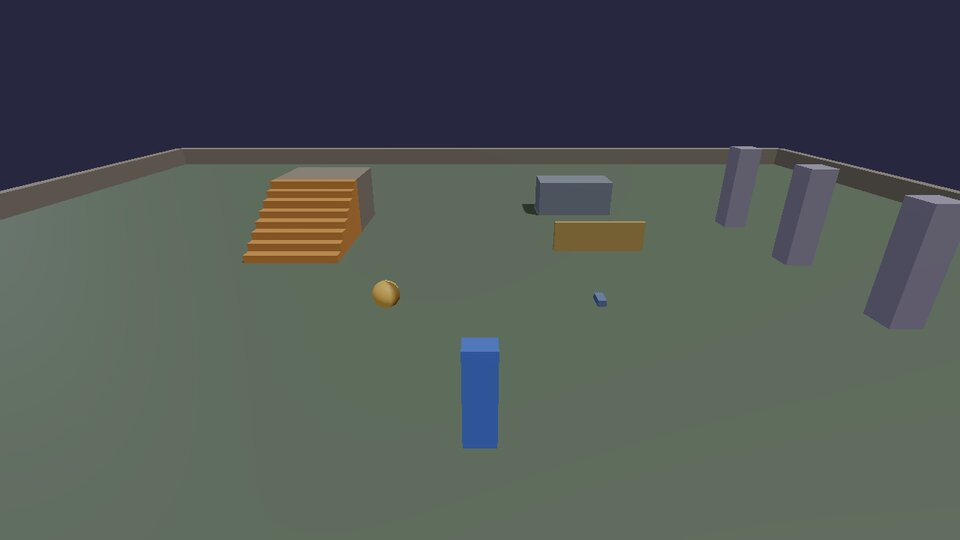
-- toggle.lua: one key, two ways. L switches a lamp on and off (pressed:
-- once per press), and holding the engine's own "sprint" action makes it
-- glow brighter while held. (docs/cookbook/input.md)

input.define("lamp", "Lamp on/off", "L")

local lamp = nil        -- the lamp's body id while it's on
local bright = false

local function setLamp(on, glow)
  if lamp then physics.remove(lamp); lamp = nil end
  if on then
    local c = glow and Vec(1, 1, 0.7) or Vec(0.9, 0.7, 0.3)
    lamp = physics.sphere { pos = Vec(-2, 1.2, 3), radius = glow and 0.4 or 0.3, color = c, static = true }
  end
end

setLamp(true, false)

hook.Add("Think", "toggle.keys", function()
  if input.pressed("lamp") then
    setLamp(lamp == nil, bright)           -- on if it was off, off if on
  end
  -- The standard character actions (move, jump, sprint, ...) are there
  -- too: read them the same way.
  local sprinting = input.held("sprint")
  if lamp and sprinting ~= bright then
    bright = sprinting
    setLamp(true, bright)
  end
end)
Binding in C++: pads, holds, chords and axes
In C++ you get everything the bindings screen can do. The cookbook game
adds its own controls in games/cookbook/Bindings.h: a button on both
keyboard and pad, a hold and a release on one key, a Ctrl chord, and an
axis driven by two keys and both triggers.
inline void addCookbookBindings(kke::InputMap& in) {
    using kke::InputModule;
    using kke::Trigger;

    // A button action: Tab on the keyboard, the View/Back button on a pad.
    in.defineAction({ "camera.next", "Next camera", "Camera" });
    in.addBinding(InputModule::bind("camera.next", InputModule::key(SDL_SCANCODE_TAB)));
    in.addBinding(InputModule::bind("camera.next", InputModule::pad(SDL_GAMEPAD_BUTTON_BACK)));

    // Hold to charge, release to throw: two actions on one key.
    in.defineAction({ "throw.charge", "Charge a throw", "Actions" });
    in.defineAction({ "throw", "Throw", "Actions" });
    in.addBinding(InputModule::bind("throw.charge", InputModule::key(SDL_SCANCODE_Q), Trigger::Hold));
    in.addBinding(InputModule::bind("throw", InputModule::key(SDL_SCANCODE_Q), Trigger::Release));

    // A chord: Ctrl+R resets the level; plain R stays free for something else.
    in.defineAction({ "level.reset", "Reset the level", "Game" });
    kke::Binding reset = InputModule::bind("level.reset", InputModule::key(SDL_SCANCODE_R));
    reset.modifiers.push_back(InputModule::key(SDL_SCANCODE_LCTRL));
    in.addBinding(reset);

    // An axis from two keys and a trigger: zoom in with X or the right
    // trigger (analog: half pulled = half speed), out with the left one.
    in.defineAction({ "zoom", "Zoom", "Camera", "game", kke::ActionType::Axis1D });
    kke::Binding in1 = InputModule::bind("zoom", InputModule::key(SDL_SCANCODE_X), Trigger::Continuous);
    in.addBinding(in1);
    kke::Binding out1 = InputModule::bind("zoom", InputModule::key(SDL_SCANCODE_Z), Trigger::Continuous);
    out1.scale = -1.0f;
    in.addBinding(out1);
    kke::Binding padIn = InputModule::bind("zoom", InputModule::padAxis(SDL_GAMEPAD_AXIS_RIGHT_TRIGGER), Trigger::Continuous);
    padIn.deadzone = 0.1f;
    in.addBinding(padIn);
    kke::Binding padOut = InputModule::bind("zoom", InputModule::padAxis(SDL_GAMEPAD_AXIS_LEFT_TRIGGER), Trigger::Continuous);
    padOut.deadzone = 0.1f;
    padOut.scale = -1.0f;
    in.addBinding(padOut);
}
Call it from your module's init, after the standard actions, then save
them as the defaults the settings screen resets to:
kke::InputMap& in = m_input->map(0); // player 0; split screen has more
kke::InputModule::defineCharacterActions(in);
cookbook::addCookbookBindings(in);
m_input->commitDefaults();
and read them in update the same way Lua does:
if (in.pressed("camera.next")) nextCamera();
if (in.held("throw.charge")) charge += dt;
if (in.pressed("throw")) throwBall(charge);
zoom -= in.axis("zoom") * 4.0f * dt;              // -1 .. 1
const glm::vec2 move = in.axis2("move");           // stick or WASD, length up to 1
The unit test Cookbook.BindingsDoWhatTheInputPageSays
(tests/test_cookbook.cpp) presses these keys and buttons on a fake
keyboard and pad and checks each action does what this page says.
Triggers at a glance
| Trigger | Fires | Good for |
|---|---|---|
Press |
on the way down, held while down | jump, interact |
Release |
on the way up | throw on release |
Hold |
after holdTime (0.35 s) held |
charge, hold to lean |
Tap |
released within tapTime |
quick actions sharing a key with a hold |
DoubleTap |
second press within 0.3 s | dodge, quick reload |
Continuous |
the whole time, with its analog value | movement, zoom, throttle |
Toggle |
each press flips it | crouch, walk |
What players change is saved in input.json next to the game; the
defaults stay in your code. Left-handed layouts, twin flight sticks and
rebinding screens are in Input.
Next: move things around.