The cookbook game
The C++ half of the cookbook. It is the
starter template's setup (the same level, the same character) plus the
eight camera types most games use, switchable while you play, screen
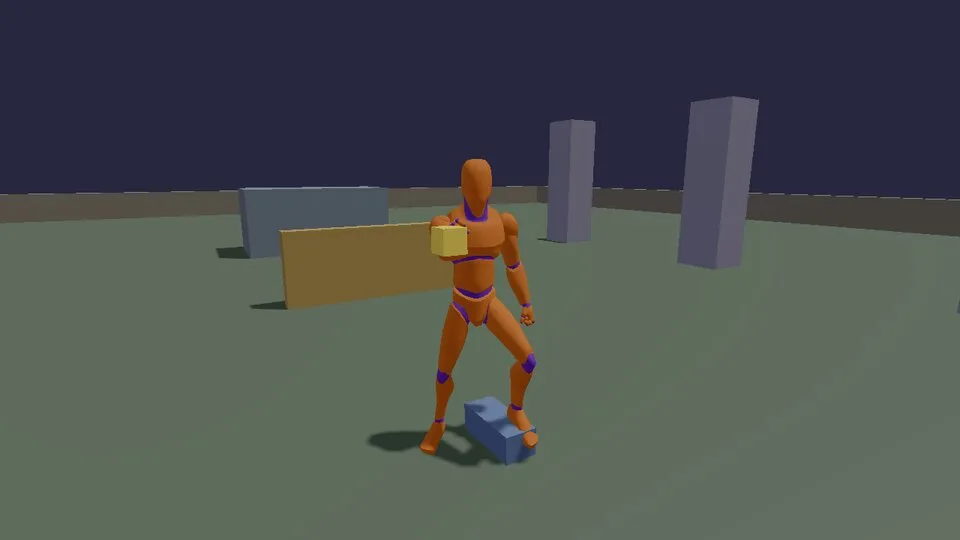
shake, and two animated UAL mannequins: one walking round a circle on a
blend space, one standing with a head that looks at you, a hand that
reaches for a floating yellow ball and feet planted on a step. The
player is the same mannequin, animated (the starter game's PlayerBody).
It is the reference for choosing a camera (shooter, action game, top-down, isometric strategy, platformer, fixed-camera horror, cutscenes) and for procedural animation on a real skeleton (blend spaces, look-at, two-bone IK, foot placement). The docs include regions of these files word for word, and CI builds and runs it, so the recipes cannot quietly go stale.
Run it
The executable is cookbook (set(GAME_NAME cookbook) in
CMakeLists.txt). The root CMakeLists.txt builds it
with the starter template, when KKE_ENABLE_JOLT and ENGINE_ENABLE_LUA
are on (the default):
cmake --build build --target cookbook
cd build/bin && ./cookbook
KKE_SKIP_INTRO=1 ./cookbook              # skip the engine's logo intro
KKE_COOKBOOK_VIEW=topdown ./cookbook     # start on that camera
KKE_COOKBOOK_MANNEQUINS=0 ./cookbook     # no mannequins
KKE_COOKBOOK_VIEW takes first, third, orbit, topdown, iso,
side, fixed or cinematic.
Controls
Click the view to take the mouse (Esc lets it go). Movement is the engine's standard character actions, as in the starter game.
| Action | Keyboard and mouse | Controller |
|---|---|---|
| Move (forward depends on the camera, see below) | WASD | left stick |
| Look | mouse | right stick |
| Jump / vault / climb | Space | A |
| Sprint | Left Shift (hold) | click the left stick (toggle) |
| Walk | Left Alt (hold) | push the left stick part of the way (the speed follows the stick) |
| Pick a camera | 1 to 8 | D-pad right cycles through them |
| Next camera | Tab | D-pad right |
| First or third person | V | click the right stick |
| Zoom the camera arm in / out | X / Z | RT / LT (analog) |
| Play a camera path over the stairs | P | d-pad up |
| Shake the camera | K | d-pad left |
| Show or hide the guide card | H | d-pad down |
| Pause: settings, button remapping, quit | Esc | Start or View / Back |
| Developer panels | F1 | none: a developer tool, keyboard only |
Bindings.h also defines throw.charge / throw (hold Q,
release Q) and level.reset (Ctrl+R) as examples for
docs/cookbook/input.md; nothing in this
game acts on them.
How it plays
There is no goal: it is a playground. Walk around the starter level (stairs, a fence, a climbing block) plus four pillars to look past, and switch cameras to feel what each does to the same scene. The walking mannequin circles at (-11, 0, 9); the standing one is at (3, 0, 1), next to where you start.
A card in the corner (scripts/guide.lua) says what the game is, and changes as you walk: next to the standing mannequin it explains the ball (arm IK), the head (look-at) and the step (foot placement); at the walker, the blend space; at the pillars, the cameras; at the stairs and the fence, moving. It always lists the camera buttons. H or the d-pad down hides it. The docs' screenshots leave it out (run_recipes.py copies the scripts without it).
How it works
Startup and the frame
main.cpp makes a 1280 x 720 application called "KKE
Cookbook", sets the playful mood and adds: SettingsModule,
InputModule("input.json"), RigidBodyModule, ModelModule,
UiModule, AudioModule (panel hidden), ScriptModule (scripts from the
source folder when it exists, else the copy next to the executable, as
in the starter template), cookbook::CookbookPlayer,
cookbook::Mannequin and StatsModule.
The cameras (CookbookPlayer)
CookbookPlayer.cpp is the starter template's
PlayerModule with a View enum of eight cameras. A camera is two
points and a field of view: every frame the module sets position,
target and fovDegrees on app.camera(). setView picks a
kke::CameraRig mode for the four the rig does itself; the other four
are placed by hand in update:
| View | How it is made |
|---|---|
first |
CameraRig::Mode::FirstPerson: eyes at the head; the character turns with the view and its body is not drawn |
third |
CameraRig::Mode::ThirdPerson: a spring arm that ray-casts through Jolt so it never goes through walls |
orbit |
CameraRig::Mode::Orbit: circles the character; look turns it |
cinematic |
CameraRig::Mode::Cinematic: a smooth path through keyframes; by default a looping 18 s tour set in init |
topdown |
11 m above the feet and 2 m back (a slight tilt so walls read as walls), fov 50 |
iso |
9, 11, 9 m from the feet at 45 degrees, fov 30 (a narrow lens: almost no perspective) |
side |
12 m out along +Z at chest height plus 1 m, fov 50; the stick only moves left and right |
fixed |
bolted at fixedCameraAt (9, 5, 9), turning to watch the chest, fov 50 |
Which way is forward. moveForward() answers that per camera, so the
stick feels right in each: the rig's forward for the rig cameras, "up on
the screen" (-Z) for top-down, away from the camera diagonally for iso,
nothing for side-on (the right vector becomes +X), and away from the
wall camera for fixed.
Screen shake is "trauma" from 0 to 1 that fades by 0.9 a second.
shakeOffset(trauma, time) in Procedural.h turns it into
yaw, pitch and roll in degrees: a few sines at unrelated rates (smooth,
not random jumps), scaled by trauma squared so small bumps stay small. It
is applied on top of whichever camera is active by turning target and
up:
const glm::vec3 wobble = shakeOffset(m_trauma, m_time);
const glm::vec3 look = cam.target - cam.position;
const glm::vec3 side = glm::normalize(glm::cross(look, glm::vec3(0, 1, 0)));
glm::mat4 turn = glm::rotate(glm::mat4(1.0f), glm::radians(wobble.x), glm::vec3(0, 1, 0));
turn = glm::rotate(turn, glm::radians(wobble.y), side);
cam.target = cam.position + glm::vec3(turn * glm::vec4(look, 0.0f));
Zoom changes the rig's arm length by the zoom axis, clamped to 1.5
to 8 m.
The Lua side (view.and player.)
registerLua() adds:
| Lua | Does |
|---|---|
view.mode(name) |
switches camera (an unknown name is a Lua error listing the valid ones); view.mode() returns the current one |
view.shake(amount) |
adds trauma (default 0.5) |
view.path(keys, loop) |
a cinematic path: { {pos = Vec(..), target = Vec(..), time = 0}, ... }, at least two keys; switches to cinematic |
player.position(), player.teleport(pos), player.facing() |
the same as the starter template, so recipes run in both games |
scripts/cameras.lua uses them: it defines actions
view.first to view.cinematic on keys 1 to 8, P plays a three-key path
over the stairs and returns to third person after 6.5 s
(timer.Simple), and K adds 0.4 trauma.
scripts/level.lua is the starter level plus four
pillars at x = 10 and the 18 cm step under the standing mannequin's foot.
The mannequins (Mannequin)
Mannequin.cpp loads UAL1_Standard.fbx once, builds an
AnimationSet (the clips as poses) and spawns two instances, each with
its own Animator:
- The walker: a 1D blend space
move(idle at 0, walk at 1.4, jog at 3.2 m/s). Its wanted speed rises and falls (1.6 + 1.6 * sin(0.35 t)),springTowardssmooths it, the blend parameter is set to the speed, and it moves round a 3 m circle by arc length (angle += speed / radius * dt), facing along it. - The stander plays the idle clip, then poses on top of it, in model space, in three steps:
kke::FootPlacercasts a ray down from each foot through Jolt and plants it (one foot lands on the step).kke::solveHumanArmputs the right palm on the near side of the ball, which drifts in a slow figure eight to the mannequin's right (never across the body or down at the hips); the elbow bends only forward, leans out and down, and the shoulder lifts its collarbone when the hand goes high, as a person's does.- The head looks at the camera: a spring smooths the look point,
turnTowardslimits the turn to 60 degrees, and the model-space turn is converted to the head bone's local rotation (local' = parent^-1 * turn * parent * local).
springTowards in Procedural.h is a critically damped
spring solved exactly (after Daniel Holden's "Spring-It-On"), so it moves
the same at 30 and 240 frames per second.
Where the docs quote the code
pulled into the docs pages by name (for example
--8<-- "games/cookbook/Mannequin.cpp:blend" in
docs/cookbook/animation.md). Rename
or remove a marker and the page breaks, so edit the code, not the
markers.
How recipes are run and screenshotted
tools/docs_site/run_recipes.py
runs every Lua recipe in docs/cookbook/recipes/ for a few seconds each
and fails on any script error (CI runs it under Xvfb, in the step
"Cookbook recipes run headless"):
- Normally each recipe is copied, with the starter template's
game.lua, into a temporary scripts folder and run instarter_game(KKE_SCRIPTS_DIRpoints at it). - With
--shotsit runs incookbookinstead, with this game'slevel.lua,KKE_COOKBOOK_MANNEQUINS=0, and an extra script that holds the camera still withview.path(two keyframes at the same place). ImageMagick (import -window root) grabs the screen after a few seconds and saves a 960 x 540 JPEG todocs/cookbook/media/. - Each camera type is captured with
KKE_COOKBOOK_VIEW=<name>(camera-<name>.jpg), and the two mannequins from fixed cameras (mannequin.jpg,walker.jpg).
tools/docs_site/run_recipes.py --bin build/bin            # run them all
tools/docs_site/run_recipes.py --shots maze.lua camera:iso  # re-shoot two
The header-only helpers (Bindings.h,
Procedural.h, PhysicsRecipes.h) are
also compiled into tests/test_cookbook.cpp, which checks that the
bindings do what the input page says, the spring arrives without
overshoot at any frame rate, shake grows with trauma squared,
turnTowards stops at its limit and dropCrate lands where
groundBelow says the ground is.
Design decisions
- Recipes are tested, not just written. The header comment in
main.cpp: the docs quote this code and CI runs it. Snippet markers,
run_recipes.pyandtest_cookbook.cppmake a stale recipe a failed build. - The same level and the same
player.*as the starter game, so a Lua recipe that works in one works in the other, and the screenshots show the level readers have. - Four cameras are rig modes, four are a few lines by hand. The
comment in
setView. The hand-made ones show that a camera is only a position and a target. - Forward depends on the camera (
moveForward), because a stick that means "camera forward" in a top-down or side-on view feels wrong. - Shake is trauma squared over smooth noise (comment in Procedural.h, after Squirrel Eiserloh's GDC talk): small bumps stay small and the view never jumps.
- Helpers are header-only and pure (Procedural.h, PhysicsRecipes.h), so the unit tests run exactly the code the docs quote.
- Mannequins can be switched off (
KKE_COOKBOOK_MANNEQUINS=0), so Lua recipe screenshots show only the recipe.
Tuning
| What | Where | Effect |
|---|---|---|
| Camera placements and fovs | CookbookPlayer::update |
what each view looks like |
fixedCameraAt (9, 5, 9) |
CookbookPlayer.h | where the fixed camera hangs |
| the default cinematic keyframes | CookbookPlayer::init |
the looping tour |
trauma decay (0.9 per second), maxDegrees (6) |
update, shakeOffset |
how long and how hard shakes are |
| zoom rate (4 m/s), 1.5 to 8 m | update |
the camera arm |
standAt, circleAt, circleRadius |
Mannequin.h | where the mannequins are |
| blend speeds (0, 1.4, 3.2) | Mannequin::init |
where idle, walk and jog meet |
| look-at limit (60 degrees), spring half-lives | updateStander |
how far and how fast the head turns |
Engine features it uses
| Feature | Header / module | Doc |
|---|---|---|
| Camera modes, cinematic paths | kke::CameraRig (kke/CameraRig.h) |
cookbook/cameras.md |
| Character movement | kke::Locomotion |
MOVEMENT.md |
| Binding keys, pad buttons, axes and chords in C++ | InputModule, kke::InputMap |
cookbook/input.md, INPUT.md |
| Lua bindings from C++ | kke::ScriptVM::registerFunction |
cookbook/cpp.md, SCRIPTING.md |
| Skinned models | ModelModule |
|
| Blend spaces, clip states | kke::Animator, kke::AnimationSet |
cookbook/animation.md |
| Arm IK, foot placement | kke::solveHumanArm, kke::FootPlacer (kke/AnimRig.h) |
PROCEDURAL_ANIMATION.md |
| Jolt bodies and ray casts from C++ | kke::RigidWorld |
cookbook/physics.md |
Assets
- The mannequin:
assets/animations/UAL1_Standard.fbx(Quaternius' Universal Animation Library, CC0; see docs/DEPENDENCIES.md), found inassets/animations/orKKE_ANIMATIONS_DIR. Clips used:Idle_Loop,Walk_Loop,Jog_Fwd_Loop. Without it the log says "assets/animations/UAL1_Standard.fbx not found: no mannequins" and the rest of the game runs. - No Synty packs. The level is Lua boxes; the player is the same mannequin (two boxes when the file is missing).
Make a game like this
- Make your game from the starter template (
tools/new_game my_game). - For a different camera, copy the case you want from
CookbookPlayer::updateinto yourPlayerModule::update, and copymoveForward()so the stick matches it. - For a Lua-switchable camera, copy
registerLua()'sview.*functions into yourPlayerModule::registerLua. - For an animated character, copy the loading and blend-space code from
Mannequin::init, and draw it at your capsule's feet instead of the block (kke_demo and Climb Race do this). - Read docs/cookbook/cameras.md and docs/cookbook/animation.md.
Pitfalls:
- Set the field of view in every camera case: the hand-placed cameras set their own, and the rig cameras reset it to the rig's setting.
- Pose on top of the animated pose, in model space, in order: feet,
then IK, then look-at. Convert a model-space turn to the bone's local
rotation through its parent, as
updateStanderdoes. - Keep the
--8<--markers when you edit files the docs quote.
Files
| File | What is in it |
|---|---|
| main.cpp | The modules and where scripts are read from |
| CookbookPlayer.h, CookbookPlayer.cpp | The player, eight cameras, screen shake, view.* and player.* |
| Mannequin.h, Mannequin.cpp | The walker (blend space) and the stander (feet, hand IK, look-at) |
| Bindings.h | addCookbookBindings: C++ input binding examples |
| Procedural.h | springTowards, shakeOffset, turnTowards |
| PhysicsRecipes.h | dropCrate, groundBelow: Jolt from C++ |
| scripts/cameras.lua | Keys 1 to 8, the camera path (P), shake (K) |
| scripts/level.lua | The starter level, pillars, the mannequin's step |
| scripts/guide.lua | The card that says what you're looking at |
| ../template/PlayerBody.cpp | The player's animated mannequin, shared with the starter game |
| CMakeLists.txt | The executable and files copied next to it |