Procedural animation demo
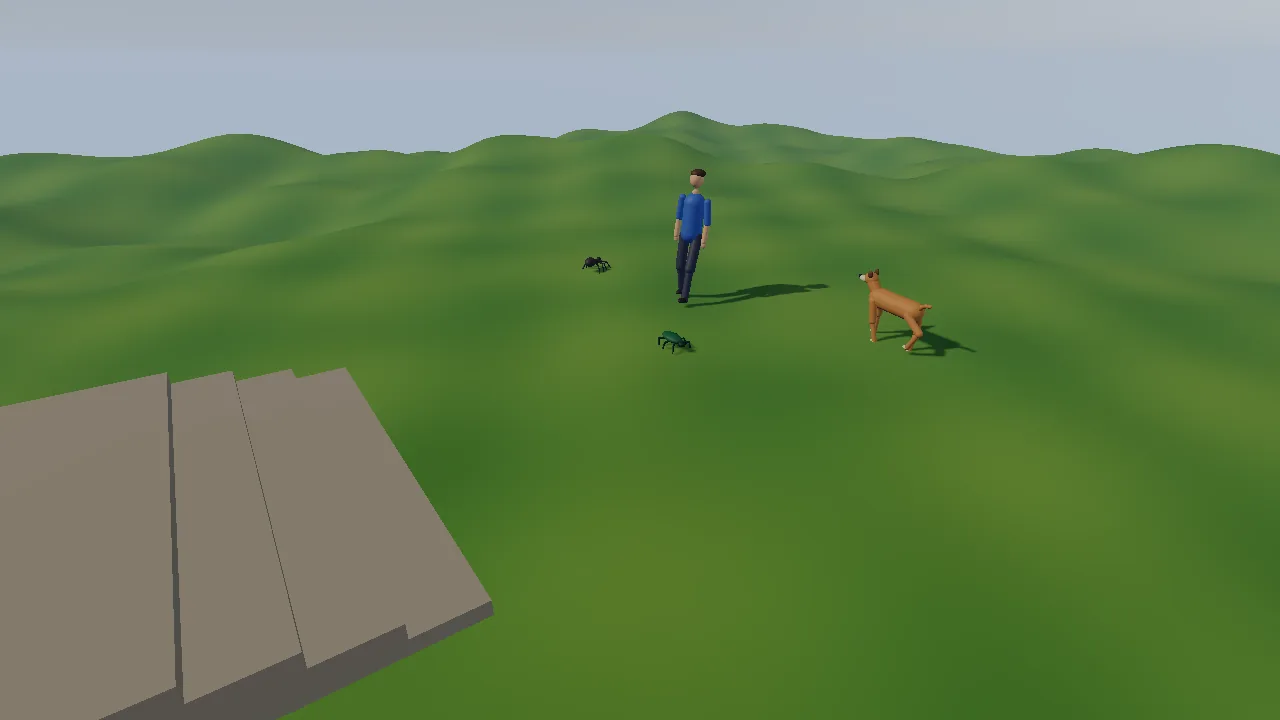
Four creatures with no animation clips at all: a spider (8 legs), a beetle
(6), a dog and a person. Each is a skeleton generated in code and moved
every frame by the procedural animation blocks
(docs/PROCEDURAL_ANIMATION.md):
kke::ProceduralGait places the feet on the hills and the steps,
kke::LookAt turns the heads toward the camera, FABRIK wags the dog's tail,
and kke::ActiveRagdoll (Jolt joint motors) makes the dog and the person
stagger when hit, fall when hit hard, and get up again. Creatures are drawn
from their bones as capsules and ellipsoids, so no art packs are needed.
This demo is the starting point for games with creatures that must walk on uneven ground without a clip for every case: insects and spiders, robots and mechs, animals of any size, and characters that react physically to hits instead of playing a canned flinch. It is also the smallest complete example of the order the layers go in: controller, gait, arm swing, tail, look-at, then physics on top.
Run it
The executable is procedural_demo (CMakeLists.txt).
The root CMakeLists.txt only builds it when KKE_ENABLE_JOLT is on (the
default): the ground and the ragdolls are Jolt bodies.
| Variable | Effect |
|---|---|
KKE_SKIP_INTRO=1 |
skip the logo intro |
KKE_PROC_VIEW=yaw,pitch,distance |
camera angle (degrees) and distance (metres); the default is -35,-25,6.5 |
KKE_PROC_FOCUS=spider\|beetle\|dog\|person |
the camera follows that creature |
KKE_PROC_GAIT=walk\|trot\|gallop |
the dog's gait (any name kke::gaitFromName knows) |
KKE_PROC_HIT=<seconds> |
hit the focused dog or person (else the person) from the side at that time |
KKE_PROC_HIT_SPEED=<m/s> |
how hard that hit and a normal click are (default 3; about 4 and up knocks them down) |
KKE_PROC_QUIT=<seconds> |
quit after that long, logging each creature's gait, speed and state every 2 s |
KKE_PROC_TRACE=1 |
log a hit body's balance, weakest joint and lean every frame |
KKE_PROC_STATION=<0-5> |
start the tour at that station |
Controls
The mouse and the keys 0 to 3 are read as raw SDL events in
ProceduralDemoModule::onEvent. Everything else is an action from
ProceduralDemoModule::defineInput (player 1, the "Creatures" group, the
default game context) or from the orbit camera, so it works on a
controller and can be rebound; rebindings are saved to
procedural_demo_input.json.
A controller has no cursor, so it aims with the middle of the screen: the
panel draws a small crosshair there (setPadCrosshair(true) in
main.cpp) while you use a pad and the panel is not Active.
The pad buttons do exactly what a click at the crosshair would.
| Action | Keyboard and mouse | Controller |
|---|---|---|
Call everyone to a flag (proc.call) |
left click the ground | A (south): a flag at the crosshair |
Hit the dog or the person (they stagger) (proc.hit) |
left click them | X (west), aimed at the crosshair |
Hard hit (they fall, then get up) (proc.hard) |
Shift + left click them | Y (north), aimed at the crosshair |
| Scare a bug (it runs off) | left click it | X or Y at the crosshair |
Tour: next / previous station (proc.next, proc.prev) |
N / B | d-pad right / left |
Tour: hide or show the card (proc.guide) |
H | click the left stick |
Dog: next gait (proc.gait: auto, walk, trot, gallop) |
G | RB (right shoulder) |
| Dog: auto / walk / trot / gallop | 0 / 1 / 2 / 3 | the panel's "Dog gait" row |
Orbit the camera (camera.orbit) |
right drag | right stick |
Pan the camera (camera.pan) |
middle drag | left stick |
Zoom (camera.zoom) |
mouse wheel | d-pad up (closer) / down (further) |
| Move the camera target | WASD (Q / E down / up, Shift faster) | the left stick (above) |
Settings panel (panel.toggle) |
F3 or Esc, or click it | View (Back) |
| Engine developer panels (ImGui) | F1, developer builds only | none (developer tools) |
| Quit | the panel's Quit row (Esc opens the panel) | the panel's Quit row |
Notes from the code:
- A is "call" only:
click(..., groundOnly = true)skips the creatures (the comment: the pad's 'call' is "never a hit"). X and Y do what a left click does, so X or Y with nothing under the crosshair also plants the flag. - A left click on the panel does not reach the scene:
onEventreturns whenm_app->uiCapturesMouse()(or ImGui wants the mouse). - The camera is
OrbitCameraModuleinEditorcontrols (left click is free for the demo), withsetPadControls(true)(right stick turns, d-pad zooms) andsetPadPan(true)(the left stick moves the point it looks at across the ground).KKE_PROC_FOCUSsets the target every frame, which overrides panning. - Button names are positions: on a PlayStation pad A is Cross, X is Square, Y is Triangle.
On a touch screen, two fingers turn and zoom the camera (the
OrbitCameraModule default).
The panel
The panel is a kke::DemoPanelModule titled "Procedural animation" on
the left edge, drawn with RmlUi
(docs/DEMO_PANEL.md). It starts collapsed
(main.cpp), so the tour's card is the first thing you read; opened, the
game keeps the controls and the mouse can click and drag any row.
panel.toggle (View on a pad, F3 on the keyboard) makes it Active: up and
down pick a row, left and right change it, A presses, B hands control
back. While it is Active, player 1's game context is off, so the sticks
and A, X and Y rest. The last row, "Hide panel", collapses it.
Esc works like a pause menu: it opens the panel with the keyboard on
it, and Esc again goes back to the game. So Esc does not close the
window; the panel's "Quit" row, just above "Hide panel", does.
setEscapeMenu(false) gives Esc back to a game that needs it.
buildPanel adds one section, "Procedural animation":
| Row | What it does |
|---|---|
| note | "No animation clips: every step is planned." |
| hint | the controls for the device you hold (a mouse and keyboard line, a controller line) |
| Dog gait | Auto, Walk, Trot, Gallop (the same as 0 to 3, G and RB) |
| Hit strength | 1 to 9 m/s in steps of 0.5: the speed of a normal hit (click, X, and the timed KKE_PROC_HIT); starts at KKE_PROC_HIT_SPEED or 3 |
| one line per creature | name, gait, speed, head turn, and "(staggering)", "(down)" or "(getting up)" while it is a ragdoll |
How it plays
The tour
Kees asked what this demo is for (2026-09-28: "im missing the reason to use it and how it could be handy"), and picked a guided tour (2026-10-03). A card at the bottom left walks through six stations (Tour.cpp). Each points the camera at one creature and says what you see, which games need it ("Use it for") and what to try, with the buttons for the device you hold:
| # | Station | Camera on | What it shows |
|---|---|---|---|
| 1 | Creatures with no animations | the meadow | the idea: motion worked out while they move |
| 2 | Feet that find the ground | the spider | the bugs walk to a flag on top of the steps: feet find each step |
| 3 | Walk, trot, gallop | the dog | gaits picked by speed; the dog's gait is set back to auto |
| 4 | Looking at you | the person, close | heads follow the camera within the neck's limits |
| 5 | Hit, stagger, fall, get up | the person | the tour hits it every 6 s while it stands, light then hard |
| 6 | Your turn | the meadow | everything, with a pointer to docs/PROCEDURAL_ANIMATION.md |
KKE_PROC_STATION=<0-5> starts at a station (screenshots). With
KKE_PROC_FOCUS or KKE_PROC_VIEW set and no station, the camera stays
where those put it.
Playing
It is a toy, not a game: no goal and no end. The creatures wander between random spots in a 18 x 18 m area in the middle of the meadow. Click the ground (or press A with the crosshair on it) and a red flag appears for 20 seconds; everyone walks to a ring around it. The dog cycles through walk (6 s), trot (6 s) and gallop (6 s) by itself unless you pick a gait. Heads turn toward the camera when it is within 7 m, and the dog wags faster when the camera is within 4 m.
The panel lists each creature's gait, speed, head turn and state (staggering, down, getting up).
How it works
Startup and the frame
main.cpp sets the mood morning and adds, in order:
SettingsModule("settings.json")RigidBodyModule(Jolt)InputModule(procedural_demo_input.json)UiModule(RmlUi, for the panel)AudioModule, its panel hidden: it plays the mood's ambience loop (meadow_day)OrbitCameraModule, withsetPadControls(true)andsetPadPan(true)procedural_demo::ProceduralDemoModuleDemoPanelModule("Procedural animation")withsetPadCrosshair(true)StatsModule, its window hidden
ProceduralDemoModule::init builds the ground, makes the four creatures,
places them, reads the KKE_PROC_* switches, and puts the orbit camera in
Editor controls (left click is free for the demo) with a distance of 0.6
to 30 m and a pitch that never goes above level. Last it defines the input
actions (defineInput) and builds the panel (buildPanel).
Each frame update first calls readInput (the pad's call, hit, hard
hit and next gait), then, with dt clamped to 1/20 s:
- For each creature: if it has a ragdoll,
updatePhysical; elsethink(where to go, how fast),move(the controller) andanimate(the pose). - The timed hit (
KKE_PROC_HIT), and the camera follow (KKE_PROC_FOCUS). - Every creature and the flag are appended into one vertex list and
uploaded to a single
DynamicMeshRenderer. - The
KKE_PROC_QUITlog and quit.
render stores the frame's view and projection (for clicks) and draws the
ground and the creatures; renderShadow draws both into the shadow map.
The ground
groundHeight(x, z) is flat near the middle and hilly further out:
const float r = std::sqrt(x * x + z * z);
const float amp = glm::smoothstep(7.0f, 14.0f, r);
return amp * (0.9f * std::sin(0.28f * x + 0.4f) * std::cos(0.23f * z) + 0.35f * std::sin(0.9f * x) * std::sin(0.8f * z + 1.0f)) +
       0.04f * std::sin(2.3f * x) * std::cos(1.9f * z);
buildGround samples it on a 48 x 48 m grid every 0.4 m, with normals from
finite differences, and adds it to Jolt as a static triangle mesh. A
flight of four steps (0.12 m each) up to a platform at x = 3.25 to 6.5 m
gives the feet something sharp to find. The steps are both drawn and added
as static Jolt boxes.
Feet find the ground with ground(), a Jolt ray cast straight down that
only accepts static bodies, so a foot never lands on a ragdoll lying
on the grass.
Building a creature
Each creature is a kke::ModelData with bones only (no meshes), built with
addBone(model, name, parent, offset):
- Spider and beetle (
makeSpider):kke::makeLegs(8 or 6, length, width, hipHeight)lays out mirror pairs of legs. For each leg the code adds an upper, lower and foot bone, putting the knee wherekke::kneePositionsays, and records aTwoBoneChain. The gait comes fromkke::legsFromSkeleton, andLookAtturns the head bone (50 degrees yaw, 30 pitch at most). - Dog (
makeDog): bones named like Quaternius' farm animals (Hips,Torso,FrontUpLeg.L,BackLowLeg.R,Tail1..4, ...). The comment says why: "so buildQuadrupedRagdoll and quadrupedLegChains find everything".kke::findIkChain(m, "Tail1", "Tail4")makes the tail chain;LookAt::quadrupedfinds Neck and Head. - Person (
makePerson): Synty / Unreal-style names (Pelvis,spine_01..03,neck_01,head,Thigh_L,calf_l,Foot_L, ...), whichbuildHumanoidRagdollandLookAt::humanoidknow.
Each creature also gets a list of Parts: a capsule between two bones, or
an ellipsoid at one bone with an offset and radii. Those are what you see.
The rest pose comes from kke::AnimationSet(rig).restPose().
Think and move: the controller
The gait never moves a creature; a controller does, like a player's input or an AI would. Here it is a point on the ground with a heading:
thinkpicks the goal: keep the flee spot while fleeing, a slot on a 0.7 m ring around the flag while called, else a new random spot every 3 to 7 s (plus 3 s for everyone but the dog). The wanted speed is the creature'scruise, slowing near the goal and to 35% when the goal is more than 60 degrees off; the turn rate is 4 x the angle, up tomaxTurn. The dog's cruise comes from its gait: 1.1 m/s walk, 2.6 trot, 5.5 gallop. A fleeing bug goes 2.5 x faster.moveturns and moves the point, keeps it inside x, z = -20..20, and sets its height from the ground ray.
Animate: the layers
animate builds the body frame from position and yaw, then:
c.gait.update(body, velocity, turnRate, ground, dt): the gait plans steps. Each foot stays planted until its turn, then swings to where it will be needed, found by ray-casting the ground.animatedPosestarts from the rest pose and applies, in order:kke::applyGait: the body sways and every foot goes onto its planned spot with two-bone IK;- arm swing (person only): the upper arms rotate against the gait phase, up to 30 degrees at 1.6 m/s;
- the tail (dog only):
kke::solveFabriktoward a target that swings side to side, with a pole above the tail root; LookAt::applytoward the camera, or back to forward when the camera is more than 7 m away.kke::poseToModelturns the pose into model-space matrices, and the body transform puts them in the world.appendCreaturedraws the parts from those matrices.
Hits: the active ragdoll
click(x, y, hard, groundOnly) is shared by the mouse and the pad. A left
click passes the mouse position; readInput passes the middle of the
window (the crosshair) for A, X and Y:
const float cx = float(w) * 0.5f, cy = float(h) * 0.5f;
if (m.pressed("proc.call")) click(cx, cy, false, true);
if (m.pressed("proc.hit")) click(cx, cy, false, false);
if (m.pressed("proc.hard")) click(cx, cy, true, false);
It builds a ray from that point through the stored view and projection
(the comment notes Vulkan's clip space: y down, depth 0 to 1). Unless
groundOnly is set, it finds the nearest creature whose body bone passes
within a radius of the ray (0.45 m person, 0.35 m dog, 0.2 m bug). No
creature means the ground: a Jolt ray cast places the flag.
hit() on a bug starts a 2.5 s flee to a spot 4 m away from the camera.
On the dog or the person:
- If there is no ragdoll yet, it builds one from the current bone
positions (
kke::buildQuadrupedRagdollorbuildHumanoidRagdollwith the creature's mass, 25 or 70 kg), binds the skeleton to it (bindSkeletonToRagdoll), creates it in Jolt with the creature's current velocity, and starts akke::ActiveRagdollaimed at the current pose. - It finds the ragdoll body nearest the click, calls
c.active.hit(body, push)(weakens the muscles there and knocks the balance), pushes that body in Jolt, and pushes the pelvis with 30% of the push.
The push is along the click ray, flat, at the panel's "Hit strength"
(m_hitSpeed: KKE_PROC_HIT_SPEED, else 3 m/s) for a normal hit or
9 m/s for a hard one, plus 0.5 m/s up.
While a creature has a ragdoll, updatePhysical runs instead of think and
move:
c.active.setTargets(c.binding, animWorld);   // where the muscles aim
c.active.update(dt, bodies);                 // balance, strength, state
if (c.active.physical()) {
    m_rigid->driveRagdoll(c.handle, c.active.drive());
    ...
} else {
    m_rigid->destroyRagdoll(c.handle);
- The target pose is the creature standing where its pelvis is now (the
gait is reset there each frame), so "once down, it gets up wherever it
ended up". While it is still in the
Active(staggering) state, the controller point stays put, so the muscles pull back toward where it stood. - The drawn pose is the ragdoll's (
kke::poseFromRagdoll); while getting up it blends toward the animated pose withgetUpBlend(). - When the state machine returns to animated, the ragdoll is destroyed and the gait resets under the body.
The state machine (Animated -> Active -> GettingUp, or Active -> Fallen
-> GettingUp) and the Jolt motor drive are explained in
docs/PROCEDURAL_ANIMATION.md,
"Active ragdoll".
Input, the camera and the panel
defineInput makes four actions. Three have only a pad button, because
the mouse and Shift already do them as clicks; proc.gait has G and RB:
action("proc.call", "Call everyone to the middle of the screen", SDL_GAMEPAD_BUTTON_SOUTH);
action("proc.hit", "Hit what's in the middle of the screen", SDL_GAMEPAD_BUTTON_WEST);
action("proc.hard", "Hit it hard", SDL_GAMEPAD_BUTTON_NORTH);
m.defineAction({ "proc.gait", "Dog: next gait", "Creatures" });
commitDefaults() then lets a saved rebinding file override them. The
dog's gait is kept twice: m_dogGait (a kke::Gait, what think uses)
and m_gaitIndex (0 to 3, what the panel's choice edits). gaitOf(index)
turns one into the other; the keys, G, RB and the panel all set the index
and then the gait, so every control and the panel agree.
OrbitCameraModule in Editor mode does the mouse orbit, pan, zoom and
WASD target moves; with pad controls on it also reads camera.orbit,
camera.zoom and camera.pan. KKE_PROC_FOCUS calls setTarget every
frame, which overrides the WASD moves and the left stick.
buildPanel builds the rows listed under The panel. The
creature lines are live text: a lambda per creature that formats its
state each frame, so the panel needs no update code.
Design decisions
- No clips at all. The header says every creature is "a generated skeleton driven by kke::ProceduralGait + kke::applyGait". It proves the gait alone gives a walk, trot and gallop, and CMakeLists.txt notes there is "nothing to download".
- The controller moves, the gait follows. docs/PROCEDURAL_ANIMATION.md:
"The controller (AI, player input, kke::Locomotion) moves the creature as
a point with a heading."
thinkandmovestand in for any AI or player. - Real bone names on generated skeletons. The dog uses Quaternius names and the person Synty names, so the same ragdoll builders, leg finders and look-at presets that work on real models work here.
- Feet only land on static ground, never on a ragdoll (
ground(), comment "Only the level: not a ragdoll lying on it"). - The ragdoll exists only while it is needed. It is created on the first hit and destroyed when the creature is animated again, so standing creatures cost no physics.
- Motors, not a limp ragdoll. The first commit's message: calm is judged by sway so a stagger settles back through getting up, and an assist on the pelvis (and chest on four legs) with gravity fed forward is what keeps a hit character on its feet. A world without motors (FEMFX) would only go limp.
- One mesh for all creatures, rebuilt every frame from capsules and ellipsoids. Simple and dependency-free; fine for four creatures.
- Headless switches instead of input for tests.
KKE_PROC_HIT,KKE_PROC_QUITandKKE_PROC_TRACElet a script take the screenshots and check that a hit character falls and gets up, with no one at the mouse. The pad controls can be scripted too: the same commit that added them (a9d24ad) madeKKE_VIRTUAL_PAD_SCRIPTaccept SDL axis names (leftx,righty, ...), so a script can move the sticks (docs/INPUT.md "Testing without hardware"). - A controller aims with the middle of the screen. A pad has no
cursor, so the panel draws a crosshair (
setPadCrosshair; its header comment: what 'click' means without a mouse, "the demo acts on the middle of the screen") and the left stick moves the view under it (setPadPan). The sameclickfunction serves both, so a pad hit and a mouse hit behave the same. - A pad button that only calls. A mouse click decides between flag and
hit by what is under the cursor. On a pad the crosshair often sits on a
creature, so A passes
groundOnly(the comment: the pad's 'call' is "never a hit") and X and Y are the hits. - The panel is RmlUi, not ImGui. Commit a9d24ad: "the ImGui HUD is now a DemoPanel with a pad crosshair". The rule in docs/DEMO_PANEL.md: ImGui (F1) is for developers, what a player uses is RmlUi, so a controller reaches every setting.
Tuning
| What | Where | Value | Effect of raising it |
|---|---|---|---|
| Cruise speed | makeSpider / makeDog / makePerson, c.cruise |
spider 0.55, beetle 0.35, dog 1.2, person 1.3 m/s | faster creatures (the gait picks longer strides and changes gait) |
| Dog gait speeds | think |
1.1 / 2.6 / 5.5 m/s | |
| Turn limit | c.maxTurn |
120 to 240 deg/s | tighter turns |
| Acceleration | think |
dog 5, others 2.5 m/s^2 | snappier starts |
| Leg layout | makeLegs(count, length, width, hipHeight) in makeSpider |
scaled by size |
bigger bugs |
| Gait feel | GaitSettings via c.gait.settings() |
engine defaults (step 0.25, lean 0.5, bob 0.04, ...) | see the doc |
| Look limits | LookAt::Settings in makeSpider |
50 deg yaw, 30 pitch | |
| Look distance | animatedPose, < 7.0f |
7 m | heads turn from further away |
| Tail wag | animatedPose |
7 to 14 rad/s, 0.1 to 0.18 m | |
| Normal / hard hit | the panel's "Hit strength" (1 to 9) or KKE_PROC_HIT_SPEED; hard ? 9.0f in click |
3 / 9 m/s | more falls |
| Mass | c.mass |
dog 25, person 70 kg | harder to knock over |
| Hills | groundHeight |
amplitude 0.9 + 0.35 m from 7 to 14 m out | steeper ground |
| Flag time | think, update |
20 s |
Engine features it uses
| Feature | Header / module | Doc |
|---|---|---|
| Gait, leg layout, look-at, FABRIK, two-bone chains | kke/ProceduralAnim.h |
PROCEDURAL_ANIMATION.md |
| Active ragdoll, ragdoll builders, skin binding | kke/ProceduralAnim.h, kke/Ragdoll.h |
RAGDOLLS.md, PROCEDURAL_ANIMATION.md |
| Poses and rest poses | kke/Animator.h, kke/AnimRig.h |
|
| Jolt ground, ray casts, ragdolls with motors | kke/RigidWorld.h, kke/modules/RigidBodyModule.h |
|
| Orbit camera with pad turn, zoom and pan | kke/modules/OrbitCameraModule.h (setPadControls, setPadPan) |
DEMO_PANEL.md |
| Actions, bindings, button prompts | kke::InputModule |
INPUT.md |
| Settings panel with a pad crosshair | kke::DemoPanelModule (setPadCrosshair) |
DEMO_PANEL.md |
| Generated meshes | DynamicMeshRenderer (kke/SphereImpostors.h) |
|
| Moods | Application::setMood |
MOODS.md |
Assets
None. Every creature, the ground and the steps are generated in code. The
build copies game.json, the shaders it needs (cube, glow, shadow)
and, through kke_use_ui, the RmlUi shaders and the Noto fonts the panel
uses (in assets/fonts/, SIL Open Font License 1.1,
docs/DEPENDENCIES.md).
Make a game like this
- Copy
games/procedural_demotogames/<your_game>, rename the executable, namespace and module, givegame.jsona new id, and add the folder to the rootCMakeLists.txtinside anif(KKE_ENABLE_JOLT). - Use real models when you have them. For a rigged animal with
Quaternius-style bones,
kke::quadrupedLegChainsandkke::legsFromSkeletongive you the gait, as the pet companion does with its pug. For a generated creature, copymakeSpiderormakeDog. - Replace
thinkandmovewith your controller: player input,kke::Locomotion, or the AI core. Feed the gait a real velocity and a turn rate every frame. - Give the gait a ground query that ignores anything that is not the
level, like
ground(). - Keep the layer order of
animatedPose: gait, then extra motion (arms, tail), then look-at last so the head turns from the final body pose. - Add hit reactions with
ActiveRagdollonly when something hits, and copyupdatePhysicalfor the target pose and the blend back. - Keep the input on the
InputModulelikedefineInput, so it is rebindable and works on a controller (docs/INPUT.md). If your game aims at things in the world, copy the crosshair idea:setPadCrosshair(true),setPadPan(true), and call your mouse code with the middle of the window.
Pitfalls the code shows:
- Call
gait.reset(...)after placing or teleporting a creature, and after a ragdoll ends, or the feet try to walk from their old spots. - The ragdoll builders look bones up by name. A missing bone gives no
ragdoll and a log line naming it (
hit()). - Clamp
dt(here 1/20 s): a long frame would ask the gait for one impossible stride.
Files
| File | What is in it |
|---|---|
| main.cpp | the app, the mood, the module list, the camera's pad controls, the panel and its crosshair |
| ProceduralDemoModule.h | the module, the Part and Creature structs, the switches in a comment |
| ProceduralDemoModule.cpp | mesh helpers, ground and steps, the four creature builders, think / move / animate, hits and the active ragdoll, clicks, input actions (defineInput, readInput), the RmlUi panel (buildPanel) |
| Tour.cpp | the guided tour: the six stations, the card (RmlUi), the tour's buttons, the timed hits at station 5 |
| CMakeLists.txt | the procedural_demo executable, game.json and shader copies, kke_use_ui (the RmlUi shaders and fonts) |
| game.json | the marketplace entry |