Racing
Five kinds of race on Jolt's vehicle physics, from a start menu where players join locally or online:
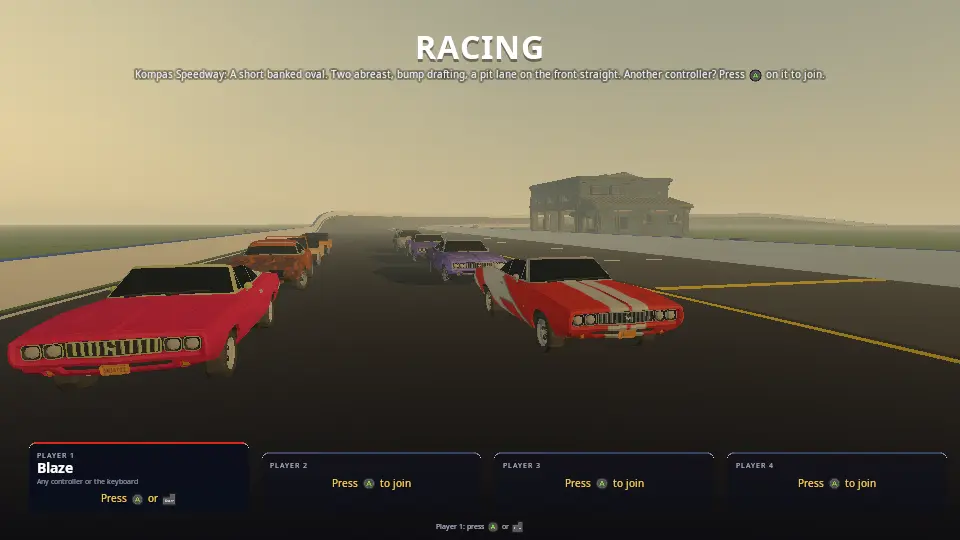
- Oval: laps of a banked speedway with a big field (up to 24 cars), two abreast, bump drafting and a pit lane. Every hit hurts: cars dent where they are struck, lose power and grip, and can be totalled, so you drive carefully to finish.
- Drift: a twisty loop round the docks. Cars leave the line one after another; sliding through the corners scores points, longer and faster slides build a combo, and hitting anything loses it.
- Drag: a straight quarter mile, eight lanes. Hold the brake and the throttle for a burnout while the ambers count down, launch on green (early is a red light) and change gear yourself at the top of the revs.
- Destruction derby: a walled dirt pen, everyone round the edge facing in. Wreck the others; the last car running wins. Points for the damage you deal decide the rest. The engine's in the front, so the clever ones reverse into people.
- Rally: a gravel stage over forest hills, no walls, one car at a time against the clock. A jump, a hairpin, and trees and rocks for anyone who runs wide.
Tyre smoke from burnouts and slides, sparks off metal, skid marks that stay on the road, bits of bodywork that fly off, smoke and fire from a wrecked engine. With the Synty POLYGON Street Racer pack the cars, paint jobs and trackside props are Synty's; without it every car is a coloured block of the right size, and the game plays the same.
Run it
The start menu opens on the grid. Press A (or Enter) to join, pick a name, car, body kit and paint, and start. Player 1 picks the track (which picks the event), how many cars, laps, how good the CPU drivers are and how much damage hurts.
For demos and tests:
| Variable | What it does |
|---|---|
KKE_RACE_AUTOPILOT=1 |
the CPU drives player 1; races start by themselves and restart 10 s after the finish |
KKE_RACE_TRACK=speedway |
this track (speedway, harbour_drift, quarter_mile, scrapyard_bowl, forest_stage, or any file in tracks/) |
KKE_RACE_CARS=16, KKE_RACE_LAPS=3 |
the field and the laps |
KKE_RACE_DAMAGE=0/1/2 |
damage off, normal, brutal |
KKE_RACE_CRASH=1 |
the damage test: CPU drivers aim at the car in front |
KKE_RACE_BENCH=pileup |
the worst case, for benchmarks: 24 cars (or KKE_RACE_CARS) in the derby pen, brutal damage, launched head-on at 108 km/h into the middle every 7 s (kke_benchmark runs it as racing_pileup) |
KKE_RACE_CAMERA=cockpit |
the camera to start with: chase, far, cockpit, first, bonnet, wheel, tv (or 0..6) |
KKE_RACE_FEMFX=0 |
dents by hand even in a FEMFX build (for comparison) |
KKE_RACE_LOBBY=0 |
straight into a race, no start menu |
KKE_RACE_QUIT=60 |
quit after 60 s, printing where every car is every 5 s |
KKE_ASSETS_DIR=... |
where the Synty packs are (docs/SCENES.md) |
Controls
Up to four players on one screen (split screen), each with a gamepad, the keyboard, a flight stick or a wheel and pedals.
| Gamepad | Keyboard | Flight stick | |
|---|---|---|---|
| Steer | left stick | A / D or the arrows | the stick left / right |
| Gas / brake | right / left trigger | W / S (S reverses once stopped) | push forward / pull back |
| Handbrake (start a slide) | A | Space | trigger |
| Gear up / down (drag strip) | B / X | E / Q | button 6 / 5 |
| Look back | LB | B | button 3 |
| Back on the track | D-pad up | T | button 4 |
| Camera (each player their own) | Y | C | button 2 |
| Look round | right stick | hold the right mouse button and move | the hat |
| Race again / next track | Start / D-pad right | R / N | trigger, once the race is over |
| Pause menu (settings, controls, main menu, quit) | Start while driving, or Select | Esc | |
| Start menu (players, cars, track) | the pause menu's Main menu | M, or the pause menu | |
| How to play | D-pad down | H | |
| Developer panels | F1 |
A flight stick or wheel joins in the start menu with its trigger (button
1). A wheel and pedals (or a stick's throttle lever) need a short set-up
once: Settings > Driving > Set up a wheel or flight stick (also in
the pause menu). Turn it all the way left, then right, press the gas,
press the brake; B or Backspace skips a step. It finds each by what
moved, so any wheel works, pedals on their own plug too, and it's saved
in racing_wheel.json.
On a touch screen: the left half of the screen steers (where your finger is, left or right of the middle of that half), the right quarter is the gas and the strip left of it the brake.
The hint bar at the bottom always shows the buttons of the device you last used (Xelu's prompts, docs/INPUT.md).
How it plays
The start menu
kke::LobbyModule (docs/LOBBY.md): each seat picks a name, one of six
cars (stock car, sports, exotic, sedan, hatch, ute: each with its own
power, weight, drive and grip), one of four body kits and a paint job.
Player 1's options: the track, how many cars (2 to 24; 8 on the strip),
laps, the CPU drivers (Easy to Expert), damage (Off, Normal, Brutal) and
Online. Behind the menu the grid waits on the chosen track with every car
as it will race, so changing a paint job shows it at once.
The oval
A rolling grid two abreast behind the line; the lights count down and everyone is held on the brake until green. The CPU drivers pick a lane, change lanes only when nobody is beside them, go round a slower car when there is room and sit behind it when there isn't, brake for the tightest corner within braking distance (grip, curvature and banking) and pit when hurt. The pit lane on the front straight has a 50 km/h limiter and repairs a stopped car at 30% a second.
After the leader finishes everyone else finishes as they next cross the line; the race ends when every car is home or out, or a minute after the winner.
Damage
Every hit is measured by how fast the two surfaces met (not how fast you were going: a tap in a pack costs little, a head-on everything). It takes health, dents the body where it landed (the mesh itself moves in, deeper for harder hits), may bend a wheel (the car pulls to that side and that tyre grips less), throws sparks and, above 40 km/h, bits of bodywork. Health sets the engine's power (half at zero); below 45% the engine smokes, and a totalled car stops where it is. Scraping along a wall or another car wears it down slowly with a trail of sparks.
A hit at a corner can puncture that tyre (it goes down over a few seconds) or blow it; driven on flat it shreds off the rim and the bare rim sparks on the road. A corner already bent all the way can lose its wheel, which rolls away on its own. The tyres also get hot: a burnout or a long slide cooks them (they smoke more, then grip less), and cold ones slide. The pit box fits a fresh set and bolts lost wheels back on.
Drift
Cars leave the line three seconds apart, so every run has room. A slide counts when three wheels are on the road, the car is at 12 to 80 degrees to where it is going and faster than 7 m/s. Points come from the angle times the speed, times a combo that grows every two seconds held (up to x5); a second out of the slide banks the chain. Hitting anything loses it. Most points wins.
The drift cars have looser rear tyres, and every car's tyres follow a friction circle: a wheel that spins or locks has less to give sideways, so a handbrake pull or a burnout steps the rear out and the throttle holds it there.
Drag
Eight lanes, the lights count down four seconds; the ambers come on for the last one and a half, and from then on the brake is yours: moving 0.4 m before green is a false start (a red light, last place). The gearbox is manual; "Perfect shift" at the top of the revs. Your reaction time and your speed through the line are on the results.
Destruction derby
Up to 12 cars start round the edge of the pen facing the middle; damage is always on. A hit takes health as anywhere else, but where it lands matters: the front (the engine) takes 1.4x, the boot 0.6x, and derby cars are braced to take about twice the knocks of a road car, so a bout lasts minutes. Driving into someone scores the damage you did to them (their hit into you scores for them); finishing a car off is 50 more. Ninety seconds without driving into anyone and you're out (until only two are left: they fight it out). The last car running wins; if several are still going after four minutes, the most points wins.
The CPU drivers pick a victim every few seconds (close, hurt, in front of them), drive at where it's going to be, and the better ones put it in reverse when it's close behind and back into it. They lift off before the wall, three-point-turn off it when they end up nose first against it, and back out of a jam.
Rally
Up to 10 cars queue behind the start and leave eight seconds apart; each car's clock starts as it crosses the line and stops at the finish. Fastest time wins. The road is gravel (two thirds of tarmac's grip, and the tyres keep most of it when they slide, so the car goes round sideways), the verge is grass, and there are no walls: run wide and you're into the fields, the trees or a rock. Far off the road for a few seconds, or upside down, puts you back on it.
Online
Player 1 sets Online to Host or Join in the start menu (or
KKE_NET=host, KKE_NET=join:ADDRESS); games on the local network show
up by themselves, and the join codes and relay in docs/SERVER_HOSTING.md
work too. Everyone on each screen drives. The host picks the track and
starts every set of lights.
How it works
Startup and the frame
main.cpp adds the modules (input, Jolt, models, RmlUi, audio, the
start menu, networking) and RacingModule. In init() it reads the
tracks, scans the asset folder for the Street Racer pack, sets up the
start menu and networking and builds the first grid.
Every physics step (fixedUpdate, after Jolt's step) each car here is
read (position, speed, wheels, where it is on the track), driven (a
player's input or the CPU's) and the race clock moves on. Every frame
(update) handles contacts and damage, effects, the cameras and the
HUD. Drawing interpolates each car between the last two physics steps,
so a car at 200 km/h is smooth at any frame rate.
Tracks (Track.h, Track.cpp)
A track is a YAML (or JSON, kke::datafile) file in tracks/: an oval, a
loop through points or a straight strip, its width, banking, walls and
laps (every key is in Track.h). It becomes a centre line sampled every
2 m, each sample with its own frame (forward, left across the banked
road, up) and curvature. From that come the road and walls (triangles
drawn with DynamicMeshRenderer and given to Jolt as static meshes),
the lane markings, the grid slots, and locate(): where any point is on
the track, as distance along it (s) and across it (u). Laps,
positions, the CPU drivers and the "back on the track" reset all use
s and u.
Two more shapes. An arena (the derby) is an oval pen size across
and along: the centre line is the wall's line, the floor is the ground
slab (its ground), and insideArena() says what's in it. A stage
(the rally) is an open road through points that may carry a height,
[x, z, y]: the samples follow the hills and a height grid round the
road (terrain(), 4 m squares) sits at the road's height beside it and
rises and falls by hills metres from about 40 m out. It is drawn, given
to Jolt as one mesh, and groundHeight() stands the trees and rocks on
it. Each track's ground and verge set what the tyres find there
(setGround, docs/VEHICLES.md "Tyres").
Cars (Cars.h, Cars.cpp)
Garage makes a car's art: the Street Racer car (SK_Veh_Preset_<type>_0<kit>),
split into the body (one mesh part per material) and a left and right
wheel, with where the four wheels sit and a convex hull for the chassis.
A paint job is a whole texture of the pack (the colour up top, badges,
plates and lights below), so both the body and livery materials get it.
Without the pack a block car of the type's size stands in.
RacingModule::buildCar turns it into a Jolt vehicle
(RigidWorld::addVehicle, docs/VEHICLES.md): the hull, the mass and
torque of its type, rear, front or all-wheel drive, suspension, brakes
biased to the front (so brake and throttle together spin the rears: a
burnout) and a handbrake on the rears. On the drag strip the gearbox is
manual. Cars from other machines are kinematic hulls that move where
their owner says.
Driving (Driving.cpp)
readPlayer: steering that ramps in (a keyboard's full lock over a
fifth of a second) and gets less at speed, so a key press doesn't spin a
car at 150 km/h. readCpu: the lane, overtaking or following, the
corner speed, pitting, the drift technique (a flick of the handbrake
into a bend, then held sideways on the throttle with the front wheels
along the slide and aimed down the road) and the drag launch and
shifts. driveCar applies the rules on top: held on the grid, the pit
limiter and repairs, a bent wheel's pull, a totalled car's stop.
The derby (Derby.cpp)
updateDerby counts who's still running, knocks out anyone who hasn't
driven into someone for 90 s, and ends the bout when one car is left
or the clock runs out (the survivors are finished there and the table
places them). hitCar passes the other car to derbyHit, which credits
it only if it was the one moving into the hit (its speed along the push
a few steps before, velocityBefore, is more than the victim's: after
the step they've already bounced). readDerbyCpu is the rammers' AI.
Damage (Damage.cpp)
Jolt reports new contacts (RigidBodyModule::frameContacts()); a car's
contacts with another car or the walls become hitCar. The dent moves
the body's vertices near the hit inwards along the hit's direction,
fading with distance and never past the car's middle, then recomputes
normals; ModelModule::setDeformedVertices draws the dented copy. Debris
are small boxes on Jolt that fade after 14 s. Online, a dent is an event
so everyone sees the same car.
Crumpling (Crumple.cpp)
In a FEMFX build (KKE_ENABLE_FEMFX, desktop) every car's body is also
an AMD FEMFX solid, a box of 288
tetrahedra the car's size, soft steel with a low yield (it stays bent).
Jolt keeps driving the car; a hit is replayed into the solid as a shove
where it landed, the way it pushed, and FEMFX works out how the metal
gives: the dent spreads, panels buckle round it, a hard hit folds a
corner in. The Synty body is skinned to the solid (kke::embedPoints,
PhysicsModule::deformEmbedded). The solids sit far from the track on
FEMFX's own ground, held still (each step their motion as a whole is
taken out, leaving only the change of shape), and are awake only for a
moment after a hit: about 0.1 ms a step with nothing hit, 1-3 ms in a
pile-up. The solid's cells are about 60 cm, too coarse for the crease
right where a bumper hit (on its own it left at most 8 cm after a 30 s
KKE_RACE_CRASH=1 run, which reads as "no deformation"), so every hit
is also pressed in by hand as above (80% as deep), kept per vertex, and
laid back on top of each shape FEMFX reads back: FEMFX bends the body,
the hand-pressed dent is the crease (17 cm deepest in the same run).
Without FEMFX (Android) the dents are only the hand-made ones.
Wheels (Wheels.cpp)
The tyre model is the engine's (docs/VEHICLES.md "Tyres": heat, wear, pressure, load, the ground, flats). This file draws it:
- Squash and bulge. The nearest six cars' tyres flatten where they meet the road, as far as the load pushes them (a landing, a banked turn), and the sidewalls bulge out; a flat one sits down on its sidewalls. It moves each tyre vertex in the wheel's spinning frame every frame the wheel turns, so it's the cars near a camera only (from further away a 3 cm flat spot can't be seen). BeamNG gets this from a soft-body tyre; this is the cheap trick of the same look.
- Wobble. A bent wheel runs out of true (its plane tilted in its own frame, so the tilt goes round as it turns); a flat one flops.
- Rims and lost wheels. A bare rim throws sparks on the road; a torn off wheel is a Jolt body of its own (a 12-sided drum), spinning as it was, and rolls away.
- The ground. On loose ground (grass, gravel, dirt, mud, snow) tyres
throw up dust at speed and a cloud and stones where they slide or spin,
instead of smoke and marks.
setGroundinRace.cppsays which body is which ground.
The wheel camera (KKE_RACE_CAMERA=wheel, or C until it comes round) sits on the side sill
looking back at the front tyre.
Effects
kke::ParticleEffects (docs/PARTICLE_EFFECTS.md): tyre smoke where a
wheel spins or slides, engine smoke and fire, sparks off hits and
scrapes. Skid marks are one growing DynamicMeshRenderer mesh of quads
laid under sliding tyres (up to 3000). Contact sounds come from the
audio module's impact synthesis (docs/AUDIO.md), from the bodies'
materials.
Sound (Sound.cpp)
Every car near you is heard from where it is: its own engine, made by
kke::EngineSound from its revs and throttle (a V8 for the stock car, a
V10 for the exotic, sixes and fours for the rest), and its tyres
squealing when they slide or spin. The players' cars always have one;
the other seven go to the cars nearest the camera. Hits and scrapes are
the audio module's impact sounds.
Split screen and cameras
One view per player (kke/Viewports.h): stacked for two, quarters for
three and four; with three players the fourth quarter is a TV camera
that follows the leader. Each player picks their own camera (Cameras.cpp):
- Chase and far chase: behind the car, the heading lagging a little so a turn swings it out; it widens its field of view with speed.
- Cockpit: the driver's seat. The Synty cars have a whole interior (dashboard, gauges, seats, steering wheel), so the camera sits where a driver's eyes would be (60 cm behind the steering wheel's middle, a third of a metre above it). The steering wheel is taken out of the body as a model of its own and turns with the steering; the windows are folded away while you sit inside (the pack's glass is drawn dark and solid for the outside).
- First person: the same seat, with a head on a spring: the car's acceleration in its own frame throws it about (braking forward, a corner sideways, a landing down) and the eyes turn into the corner.
- Bonnet: just above the middle of the bonnet (found from the body's shape), nothing in the way.
- Wheel: on the side sill, looking back at the front tyre.
- TV: trackside, following the car past.
The right stick looks round: where it points is where you look (up ahead, right to the right, down behind you), and letting go swings the view back. Outside the car the camera goes round it; inside, the head turns (up to 125 degrees). The mouse does the same with its right button held, at the Settings page's look sensitivity.
The HUD (Hud.cpp, ui/racing_hud.rml)
RmlUi with a data model: each player's panel in their view's corner (place, lap, times, drift points and notes such as "Perfect shift") and dash (speed, gear, revs, the car's health), the standings, the lights, banners and the results table. Menus and HUD keep to the screen's safe area (docs/INPUT.md "Phone, PC and console").
Networking (Net.cpp, NetRace.h, NetRace.cpp)
Modelled on Climb Race. The host sends a Setup event (the track, laps,
damage and every seat: who drives which car), a Go event to start the
lights, and its CPU cars 15 times a second. Each machine sends its own
cars in NetPlayerState (position, velocity) with the rest packed into
its 32 extra bytes (rotation, speed, steering, revs, health, lap,
progress, which tyres smoke). Finishes and dents are events. Remote cars
are dead-reckoned from their last pose.
Design decisions
- Jolt's vehicles, not our own. Jolt's
WheeledVehicleControllerhas suspension, tyre friction curves, an engine, a gearbox, limited slip differentials and anti-roll bars, tested in many games. The engine adds only what it lacks: a friction circle (wheelspin and locked wheels lose sideways grip), per-wheel grip for damage and a power scale. - Damage from the closing speed. Racing in a pack means constant touches; measuring the speed the surfaces met at makes bumping cheap and crashing expensive, like the real thing.
- Dents in the mesh, not swapped parts. Works on any car, block or Synty, and shows exactly where the hit was.
- Drift runs one after another. Eight cars sliding into the first corner together is a pile-up, not a drift contest.
- The race runs on the physics clock. Lap times and the countdown use the same steps as the cars, so a slow frame never changes a result.
Tuning
| What | Where |
|---|---|
| A car type's weight, power, drive, grip, lock | carTypes() in Cars.cpp |
| Suspension, brakes, tyres | buildCar in Driving.cpp / Cars.cpp |
| How much a hit hurts, dent depth | hitCar in Damage.cpp |
| How the metal gives (FEMFX) | bodyMaterial() and m_crumpleShove in Crumple.cpp |
| Punctures, lost wheels, the tyre's squash | damageWheel, kTyreStiffness in Wheels.cpp |
| Tyre heat, wear, grip of each ground | kke::TyreDesc, kke::GroundGrip (docs/VEHICLES.md) |
| Drift scoring | updateDrift in Damage.cpp |
| CPU pace, lanes, drifting | readCpu in Driving.cpp; skill in resetRace (Race.cpp) |
| Pit limiter and repair rate | kPitSpeed, driveCar in Driving.cpp |
| A track | a file in tracks/ |
Engine features it uses
Jolt vehicles and their tyres (kke/Vehicle.h, kke/Tyre.h, docs/VEHICLES.md),
FEMFX plastic solids with an embedded mesh (docs/PHYSICS_BRIDGE.md), kke::ParticleEffects
(docs/PARTICLE_EFFECTS.md), model deformation (ModelModule::setDeformedVertices),
DynamicMeshRenderer, the start menu (docs/LOBBY.md), networking
(docs/NETWORKING.md), split screen and button prompts (docs/INPUT.md),
moods (docs/MOODS.md), engine and impact sounds (docs/AUDIO.md), data files
(docs/DATA_FILES.md).
Assets
The Synty POLYGON Street Racer pack, and POLYGON Nature for the
rally stage's trees and rocks, from KKE_ASSETS_DIR (never in the
repository); docs/SCENES.md lists every asset used. Without it the
cars are blocks, the tracks have no props, a line in the log (info) and
on screen says so, and everything else is the same.
Make a game like this
- Another track: copy a file in
tracks/, change the numbers or the points; it's in the start menu next time. - Another event: a new
EventinTrack.h; its rules inupdateRace/crossLine(Race.cpp) and its HUD inHud.cpp.Derby.cppis a whole event in one file: start there. - Another stage or pen:
tracks/forest_stage.yamlwith your own points and heights (ground: snow,hills: 20), ortracks/scrapyard_bowl.yamlwith anothersizeandground: mud. - A car game of your own:
RigidWorld::addVehiclewith aVehicleDescis all the physics (docs/VEHICLES.md has a complete example);ParticleEffectsfor smoke.
Files
| File | What |
|---|---|
main.cpp |
the modules |
RacingModule.h, RacingModule.cpp |
the game: state, the frame, drawing |
Track.h, Track.cpp |
tracks from tracks/*.yaml: the road, walls, where a car is |
Cars.h, Cars.cpp |
car types, paint jobs, the car art (Synty or blocks) |
Race.cpp |
the field, the grid, the race rules, laps and results, scenery |
Driving.cpp |
players, CPU drivers, touch, the rules on top |
Cameras.cpp |
the seven cameras, looking round, the head in first person |
Controllers.cpp |
flight sticks, and setting up a wheel and pedals |
Damage.cpp |
hits, dents, debris, smoke, sparks, skid marks, drift points |
Sound.cpp |
the engines and tyres |
Wheels.cpp |
tyres squashing, flats, rims, lost wheels, dust |
Crumple.cpp |
the bodies' FEMFX solids |
Derby.cpp |
the destruction derby: rules, points, the rammers |
Lobby.cpp |
the start menu |
Net.cpp, NetRace.h, NetRace.cpp |
online races |
Hud.cpp, ui/racing_hud.rml |
the HUD |
tracks/ |
Kompas Speedway, Harbour Run, The Quarter Mile, Scrapyard Bowl, Pinewood Stage |